
Build a Number Guessing Game
You've clicked buttons. You've added items to a list. Now it's time to make JavaScript think.

You've clicked buttons. You've added items to a list. Now it's time to make JavaScript think.
A number guessing game is the perfect first project where the code stops being syntax you copy and starts being logic you control. The browser picks a secret number. You type a guess. The page tells you whether to aim higher or lower. That conversation—between your code and the player—is the heart of nearly every interactive page on the web.
In this beginner JavaScript project, you'll build a complete game from scratch: a random number between 1 and 100, ten turns to find it, and clear feedback after every guess. Along the way, you'll practice the four skills that power real web forms and interactive apps: generating random values, reading user input, comparing numbers, and tracking game state.
Let's build it.
What You'll Build
Here's the finished game in plain English:
- The page picks a random number between 1 and 100.
- You type a guess and click a button.
- The page tells you if the guess is too high, too low, or exactly right.
- You get ten turns. If you guess correctly, you win. If you run out of turns, the game ends.
- A reset button lets you start a fresh round with a new random number.
That's it. No graphics, no sound, no scoreboard. Just a clean loop of guess, feedback, and another guess.
This JavaScript number guessing game is the natural next step after a click counter and a to-do list. Those projects taught you how to react to clicks and change the page. This one teaches you something deeper: how to make decisions based on what the player does.
How One Click Works
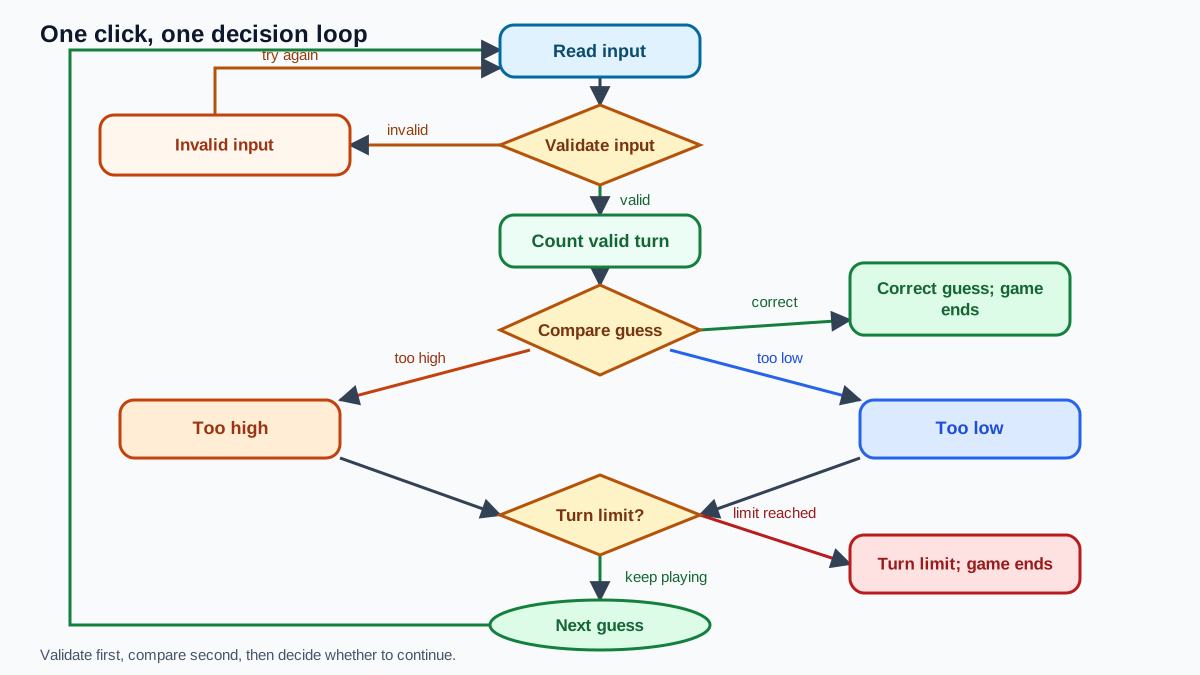
Before we write code, let's trace what should happen every time the player clicks the button. This loop is the spine of the whole game:
- Read the number from the input field.
- Check whether the input is valid.
- Compare the guess with the secret number.
- Update the message and the turn counter.
- Decide whether to continue, end the game, or celebrate a win.
Every piece of code you write in this tutorial fits into one of those five steps. When something feels confusing, ask yourself: which step of the loop does this belong to? That question will tell you where the code goes and what it should do.
Knowledge check
Check your understanding
Answer this question before you continue.
Setting Up the Page
Create a new folder and save this file as index.html. Open it in your browser and you should see a heading, an input field, and a button.
<!DOCTYPE html>
<html lang="en">
<head>
  <meta charset="UTF-8">
  <title>Number Guessing Game</title>
</head>
<body>
  <h1>Guess the Number</h1>
  <p>I'm thinking of a number between 1 and 100. Can you find it in 10 turns?</p>

  <label for="guessInput">Your guess:</label>
  <input type="number" id="guessInput" min="1" max="100">
  <button id="guessButton">Submit guess</button>

  <p id="message"></p>
  <p id="turnCount"></p>

  <script>
    // Your JavaScript goes here
  </script>
</body>
</html>
Here's what each piece does:
- The
<input type="number">gives the player a box for typing numbers. Theminandmaxattributes hint at the allowed range, but they don't enforce it. The browser still lets someone type 150 or clear the field entirely. Your JavaScript will handle the real rules. - The
<button>is what the player clicks to submit each guess. - The two empty
<p>elements are message areas. One will show feedback like "Too high!" and the other will track how many turns remain.
The empty <script> tag at the bottom is where all your game logic will live. Browsers read the page top to bottom, so placing the script at the end guarantees the input and button exist before your code tries to talk to them.
Picking a Random Number
Every game needs a secret. JavaScript gives you Math.random(), which returns a decimal between 0 (inclusive) and 1 (exclusive). Run this in your browser's console:
console.log(Math.random());
The output will be a decimal like 0.5731849021837462—but the exact digits change every time. That's the point: the value is unpredictable.
That decimal alone isn't useful for a guessing game. Nobody wants to guess 0.5731849021837462. You need a whole number between 1 and 100.
Here's the formula that gets you there:
let randomNumber = Math.floor(Math.random() * 100) + 1;
console.log(randomNumber);
The output will be a whole number somewhere between 1 and 100, like 57 or 12 or 88. Run it a few times and watch the value change.
Let's break down what happens, step by step:
Math.random()produces a decimal between 0 and 1.- Multiplying by 100 stretches that range to between 0 and 99.999...
Math.floor()chops off the decimal part, leaving a whole number from 0 to 99.- Adding 1 shifts the range up to 1 through 100.
Common mistake: forgetting the +1
If you write Math.floor(Math.random() * 100) without the +1, your range becomes 0 to 99. The player could never guess 100, and they might guess 0 even though your instructions say the number starts at 1. That one missing character quietly breaks the entire game.
Knowledge check
Check your understanding
Answer this question before you continue.
Reading the Player's Guess
Now you need to capture what the player types. The button needs to know that when it's clicked, it should grab the input value and do something with it.
const guessButton = document.getElementById('guessButton');
const guessInput = document.getElementById('guessInput');

guessButton.addEventListener('click', function() {
  let guess = Number(guessInput.value);
  console.log(guess);
});
Click the button after typing a number and you'll see it appear in the console.
There's a subtle trap hiding in that Number() call. When JavaScript reads the value of an input field, it arrives as text, not a number. The string "42" and the number 42 look similar, but they behave differently. Compare them:
console.log("42" === 42);
false
The triple equals checks both value and type. A string and a number are never equal, even when they look the same on screen. That's why you wrap the input value in Number()—it converts the text into an actual number your comparison logic can understand.
Knowledge check
Check your understanding
Answer this question before you continue.
Comparing the Guess
Now for the part where your code starts making decisions. JavaScript's if, else if, and else statements let you check conditions and run different code depending on the result.
Replace the contents of your <script> tag with this:
let randomNumber = Math.floor(Math.random() * 100) + 1;
const message = document.getElementById('message');

guessButton.addEventListener('click', function() {
  let guess = Number(guessInput.value);

  if (guess === randomNumber) {
    message.textContent = 'Correct! You got it!';
  } else if (guess > randomNumber) {
    message.textContent = 'Too high! Try a lower number.';
  } else {
    message.textContent = 'Too low! Try a higher number.';
  }
});
Read the logic out loud and it sounds like a conversation:
- If the guess equals the secret number, the player wins.
- Otherwise, if the guess is greater, tell them to aim lower.
- Otherwise—meaning the guess must be less—tell them to aim higher.
The order matters. The code checks the first condition, then the second, and only reaches the final else if neither earlier condition was true. Since there are only three possibilities—equal, greater, or less—those three branches cover every case.
Counting Turns and Ending the Game
A game without an ending isn't a game; it's an endless loop of guessing. Let's add a turn counter and a limit.
Replace the contents of your <script> tag with this:
let randomNumber = Math.floor(Math.random() * 100) + 1;
let guessCount = 0;
const maxGuesses = 10;

const guessButton = document.getElementById('guessButton');
const guessInput = document.getElementById('guessInput');
const message = document.getElementById('message');
const turnCount = document.getElementById('turnCount');

guessButton.addEventListener('click', function() {
  let guess = Number(guessInput.value);

  if (guess < 1 || guess > 100 || isNaN(guess)) {
    message.textContent = 'Please enter a number between 1 and 100.';
    return;
  }

  guessCount++;

  if (guess === randomNumber) {
    message.textContent = 'Correct! You got it in ' + guessCount + ' guesses!';
    endGame();
  } else if (guessCount >= maxGuesses) {
    message.textContent = 'Game over! The number was ' + randomNumber + '.';
    endGame();
  } else if (guess > randomNumber) {
    message.textContent = 'Too high! Try a lower number.';
  } else {
    message.textContent = 'Too low! Try a higher number.';
  }

  turnCount.textContent = 'Guesses used: ' + guessCount + ' of ' + maxGuesses;
  guessInput.value = '';
});

function endGame() {
  guessButton.disabled = true;
  guessInput.disabled = true;
}
Two new ideas appear here.
First, the counter. Every time the player clicks the button, guessCount increases by one. That single variable remembers how many attempts have happened, which is the essence of what programmers call state—information your program keeps track of between actions.
Second, the game-over check. Notice that the win condition and the turn limit are checked before the too-high and too-low messages. If the player guesses correctly on turn ten, they should see "Correct!", not "Game over!" The order of your conditions controls which message wins when two things are true at once.
When the game ends, endGame() disables both the input and the button. The player physically cannot keep guessing, which prevents the game from falling apart after it should have stopped.
Why validation comes first
The validation check at the top of the click handler is the guard at the door. If the player submits an empty field, Number('') becomes 0—which would count as a turn and tell them "Too low!" for a number they never typed. If they type 150, the game would accept it even though your instructions promise a range of 1 to 100.
The return statement stops the function right there. No turn is counted, no misleading feedback is shown. The player gets a clear message and a chance to fix their input.
Knowledge check
Check your understanding
Answer this question before you continue.
Tip: clear the input after each guess
Notice the line guessInput.value = ''; at the end of the click handler. Without it, the previous guess stays in the box. A player who types 50, gets told "Too low!", and clicks submit again will resubmit the same 50. Clearing the field forces them to type a fresh guess each turn.
Letting the Player Start Over
A game that ends and stays frozen forever is a dead end. Players need a way to start fresh. The cleanest approach is to create a reset button only when the game ends.
Add this below your existing endGame function:
let resetButton;
function endGame() {
guessButton.disabled = true;
guessInput.disabled = true;
resetButton = document.createElement('button');
resetButton.textContent = 'Play again';
document.body.appendChild(resetButton);
resetButton.addEventListener('click', resetGame);
}
function resetGame() {
guessCount = 0;
randomNumber = Math.floor(Math.random() * 100) + 1;
message.textContent = '';
turnCount.textContent = '';
guessInput.value = '';
guessInput.disabled = false;
guessButton.disabled = false;
resetButton.remove();
}
The reset function mirrors the setup steps in reverse. It resets the counter to zero, clears the message areas, re-enables the input and button, and removes the reset button from the page.
One detail matters more than it looks: the reset regenerates the random number. If you reused the old secret number, the player would already know the answer from their previous attempts. A new round needs a new secret.
The Complete Game
Here's the full index.html with every piece in place. Save this file, open it in your browser, and play a full round.
<!DOCTYPE html>
<html lang="en">
<head>
<meta charset="UTF-8">
<title>Number Guessing Game</title>
</head>
<body>
<h1>Guess the Number</h1>
<p>I'm thinking of a number between 1 and 100. Can you find it in 10 turns?</p>
<label for="guessInput">Your guess:</label>
<input type="number" id="guessInput" min="1" max="100">
<button id="guessButton">Submit guess</button>
<p id="message"></p>
<p id="turnCount"></p>
<script>
let randomNumber = Math.floor(Math.random() * 100) + 1;
let guessCount = 0;
let resetButton;
const maxGuesses = 10;
const guessButton = document.getElementById('guessButton');
const guessInput = document.getElementById('guessInput');
const message = document.getElementById('message');
const turnCount = document.getElementById('turnCount');
guessButton.addEventListener('click', function() {
let guess = Number(guessInput.value);
if (guess < 1 || guess > 100 || isNaN(guess)) {
  message.textContent = 'Please enter a number between 1 and 100.';
  return;
}
guessCount++;
if (guess === randomNumber) {
message.textContent = 'Correct! You got it in ' + guessCount + ' guesses!';
endGame();
} else if (guessCount >= maxGuesses) {
message.textContent = 'Game over! The number was ' + randomNumber + '.';
endGame();
} else if (guess > randomNumber) {
message.textContent = 'Too high! Try a lower number.';
} else {
message.textContent = 'Too low! Try a higher number.';
}
turnCount.textContent = 'Guesses used: ' + guessCount + ' of ' + maxGuesses;
guessInput.value = '';
});
function endGame() {
guessButton.disabled = true;
guessInput.disabled = true;
resetButton = document.createElement('button');
resetButton.textContent = 'Play again';
document.body.appendChild(resetButton);
resetButton.addEventListener('click', resetGame);
}
function resetGame() {
guessCount = 0;
randomNumber = Math.floor(Math.random() * 100) + 1;
message.textContent = '';
turnCount.textContent = '';
guessInput.value = '';
guessInput.disabled = false;
guessButton.disabled = false;
resetButton.remove();
}
</script>
</body>
</html>
Test these four scenarios to confirm everything works:
- Guess a number too low. You should see "Too low!"
- Guess a number too high. You should see "Too high!"
- Guess the correct number. You should see the win message and the Play again button.
- Click Play again. The game should reset with a fresh secret number.
Common Mistakes to Watch For
Every beginner hits these walls. Here's what they look like and how to climb over them.
Comparing text to numbers. If you forget Number() around the input value, your comparison becomes "50" === 50, which is always false. The game would never register a correct guess. Fix: always convert the input value before comparing.
Forgetting the +1 in the random range. Math.floor(Math.random() * 100) produces 0 to 99, not 1 to 100. The player can never guess 100, and the instructions lie about the range. Fix: add 1 after the Math.floor() call.
Using a single equals sign in comparisons. if (guess = randomNumber) doesn't check whether two values are equal—it assigns the random number to the guess variable. The condition becomes true, and the game breaks in confusing ways. Fix: use === for comparison, and reserve = for assignment.
Forgetting to clear the input. Without guessInput.value = '', the same guess stays in the box. Players can accidentally resubmit the same number repeatedly. Fix: clear the input after processing each guess.
Checking game over before checking for a win. If the win check comes after the turn-limit check, a player who guesses correctly on turn ten sees "Game over!" instead of "Correct!" Fix: check the win condition first.
These mistakes aren't signs of failure. They're evidence that you're learning how the language actually behaves. Every programmer I know has hit each of these at least once.
Make It Yours
The game works. Now make it yours. Here are a few small extensions that turn this beginner JavaScript project into deliberate practice:
Change the range. Instead of 1 to 100, try 1 to 1000. Notice how much harder the game becomes when the range widens.
Show previous guesses. Keep a running list of every guess the player has made. This teaches you how to build up a string or array over time.
Add a score. Award points based on how few guesses it takes to find the number. This adds a reason to replay.
Make it harder. Reduce the turn limit to five, or widen the range to 1 to 500. Small rule changes create entirely different games.
Track wins and losses. Count how many rounds the player has won and lost across multiple resets. This introduces the idea of persisting state beyond a single round.
Try one of these. When you finish, run the game, play a full round, and watch your logic work from start to finish.
The skills you just practiced—reading input, comparing values, tracking state, and resetting—are the same building blocks behind every web form, quiz app, and interactive page on the internet. You're not just building a game. You're learning how to make a webpage that thinks.
Knowledge check
Final check
Finish the article by checking the ideas you just learned.
References
Want a more structured JavaScript path?
Use the JavaScript for AI Applications Starter Pack to turn individual tutorials into a focused path from language fundamentals to interactive AI applications.
JavaScript for AI Applications Starter Pack
Build the JavaScript foundation behind modern interactive applications. The JavaScript for AI Applications Starter Pack takes you from core language concepts through functions, browser events, forms, DOM updates, application state, debugging, and practical projects—so you can learn how interfaces take input, work with structured data, respond to users, and turn results into experiences people can actually use.
- 253-page illustrated PDF
- 12 guided JavaScript chapters
- Visual concept diagrams
- Self-assessment quizzes
- Bonus deep-dive sections
- DOM, events, forms & application state
- Browser projects, debugging & practical workflows
Coming soon


