
Event Delegation in JavaScript with a Clickable List
You built a list. You wired every item with a click listener. It worked. Then you added one new item, clicked it, and nothing happened. The old approach…

You built a list. You wired every item with a click listener. It worked. Then you added one new item, clicked it, and nothing happened. The old approach works until the list grows. The fix is to stop wiring every item and let one parent listener do the work.
Why Clicking a New List Item Does Nothing
Here's the naive approach that most beginners reach for first. You have a list, you grab all the items, and you attach a click listener to each one:
<ul id="todo-list">
  <li>Buy coffee</li>
  <li>Write code</li>
  <li>Take a walk</li>
</ul>
const items = document.querySelectorAll("#todo-list li");

items.forEach(function (item) {
  item.addEventListener("click", function () {
    item.classList.toggle("done");
  });
});
This works for the three items that exist at page load. Click any of them and the done class toggles on and off.
Now add a fourth item:
const list = document.getElementById("todo-list");
const newItem = document.createElement("li");
newItem.textContent = "Drink water";
list.appendChild(newItem);
Click "Drink water." Nothing happens. No error, no class toggle, just silence.
The reason is simple: querySelectorAll only returns the elements that exist when it runs. Your loop attached listeners to those three original items. The fourth item was born without a listener, and JavaScript does not magically re-run your loop when the DOM changes.
This is the core constraint: listeners are attached to elements that exist at the time of the loop, not to future elements.
The goal is to write one listener that works for every current and future item. That's what JavaScript event delegation gives you.
What Event Bubbling Actually Does
Event delegation depends on a browser behavior called event bubbling. Here's what happens when you click an element on a page:
- The event fires on the element you actually clicked.
- Then it fires on that element's parent.
- Then on the parent's parent.
- And so on, all the way up to the top of the document.
The click does not just happen in one spot. It travels upward through the family tree, and every ancestor gets a chance to hear it.
Let's prove it with a tiny example:
<div id="outer">
  <div id="inner">
    <button id="button">Click me</button>
  </div>
</div>
const outer = document.getElementById("outer");
const inner = document.getElementById("inner");
const button = document.getElementById("button");

button.addEventListener("click", function () {
  console.log("button clicked");
});

inner.addEventListener("click", function () {
  console.log("inner clicked");
});

outer.addEventListener("click", function () {
  console.log("outer clicked");
});
Click the button and check the console:
button clicked
inner clicked
outer clicked
The event starts at the button, then bubbles up through the inner div, then reaches the outer div. Each listener fires in turn as the event passes through.
This is why a parent listener can catch clicks meant for its children. The click on a list item bubbles up to the list itself, so a listener on the list hears it.
Knowledge check
Check your understanding
Answer this question before you continue.
event.target vs. event.currentTarget
When your parent listener fires, you need to know which element the user actually clicked. Two properties on the event object answer that question, and confusing them is one of the most common delegation bugs.
event.target is the innermost element the user actually clicked. If the user clicks directly on an <li>, that <li> is the target.
event.currentTarget is the element whose listener is running. In a delegated listener attached to a <ul>, event.currentTarget is always that <ul>, no matter what was clicked.
Here's the difference in action:
const list = document.getElementById("todo-list");

list.addEventListener("click", function (event) {
  console.log("target:", event.target.tagName);
  console.log("currentTarget:", event.currentTarget.tagName);
});
Click on the first list item and you'll see:
target: LI
currentTarget: UL
The target is the item you clicked. The currentTarget is the list that owns the listener.
Delegation code must read event.target because that tells you which child was actually clicked. If you check event.currentTarget, you'll always see the parent, which tells you nothing about the specific item.
Knowledge check
Check your understanding
Answer this question before you continue.
Building One Delegated Listener
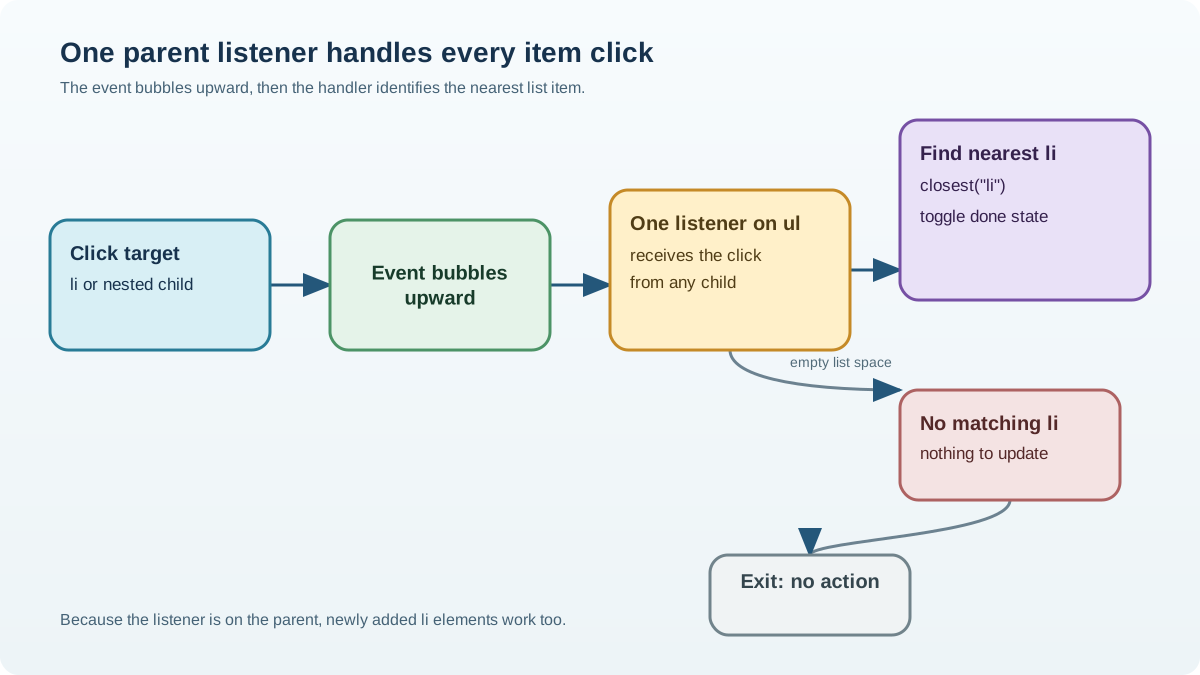
Now let's build the real pattern. Instead of looping over list items, attach one click listener to the <ul>:
const list = document.getElementById("todo-list");

list.addEventListener("click", function (event) {
  if (event.target.tagName === "LI") {
    event.target.classList.toggle("done");
  }
});
One listener. No loop. No per-item wiring.
Inside the handler, you check whether event.target is the kind of element you care about. If the user clicked an <li>, toggle its class. If they clicked empty space inside the list, the target will be the <ul> itself, and the check fails quietly.
But there's a wrinkle. What if your list items contain nested content?
<ul id="todo-list">
  <li>
    <span>Buy coffee</span>
    <button class="delete">×</button>
  </li>
</ul>
If the user clicks the <span> or the <button>, event.target is no longer the <li>. It's the span or the button. Your tagName === "LI" check fails, and the click does nothing.
The fix is the closest() method. It walks up the ancestor chain from event.target and returns the nearest matching element, including the element you call it on:
list.addEventListener("click", function (event) {
  const item = event.target.closest("li");

  if (!item) {
    return;
  }

  item.classList.toggle("done");
});
If the user clicks the span, the button, or the li itself, closest("li") finds the containing list item. If they click empty space in the list, closest("li") returns null, and you exit early.
This is the safe, complete version of the delegated pattern:
- Attach one listener to the parent.
- Use
event.target.closest()to find the matching ancestor. - Act only when a real item was found.
Knowledge check
Check your understanding
Answer this question before you continue.
Why Delegation Wins as the List Grows
Here's the payoff. Add new items to the list and they respond immediately, with zero extra code:
const addButton = document.getElementById("add-button");
const input = document.getElementById("new-item");
const list = document.getElementById("todo-list");

addButton.addEventListener("click", function () {
  const newItem = document.createElement("li");
  newItem.textContent = input.value;
  list.appendChild(newItem);
  input.value = "";
});
The delegated listener on the list was attached once, before any of these new items existed. When a new item is clicked, the event bubbles up to the list, and the listener handles it exactly like the original items.
Compare the two approaches:
| Approach | Listener count | New items | Code to maintain |
|---|---|---|---|
| Loop over items | One per item | Need re-wiring | Re-run loop after every change |
| Delegated listener | One total | Work automatically | None |
With the loop approach, you need N listeners for N items, and every time you add or remove an item, you must re-run the wiring. With delegation, you have one listener for any number of items, and DOM changes need no listener management at all.
The performance benefit is real but honest: with three items, the difference is negligible. It matters when you have hundreds of rows, or when items change frequently and re-wiring would create a maintenance headache.
Knowledge check
Check your understanding
Answer this question before you continue.
Common Mistakes to Avoid
Delegation is a small pattern, but beginners break it in predictable ways. Watch for these four.
Checking the wrong element. If you test event.target against the parent instead of the clicked child, your handler never matches. Remember: the target is the innermost clicked element, not the element that owns the listener.
Forgetting about nested content. A button inside an <li> changes event.target. If your handler checks event.target.tagName === "LI", clicks on the button will fail. Use closest() to handle nested content safely.
Assuming every event bubbles. Delegation only works for events that bubble. Some events do not bubble: focus, blur, scroll, mouseenter, and mouseleave are common examples. You cannot delegate those with a parent listener. For focus and blur, you can use the capturing phase instead, but that's a more advanced topic.
Using stopPropagation() in a child handler. If you have a listener on a child element that calls event.stopPropagation(), it stops the event from traveling upward. Your delegated parent listener never fires. This is a silent killer: no error, just a listener that mysteriously stops working.
Warning: If a delegated listener stops working after you add another listener somewhere else, look for
stopPropagation()first. It's the usual suspect.
When to Use Delegation and When Not To
Delegation is a tool, not a rule. Here's when it earns its keep.
Use delegation when:
- Items are added or removed dynamically.
- You have many similar elements that all need the same behavior.
- You're building a list, table, or menu that can grow.
Skip it when:
- You have a single fixed button.
- You have a small set of elements that never change after page load.
For one button that exists from the start, a direct listener is simpler and clearer:
const saveButton = document.getElementById("save-button");
saveButton.addEventListener("click", saveData);
My rule of thumb: delegate when the set of clickable elements can change or get large. If neither is true, attach the listener directly and move on.
Practice: Make a Growing To-Do List Respond to Clicks
Time to build it yourself. Start with this HTML:
<ul id="todo-list">
  <li>Buy coffee</li>
  <li>Write code</li>
</ul>

<input id="new-item" placeholder="Add a task" />
<button id="add-button">Add</button>
Your task: add one delegated click listener to the <ul> that marks a clicked item as done by toggling a class. Then add the logic to create new items from the input.
Expected behavior: Newly added items respond to clicks immediately, with no extra wiring. You never attach a listener to a new item.
Stretch goal: Add a delete button inside each item, then use closest() in the same delegated listener so the delete button works without its own listener. If you get stuck, trace what event.target is when the user clicks the button versus the item text.
The Durable Rule
Stop wiring every item. Let one parent listener catch the clicks that bubble up from its children. That single listener handles every item that exists now and every item you add later.
Event delegation is one of those patterns that feels like a trick until you see the mechanism, then it feels like the only sensible way to build. Once you're comfortable with it, the natural next step is combining delegation with form handling, or using it to build a small interactive component where the DOM changes as the user works.
Knowledge check
Final check
Finish the article by checking the ideas you just learned.
References
Want a more structured JavaScript path?
Use the JavaScript for AI Applications Starter Pack to turn individual tutorials into a focused path from language fundamentals to interactive AI applications.
JavaScript for AI Applications Starter Pack
Build the JavaScript foundation behind modern interactive applications. The JavaScript for AI Applications Starter Pack takes you from core language concepts through functions, browser events, forms, DOM updates, application state, debugging, and practical projects—so you can learn how interfaces take input, work with structured data, respond to users, and turn results into experiences people can actually use.
- 253-page illustrated PDF
- 12 guided JavaScript chapters
- Visual concept diagrams
- Self-assessment quizzes
- Bonus deep-dive sections
- DOM, events, forms & application state
- Browser projects, debugging & practical workflows
Coming soon


