
Fix "Assignment to Constant Variable" in JavaScript
Now you're stuck on a question that feels bigger than the error itself: do you change the const to let, or do you rewrite the line that's failing? The…

You wrote some JavaScript, ran it, and the console hit you with this:
TypeError: Assignment to constant variable.
Now you're stuck on a question that feels bigger than the error itself: do you change the const to let, or do you rewrite the line that's failing? The answer depends on what that variable is supposed to do. Let's figure out how to tell.
What the Error Is Telling You
Here's a tiny example that triggers the error:
const price = 25;
price = 30;
When you run this, JavaScript throws:
TypeError: Assignment to constant variable.
In plain language, JavaScript is saying: "You declared this name with const, which locks it to one value. You just tried to point it at a different value. I won't do that."
The word assignment is the key. In JavaScript, when you use = to give a variable a value, that's called assignment. The error is telling you that you tried to assign a new value to a name that const has locked down.
Knowledge check
Check your understanding
Answer this question before you continue.
Why const Refuses to Change
Think of const as a label stuck to a single value. Once you declare it, that label is glued in place:
const price = 25;
The name price now points at the number 25. If you try price = 30, you're asking JavaScript to peel the label off 25 and stick it on 30. With const, that's not allowed.
This is where let comes in. The let keyword exists precisely for names that need to point at different values over time:
let price = 25;
price = 30;

console.log(price);
30
No error. The name price was allowed to move from one value to another.
So the first fix is simple: if the value is meant to change, switch const to let.
The Decision: Change the Declaration or Change the Code?
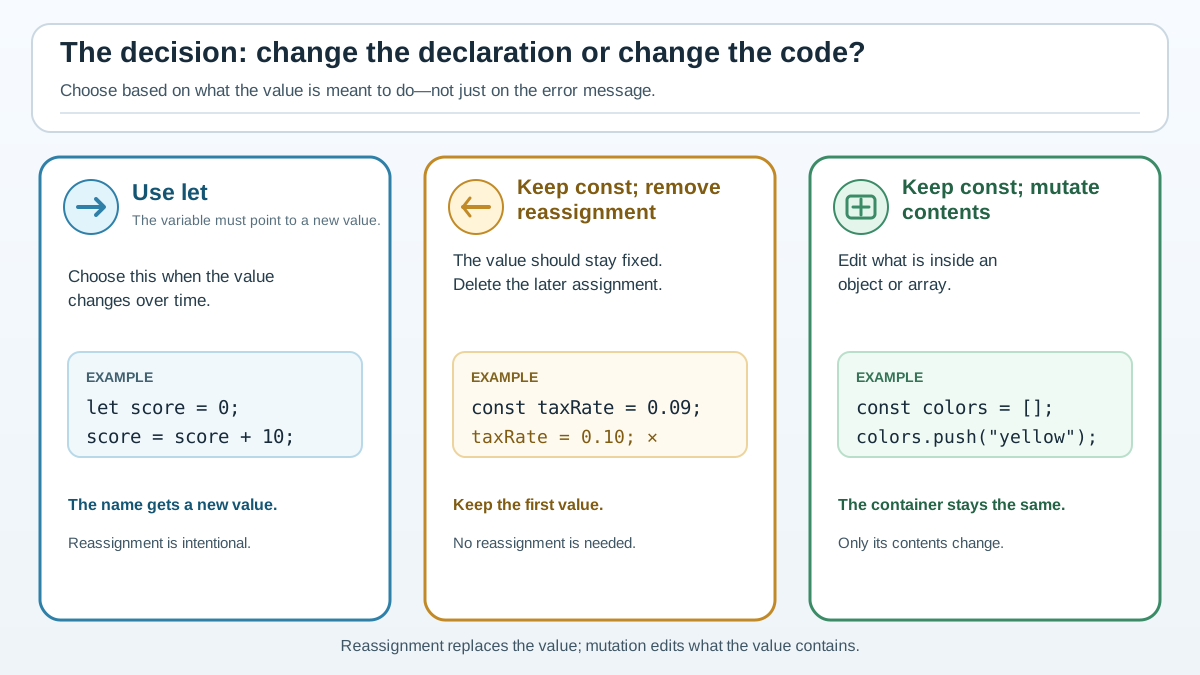
When you see "Assignment to constant variable," ask yourself one question: is this value supposed to change?
Here's a scenario. You're tracking a user's score in a game:
const score = 0;
score = score + 10; // TypeError: Assignment to constant variable.
The score should increase as the player earns points. The value is meant to change. So const was the wrong choice from the start:
let score = 0;
score = score + 10;

console.log(score);
10
Now the opposite scenario. You're storing a tax rate that should stay fixed for the whole program:
const taxRate = 0.08;
taxRate = 0.09; // TypeError: Assignment to constant variable.
Here, the value was never supposed to change. The fix isn't to switch to let—it's to remove the reassignment line entirely:
const taxRate = 0.08;
Common mistake
When beginners see this error, the reflex is often "just use let." But that's not always the right fix. If the value represents something that should stay constant—a tax rate, a maximum retry count, a fixed configuration value—then const is protecting you from a bug. The real problem is the line trying to change it.
A good default instinct: reach for const first, and only use let when you know the value will change. const is the safer choice because it prevents accidental reassignment.
Knowledge check
Check your understanding
Answer this question before you continue.
The Trap: const Objects and Arrays Can Still Change
Here's where beginners get confused. Watch this:
const colors = ["red", "green", "blue"];
colors.push("yellow");

console.log(colors);
["red", "green", "blue", "yellow"]
No error! But wait—didn't we just say const locks the value?
Here's the distinction that clears everything up:
- Reassignment points the name at a new value.
- Mutation edits the contents of the value the name already points to.
const locks the name, not the contents.
With an array, you can change its elements, add items, or remove items—as long as you don't try to point colors at a whole new array:
const colors = ["red", "green", "blue"];
colors = ["cyan", "magenta", "yellow"]; // TypeError: Assignment to constant variable.
Same story with objects. You can change properties freely:
const user = { name: "Avery", age: 30 };
user.age = 31;
user.country = "Canada";

console.log(user);
{ name: "Avery", age: 31, country: "Canada" }
But you can't reassign the whole object:
const user = { name: "Avery", age: 30 };
user = { name: "Jordan", age: 25 }; // TypeError: Assignment to constant variable.
The plain-language rule: const locks the name, not the contents.
How to tell them apart
When you see the error, look at the left side of the failing statement. If it's a bare variable name followed by =, that's a reassignment:
colors = ["cyan", "magenta", "yellow"]; // Reassignment: changes the binding
If the left side has a property or a method call, you're likely mutating the existing value, which const allows:
colors.push("yellow");      // Mutation: changes the array's contents
user.age = 31;              // Mutation: changes a property
This test works for any const error: bare name with = means reassignment. Property or method means mutation.
Knowledge check
Check your understanding
Answer this question before you continue.
A Three-Step Fix for Real Code
When the error appears inside a longer function or loop, you need a reliable repair workflow. Here's the one I use:
Step 1: Find the exact failing line. The error message points to a specific line number. Open that line in your code.
Step 2: Check the declaration. Scroll up and find where that variable was declared. Was it const? If the value is supposed to change over time, switch that declaration to let.
Step 3: Check every other assignment to that name. If the value should stay fixed, the failing line is the bug. Remove it, replace it with a different variable name, or find another way to express what you're trying to do.
Knowledge check
Check your understanding
Answer this question before you continue.
Preventing the Error Before It Happens
The best fix is the one you never need. Build these habits and you'll see this error far less often:
Default to const. Start every variable with const. When you later realize a value needs to change, switch that one declaration to let. This keeps your code safer by default.
When you see the error, read the failing line and ask what the variable represents. Is it a value that should evolve over time, like a score, a counter, or a running total? Use let. Is it a fixed value that should never move, like a rate or a limit? Remove the reassignment.
A nearby mistake worth knowing
Redeclaring the same const name in the same scope also fails:
const maxRetries = 3;
const maxRetries = 5; // SyntaxError: Identifier 'maxRetries' has already been declared
If you need a second constant with a different value, give it a different name.
Your Turn: Spot the Problem
Here's a short snippet. Before you run it, predict which lines will throw the error:
const basePrice = 100;
let discount = 0.1;
const cart = [];

basePrice = 120;
discount = 0.2;
cart.push("keyboard");
cart = ["mouse"];
The two lines that fail are basePrice = 120 and cart = ["mouse"]. The first tries to reassign a const primitive. The second tries to reassign a const array. The discount reassignment works because it's let, and cart.push() works because it mutates the array without reassigning it.
When you see "Assignment to constant variable," you now have a clear decision rule: if the value is meant to change, use let. If it should stay fixed, remove the reassignment. And if the value is an object or array, remember—you can change what's inside it, just not what it is.
Knowledge check
Final check
Finish the article by checking the ideas you just learned.
References
Want a more structured JavaScript path?
Use the JavaScript for AI Applications Starter Pack to turn individual tutorials into a focused path from language fundamentals to interactive AI applications.
JavaScript for AI Applications Starter Pack
Build the JavaScript foundation behind modern interactive applications. The JavaScript for AI Applications Starter Pack takes you from core language concepts through functions, browser events, forms, DOM updates, application state, debugging, and practical projects—so you can learn how interfaces take input, work with structured data, respond to users, and turn results into experiences people can actually use.
- 253-page illustrated PDF
- 12 guided JavaScript chapters
- Visual concept diagrams
- Self-assessment quizzes
- Bonus deep-dive sections
- DOM, events, forms & application state
- Browser projects, debugging & practical workflows
Coming soon


