
for Loops vs forEach vs map in JavaScript
You can loop over an array three different ways, and they all look nearly identical when you write them. So which one should you use?

You can loop over an array three different ways, and they all look nearly identical when you write them. So which one should you use?
The answer comes down to two questions: what should the operation produce, and do you need to control when iteration stops? Once you can answer those, the right choice becomes obvious.
Three Ways to Walk an Array
Let's start with a tiny array and a simple task. We want to log each number to the console.
Here's the same job done three ways:
const numbers = [1, 2, 3];

// A for loop
for (let i = 0; i < numbers.length; i++) {
  console.log(numbers[i]);
}

// forEach
numbers.forEach(function(number) {
  console.log(number);
});

// map
numbers.map(function(number) {
  console.log(number);
});
All three produce the same output:
1
2
3
See why beginners treat them as interchangeable? They all visit every element. They all run your code for each item. On the surface, they look like three names for the same thing.
But two hidden differences separate them: what each one hands back when it finishes, and whether you can stop the loop partway through. Those two details determine which tool fits each job.
What Each Tool Returns
The return value is your first clue. Once you know what each approach gives you back, half your confusion disappears.
The for loop returns nothing on its own
A for loop is just a set of instructions. It runs, and that's it. If you want results, you build them yourself with a variable you declare outside the loop:
const numbers = [1, 2, 3];
const doubled = [];

for (let i = 0; i < numbers.length; i++) {
  doubled.push(numbers[i] * 2);
}

console.log(doubled);
[2, 4, 6]
You're doing the work manually: create an empty array, push into it, and hope you didn't forget anything. It works, but it's a lot of ceremony for a simple transformation.
forEach returns undefined
forEach runs a function for each element, but it never hands anything back. No matter what you do inside that function, forEach itself returns undefined:
const numbers = [1, 2, 3];

const result = numbers.forEach(function(number) {
  return number * 2;
});

console.log(result);
undefined
The return inside the callback doesn't matter. forEach collects nothing. It's a tool for doing, not for producing.
Knowledge check
Check your understanding
Answer this question before you continue.
map returns a brand-new array
map calls your function for each element, collects whatever that function returns, and builds a new array from those results:
const numbers = [1, 2, 3];

const doubled = numbers.map(function(number) {
  return number * 2;
});

console.log(doubled);
[2, 4, 6]
The original numbers array is untouched. You get a fresh array, the same length as the original, with each element transformed by your function.
Here's the difference in one table:
| Approach | Returns | Can stop early? |
|---|---|---|
for loop | Nothing on its own | Yes, with break |
forEach | undefined | No |
map | A new array | No |
That's the core. Now let's see when each one is the right fit.
Side Effects: When You Just Want an Action
A side effect is code that does something observable rather than just computing a value. Logging to the console is a side effect. Updating a variable outside the loop is a side effect. Sending data to a server is a side effect.
When your goal is an action, not a result, forEach is your tool:
const students = ["Aisha", "Ben", "Cara"];

students.forEach(function(student) {
  console.log(`Sending welcome email to ${student}`);
});
Sending welcome email to Aisha
Sending welcome email to Ben
Sending welcome email to Cara
You're doing something for each item, and you don't need anything back. That's exactly what forEach is built for.
Use forEach when: you want to perform an action for each element and don't need a returned array.
Don't use forEach when: you need to build a new array. You'll end up pushing into an outside variable, which is more code and easier to get wrong than just using map.
Transformation: When You Want a New Array
When you want to take one array and turn it into another array of the same length, map is almost always the right choice.
Say you have product prices and you need them with tax added:
const prices = [10, 25, 50];

const pricesWithTax = prices.map(function(price) {
  return price * 1.2;
});

console.log(pricesWithTax);
[12, 30, 60]
One line of real logic, and you get exactly what you asked for: a new array. The original prices array is still [10, 25, 50], untouched and ready to use elsewhere.
Use map when: you want a new array of the same length, transformed from the original.
Don't use map when: you only want to perform actions. If you're not using the returned array, map is the wrong tool—you're building an array just to throw it away. That's why the earlier logging example with map works but is a poor choice for real code.
Knowledge check
Check your understanding
Answer this question before you continue.
Early Exit: Where the for Loop Wins
Here's the job that forEach and map simply cannot do: stop early.
Both forEach and map visit every single element. There's no break statement inside them. Once you start, you're committed to the whole journey.
A for loop, though, can bail out whenever you want:
const numbers = [3, 7, 2, 9, 4, 8];
let firstOverFive = null;

for (let i = 0; i < numbers.length; i++) {
  if (numbers[i] > 5) {
    firstOverFive = numbers[i];
    break; // Stop right here
  }
}

console.log(firstOverFive);
7
The loop found 7, the first number over five, and stopped. It never looked at 2, 9, 4, or 8.
This matters more than you might think. Imagine searching a list of 10,000 customer records for the first one with a specific email. With forEach, you'd check all 10,000 even after finding your match. With a for loop, you stop at the first hit and move on.
One warning: a return inside a forEach callback does not stop the loop. It only exits the current callback, and forEach moves on to the next element. If you need to stop iterating entirely, reach for a for loop with break.
Use a for loop when: you need to stop early, skip ahead, or have precise control over the iteration.
Don't use a for loop when: you're doing a simple transformation or a simple action. The extra control comes with extra code, and you don't need it for straightforward jobs.
Knowledge check
Check your understanding
Answer this question before you continue.
Picking the Right Tool
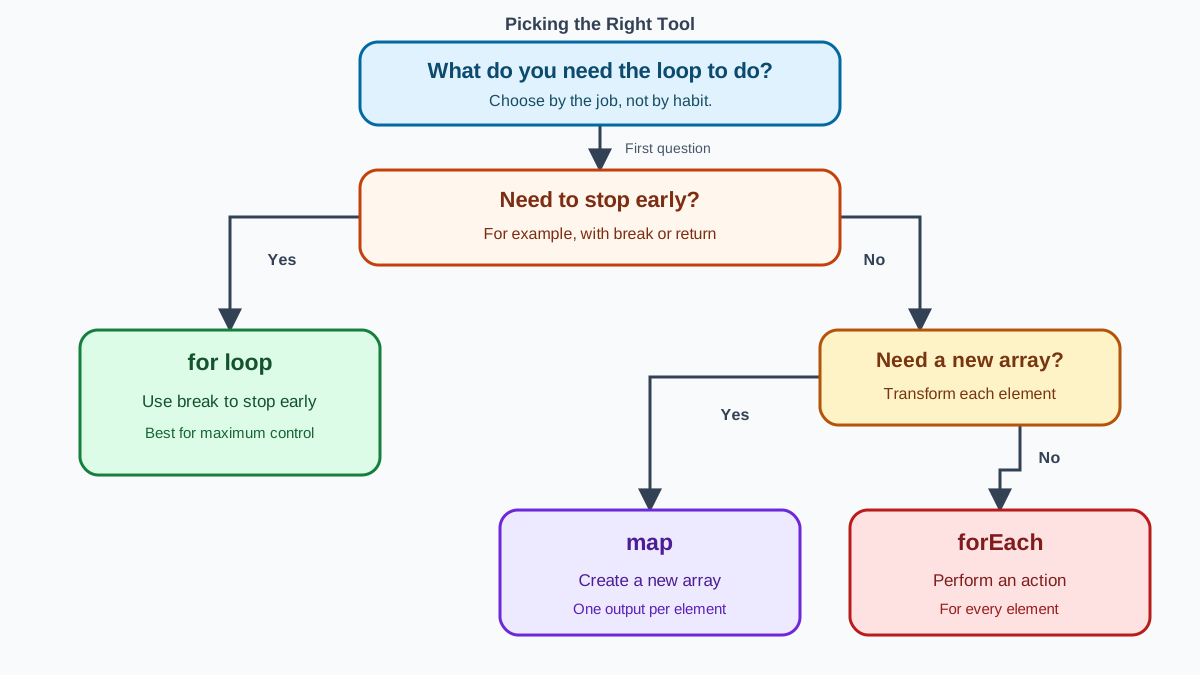
Here's the decision rule you can carry into any future project:
- Need to stop early? Use a
forloop. - Need a new array? Use
map. - Just doing an action per item? Use
forEach.
That's it. Three questions, three answers, no agonizing.
| Tool | Returns | Can stop early? | Best for |
|---|---|---|---|
for loop | Nothing on its own | Yes, with break | Searching, complex control, early exit |
forEach | undefined | No | Side effects: logging, updating, sending |
map | New array | No | Transforming data into a new array |
None of these tools is "better" than the others. They're different tools for different jobs, and the choice is about your intent, not about which one is more modern or more impressive.
A Common Beginner Mistake to Avoid
Here's the mistake I see beginners make more than any other with these tools. They use map to change objects, but they forget to return anything:
const products = [
  { name: "Notebook", price: 5 },
  { name: "Pen", price: 2 }
];

const updatedProducts = products.map(function(product) {
  product.price = product.price * 1.2;
  // No return statement!
});

console.log(updatedProducts);
[undefined, undefined]
What happened? map builds its new array from whatever your callback returns. Your callback returned nothing, so map filled the new array with undefined.
This mistake is completely normal, and it's easy to fix once you understand the mechanism. You have two choices, depending on what you actually wanted.
If you wanted to change the original objects, use forEach:
const products = [
  { name: "Notebook", price: 5 },
  { name: "Pen", price: 2 }
];

products.forEach(function(product) {
  product.price = product.price * 1.2;
});

console.log(products);
[
  { name: "Notebook", price: 6 },
  { name: "Pen", price: 2.4 }
]
If you wanted a new array with transformed objects, return a new object from map:
const products = [
  { name: "Notebook", price: 5 },
  { name: "Pen", price: 2 }
];

const updatedProducts = products.map(function(product) {
  return {
    name: product.name,
    price: product.price * 1.2
  };
});

console.log(updatedProducts);
[
  { name: "Notebook", price: 6 },
  { name: "Pen", price: 2.4 }
]
The rule to remember: if you use map, you must return a value from the callback. Every single time.
One more distinction worth knowing: forEach and map don't change the array structure themselves. The original array keeps its length and order. But code inside the callback can change things. In the forEach example above, the callback changed a property on each product object. That's not the method mutating the array—it's your code doing it. If you want to avoid changing the original objects entirely, the map version that returns new objects is the safer path.
Knowledge check
Check your understanding
Answer this question before you continue.
Your Turn
Here's a small practice task to lock in the decision rule. Take this array:
const scores = [45, 82, 91, 67, 58, 73];
Now pick the right tool for each of these three jobs:
- Log each score to the console.
- Create a new array where every score is rounded up to the nearest multiple of 10.
- Find the first failing score (below 60) and stop as soon as you find it.
For job 1, you're performing an action—use forEach. For job 2, you want a new array—use map. For job 3, you need to stop early—use a for loop with break.
When you run your solutions, check what each approach gives you back. forEach returns undefined. map returns a new array you can inspect. The for loop stops at the first failing score—in this case 45—without checking the rest.
When you're done, you'll have internalized the one rule that matters: stop early means for, new array means map, action means forEach. That rule will serve you well in every JavaScript project you write from here on.
Knowledge check
Final check
Finish the article by checking the ideas you just learned.
References
Want a more structured JavaScript path?
Use the JavaScript for AI Applications Starter Pack to turn individual tutorials into a focused path from language fundamentals to interactive AI applications.
JavaScript for AI Applications Starter Pack
Build the JavaScript foundation behind modern interactive applications. The JavaScript for AI Applications Starter Pack takes you from core language concepts through functions, browser events, forms, DOM updates, application state, debugging, and practical projects—so you can learn how interfaces take input, work with structured data, respond to users, and turn results into experiences people can actually use.
- 253-page illustrated PDF
- 12 guided JavaScript chapters
- Visual concept diagrams
- Self-assessment quizzes
- Bonus deep-dive sections
- DOM, events, forms & application state
- Browser projects, debugging & practical workflows
Coming soon


