
let, const, and var in JavaScript: Which Should You Use?
You already know how to declare a variable. You've probably written let score = 0 or const userName = "Alex" and moved on. But then you open an older…

You already know how to declare a variable. You've probably written let score = 0 or const userName = "Alex" and moved on. But then you open an older tutorial, spot var, and freeze. Three keywords. Same job. Which one are you supposed to type?
Here's the short answer: use const by default, use let when you need to reassign, and don't use var in new code. By the end of this guide, you'll understand exactly why that rule works—and you'll be able to choose the right keyword without hesitation.
Three Keywords, One Question
All three keywords declare variables. The syntax looks nearly identical:
var oldWay = "I'm from the past";
let canChange = "I can be updated";
const staysSame = "I cannot be reassigned";
So why does JavaScript give you three ways to do the same thing? Because var was the only option in early JavaScript, and when the language evolved, let and const were added to fix real problems that var created.
To pick the right keyword, you only need to answer two questions:
- Will I assign a different value to this variable later? If no, use
const. If yes, uselet. - Where should this variable live?
letandconststay inside the nearest curly braces.varignores those boundaries.
The first question is about reassignment. The second is about scope. Let's look at both.
Reassignment: The First Decision
Reassignment means pointing a variable name at a new value after you've already given it one.
let score = 10;
score = 25;
console.log(score); // 25
That works fine with let. The variable score started at 10, then you updated it to 25. No problem.
Now try the same thing with const:
const maxPlayers = 4;
maxPlayers = 8; // TypeError: Assignment to constant variable
JavaScript throws an error. A const variable is locked to its first value. You cannot point it at something else later.
There's one more difference worth knowing: const requires a value at declaration time. You can't declare it empty and fill it in later.
const playerName; // SyntaxError: Missing initializer in const declaration
With let, declaring empty is perfectly fine:
let playerName;
playerName = "Sam";
What to notice: let gives you freedom to update. const gives you safety from accidental updates. When a value should never change—a game's maximum score, a user's ID, a configuration setting—const protects you from yourself.
Before we move on, there's an important distinction to make. Reassignment is not the same as mutation. Reassignment means pointing the variable at a brand-new value. Mutation means changing what's inside an object or array that the variable already points to. You'll see why that matters in a moment.
Knowledge check
Check your understanding
Answer this question before you continue.
Scope: Where Each Variable Lives
Scope is the region of your code where a variable is visible and usable. Think of it as the variable's neighborhood. Some variables are known only on one street; others roam the whole town.
let and const are block-scoped. A block is whatever sits between a pair of curly braces {}—an if statement, a loop, a function.
if (true) {
  let message = "Hello from inside the block";
  console.log(message); // Works fine
}

console.log(message); // ReferenceError: message is not defined
The variable message lives only inside the if block. Step outside those curly braces, and JavaScript has no idea what you're talking about.
Now watch what var does in the exact same situation:
if (true) {
  var message = "Hello from inside the block";
}

console.log(message); // "Hello from inside the block"
The var variable escaped the block. It's visible outside the if statement, even though you declared it inside. That's because var is function-scoped, not block-scoped. If the code isn't inside a function, a var variable can leak all the way up to global scope.
What to notice: let and const respect the boundaries you create with curly braces. var ignores those boundaries entirely. That might sound convenient, but it's exactly what causes bugs.
Knowledge check
Check your understanding
Answer this question before you continue.
Why var Is Risky in New Code
The problem with var isn't that it's mysterious. It's that it's too loose. It lets you make mistakes that quietly corrupt your data.
Here's the classic failure. Imagine you're using a loop variable inside a block:
for (var i = 0; i < 3; i++) {
  // loop body
}

console.log(i); // 3
The loop counter i is still accessible after the loop finishes. In a small script, that's annoying. In a larger program, that same i can collide with another i somewhere else, silently overwriting a value you didn't intend to touch.
var also lets you redeclare the same name in the same scope:
var player = "Alex";
var player = "Sam";
console.log(player); // "Sam"
No error. The first value was silently replaced. With let or const, JavaScript would throw an error immediately, telling you the name is already taken.
There's one more var quirk you'll encounter: it can be referenced before its declaration line. The variable exists, but its value is undefined until the assignment runs.
console.log(score); // undefined (no error!)
var score = 10;
That behavior—called hoisting—hides bugs. You might expect an error telling you score doesn't exist yet. Instead, you get undefined, which can flow through your code and cause confusing failures later.
Notice the pattern here. Block leakage, silent redeclaration, and pre-declaration access all have the same root problem: var makes your code's state harder to see and predict. When a variable can appear anywhere, change without warning, or exist before you expect it, debugging becomes guesswork. That's why var is excluded from the modern decision entirely—not because it's old-fashioned, but because it's risky.
Common mistake: Reaching for
varbecause an old tutorial or Stack Overflow answer used it.varis a legacy keyword from early JavaScript. Modern code avoids it for good reasons. You don't need to memorize everyvarquirk right now—just recognize that it's the risky option and skip it.
Knowledge check
Check your understanding
Answer this question before you continue.
A Quick Comparison Table
Here's a reference you can return to whenever you're unsure:
| Feature | var | let | const |
|---|---|---|---|
| Scope | Function or global | Block {} | Block {} |
| Can be reassigned | Yes | Yes | No |
| Can be redeclared in same scope | Yes | No | No |
| Requires value at declaration | No | No | Yes |
| Modern code recommendation | Avoid | Use when value changes | Use by default |
The takeaway: const and let are block-scoped and predictable. var is function-scoped and loose. Use const unless you know you'll reassign the variable—then use let. var isn't part of the decision.
How to Choose: A Simple Decision Rule
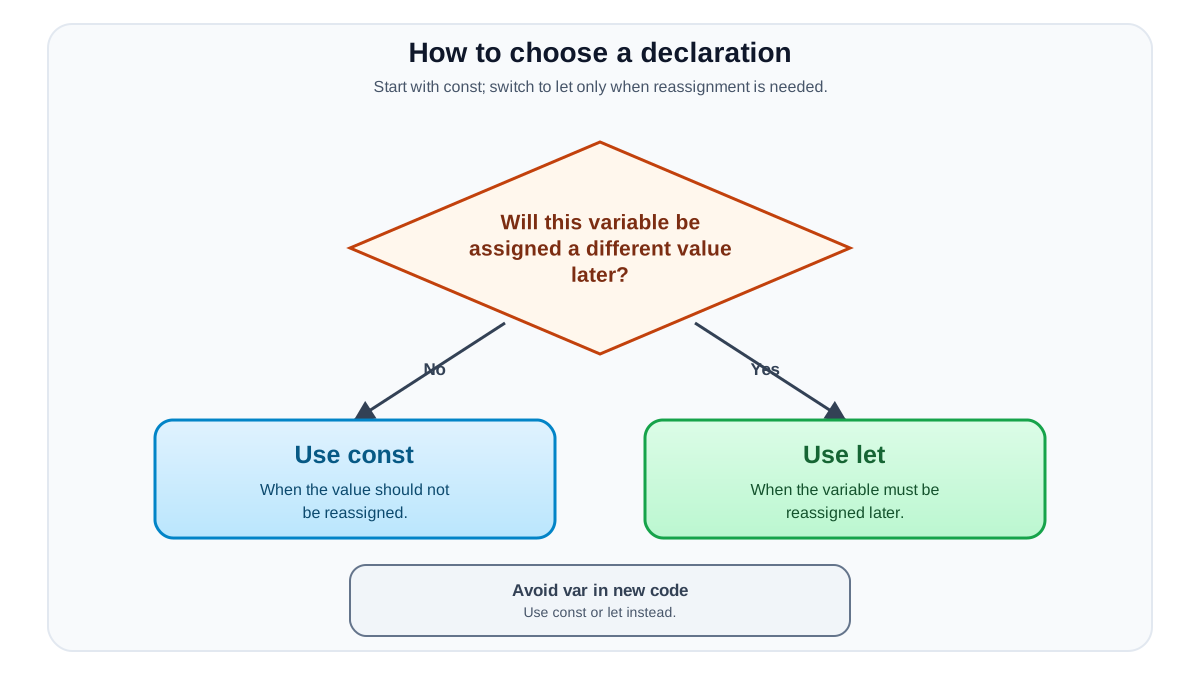
When you're about to declare a variable, ask yourself one question:
Will I assign a different value to this variable later?
- No? Use
const. - Yes? Use
let.
That's the whole rule. var doesn't enter the conversation.
Here's what that looks like in a real script:
const gameTitle = "Space Explorer"; // Never changes
const startingLives = 3; // Never changes
let currentLives = startingLives; // Changes as the player loses lives
let score = 0; // Changes constantly
The fixed settings get const. The values that move and update get let. Reading that code, you immediately know which values are stable and which ones you need to watch.
Now, about that mutation distinction from earlier. const doesn't make objects or arrays completely frozen. You can't reassign the variable itself, but you can change what's inside it.
const player = { name: "Alex", score: 0 };
player.score = 50; // This works fine
console.log(player.score); // 50

player = { name: "Sam" }; // TypeError: Assignment to constant variable
The variable player is locked to that object. The object's contents can still be updated. For a beginner, the practical rule is simple: if you're pointing the variable at a brand-new value, you need let. If you're just changing a property inside an object or array, const is fine.
Knowledge check
Check your understanding
Answer this question before you continue.
Common Beginner Mistakes
These three mistakes show up constantly. Here's how to recognize and fix each one.
Mistake 1: Using const on a value that needs to change.
const score = 0;
score = score + 10; // TypeError: Assignment to constant variable
The fix: If you'll reassign the variable, declare it with let.
let score = 0;
score = score + 10; // Works fine
Mistake 2: Reaching for var out of habit.
var userName = "Alex";
The fix: Use const or let. If you're not sure whether the value will change, start with const. If you later hit an assignment error, switch to let. The error message tells you exactly what to fix.
Mistake 3: Expecting a block-scoped variable to be visible outside its block.
const loggedIn = true;

if (loggedIn) {
  let user = "Alex";
}
console.log(user); // ReferenceError: user is not defined
The fix: Declare the variable outside the block if you need it afterward.
const loggedIn = true;
let user;

if (loggedIn) {
  user = "Alex";
}
console.log(user); // Works fine
These errors are completely normal. Every JavaScript developer hits them. The good news is that the error messages point directly at the problem—read them, adjust your keyword or your placement, and move on.
Your Turn: Practice the Decision
Here's a small exercise to make the rule stick. Open your browser console or a JavaScript playground and run this starter script:
const gameTitle = "Space Explorer";
const maxPlayers = 4;
let currentPlayers = 1;

currentPlayers = 2;
currentPlayers = 3;

console.log(gameTitle);
console.log(maxPlayers);
console.log(currentPlayers);
Expected output:
Space Explorer
4
3
Now make two controlled changes:
- Try reassigning
maxPlayersto8. Read the error that appears. That error is JavaScript protecting you from an accidental overwrite. - Change
currentPlayerstoconstinstead oflet. Run the script again and compare the errors.
When you see that TypeError: Assignment to constant variable, you're not failing—you're watching the rule work.
The durable rule, one more time: const by default, let when you must reassign, var never in new code.
Once you're comfortable choosing between const and let, you're ready to put those variables to work. The next natural step is learning how to make decisions with if/else statements, where your block-scoped variables will start showing up inside curly braces—and where knowing exactly how scope works will save you from your first real debugging session.
Knowledge check
Final check
Finish the article by checking the ideas you just learned.
References
Want a more structured JavaScript path?
Use the JavaScript for AI Applications Starter Pack to turn individual tutorials into a focused path from language fundamentals to interactive AI applications.
JavaScript for AI Applications Starter Pack
Build the JavaScript foundation behind modern interactive applications. The JavaScript for AI Applications Starter Pack takes you from core language concepts through functions, browser events, forms, DOM updates, application state, debugging, and practical projects—so you can learn how interfaces take input, work with structured data, respond to users, and turn results into experiences people can actually use.
- 253-page illustrated PDF
- 12 guided JavaScript chapters
- Visual concept diagrams
- Self-assessment quizzes
- Bonus deep-dive sections
- DOM, events, forms & application state
- Browser projects, debugging & practical workflows
Coming soon


