
Function Parameters and Return Values
A function that always does the same thing is a dead end. A function that can accept input and hand back a result becomes a tool you can reuse anywhere.

A function that always does the same thing is a dead end. A function that can accept input and hand back a result becomes a tool you can reuse anywhere.
If you have worked through the basics of defining and calling functions, you already know how to write one that prints a fixed message. But what happens when you need the same logic to work with different values? That is where JavaScript function parameters and return values come in.
Think of a function like a small machine. Parameters are the raw materials you feed into it. The function body is the mechanism that does the work. The return value is the finished product that comes out the other end. Once you understand those three pieces, you can build functions that are genuinely useful.
Why Functions Need Input and Output
Imagine writing a function that greets a user:
function sayHello() {
  console.log("Hello there!");
}

sayHello();
Hello there!
That works, but it only ever says one thing. What if you want to greet a user by name? What if you want to reuse the same greeting logic for a hundred different users?
You could write a hundred separate functions, but that would be absurd. The better path is to make the function flexible: let it accept a name as input, then produce a greeting as output.
That is the entire idea behind parameters and return values. Parameters let you pass data into a function. Return values let the function send a result back to the code that called it. Together, they turn a one-trick script into a reusable tool.
Parameters: The Inputs Your Function Accepts
A parameter is a named placeholder listed inside the parentheses of a function definition. When you call the function, you supply real values called arguments, and those values get assigned to the parameters.
Here is a tiny example:
function greet(name) {
  console.log("Hello, " + name + "!");
}

greet("Maya");
greet("Diego");
Hello, Maya!
Hello, Diego!
Notice what happened. The function was defined once, but it ran twice with different results. The parameter name acted as a placeholder. On the first call, name held the value "Maya". On the second call, it held "Diego".
You can also define functions that accept multiple parameters:
function add(a, b) {
  console.log(a + b);
}

add(3, 5);
add(10, 2);
8
12
Inside the function body, parameters behave like local variables. You can use them in calculations, combine them with strings, or pass them to other functions. The names are entirely your choice, but pick names that describe what the input represents. function add(firstNumber, secondNumber) is clearer than function add(x, y) when someone else reads your code later.
Note: The terms "parameter" and "argument" are often used interchangeably, but they mean slightly different things. Parameters are the placeholders in the function definition. Arguments are the actual values you pass when calling the function.
Knowledge check
Check your understanding
Answer this question before you continue.
Return Values: Sending a Result Back
Logging a result to the console is useful for seeing what a function does, but it has a limitation: the result is not handed back to the code that called the function. You cannot store it, compare it, or use it in another calculation.
The return keyword solves that problem. It stops the function and sends a value back to the code that called it. The caller can then store that value in a variable:
function add(a, b) {
  return a + b;
}

let total = add(3, 5);
console.log(total);
8
The key difference is that console.log prints a value to the console, while return hands a value back for reuse. A function can do both, but they serve different purposes.
function add(a, b) {
  console.log("Adding numbers...");
  return a + b;
}

let result = add(4, 6);
console.log("The result is " + result);
Adding numbers...
The result is 10
The function printed a status message, then returned the actual sum. The caller captured that returned value and used it in a second message.
What happens if a function has no return statement? It returns undefined, a special value that means "nothing was returned." This catches many beginners off guard:
function add(a, b) {
  console.log(a + b);
}

let result = add(3, 5);
console.log(result);
8
undefined
The first line of output comes from console.log inside the function. The second line shows that result is undefined, because the function never returned anything. If you need the result for later use, return it.
Knowledge check
Check your understanding
Answer this question before you continue.
Return Values Can Feed Other Functions
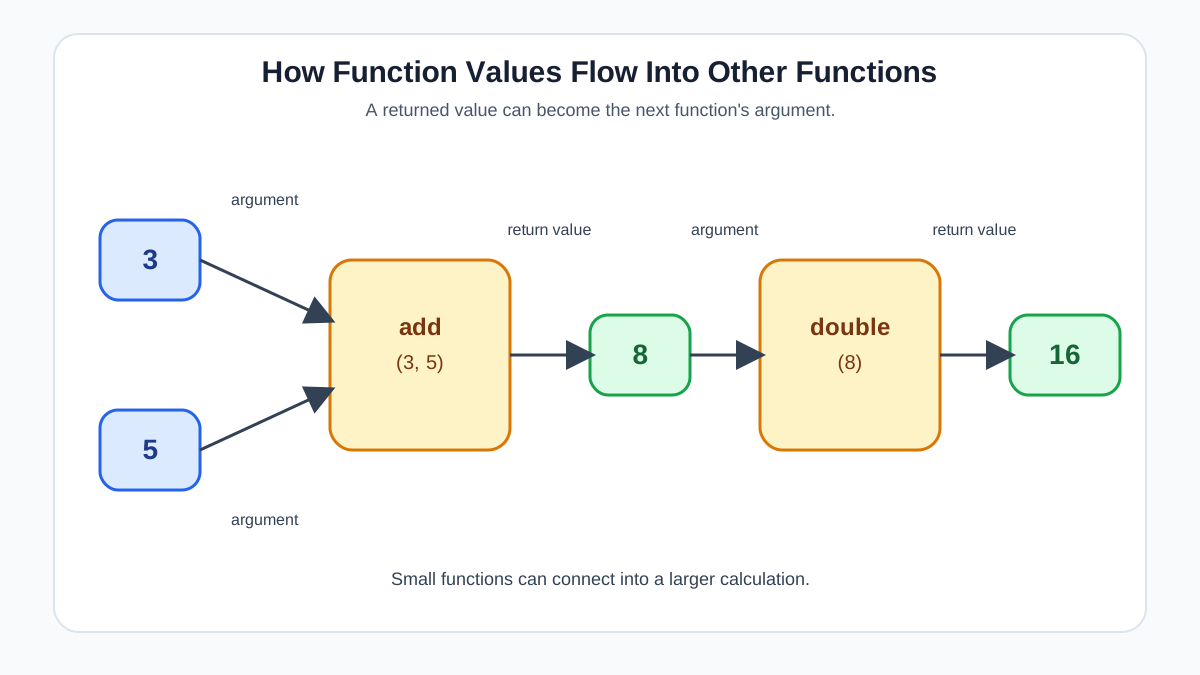
Here is where return values become genuinely powerful: the value a function returns can flow directly into another function or calculation. This is the difference between printing a result and building with it.
function add(a, b) {
  return a + b;
}

function double(number) {
  return number * 2;
}

let result = double(add(3, 5));
console.log(result);
16
Read that carefully. JavaScript evaluates the inner function first: add(3, 5) returns 8. That returned value becomes the argument for double, so double(8) runs and returns 16.
This is the real payoff of return values. They let you connect functions like building blocks. One function's output becomes another function's input. You cannot do this with console.log, because logging only displays a value—it does not give it to the next function.
Knowledge check
Check your understanding
Answer this question before you continue.
Default Parameters: Handling Missing Arguments
What happens if you call a function with fewer arguments than it has parameters?
function greet(name, greeting) {
  return greeting + ", " + name + "!";
}

console.log(greet("Maya"));
undefined, Maya!
The missing parameter holds undefined, which produces a confusing message. Default parameters give you a way to handle this gracefully. You set a fallback value using the assignment operator (=) right in the parameter list:
function greet(name, greeting = "Hello") {
  return greeting + ", " + name + "!";
}

console.log(greet("Maya"));
console.log(greet("Diego", "Welcome"));
Hello, Maya!
Welcome, Diego!
When the caller supplies a second argument, it overrides the default. When the argument is missing, the default kicks in. This is a small convenience, but it makes your functions much more forgiving to call.
Tip: Default parameters are a convenience, not a requirement for every function. Use them when a sensible fallback exists, like a default greeting or a default quantity.
Knowledge check
Check your understanding
Answer this question before you continue.
Common Beginner Mistakes
Every JavaScript developer hits these walls early. Here is what goes wrong and how to recover.
Hard-coding values in the parameter list. Parameters must be placeholder names, not actual values. Writing function add(3, 5) is invalid. The parameter list declares names like function add(a, b), and the real values arrive when the function is called.
Using console.log when you meant to return. If you try to store the result of a function that only logs, you get undefined. Ask yourself: do I just want to see the output, or do I need the value for something else? If the answer is the latter, use return.
Forgetting that code after return never runs. The return statement ends the function immediately. Any code after it is ignored:
function checkNumber(num) {
  return num > 10;
  console.log("This line never runs.");
}
If you need to log something before returning, put the log first.
Calling a function but not capturing its return value. This one is subtle. A function can return a value, but if you never store or use it, the result is lost:
function add(a, b) {
  return a + b;
}

add(3, 5); // The result 8 is computed and discarded.
The function ran, but nothing happened with the result. If you need the value, assign it to a variable or pass it directly to another function.
Where This Shows Up in Real Code
This pattern is everywhere in JavaScript. Browser APIs, libraries, and your own code all follow the same shape: input in, result out.
Here is a small helper function you might actually write, converting temperatures:
function celsiusToFahrenheit(celsius) {
  return (celsius * 9) / 5 + 32;
}

let boilingPoint = celsiusToFahrenheit(100);
console.log(boilingPoint);
212
Or a greeting builder for a signup flow:
function buildWelcomeMessage(username, plan = "free") {
  return "Welcome, " + username + "! You are on the " + plan + " plan.";
}

console.log(buildWelcomeMessage("Alex"));
console.log(buildWelcomeMessage("Sam", "premium"));
Welcome, Alex! You are on the free plan.
Welcome, Sam! You are on the premium plan.
These are small examples, but the pattern scales. Nearly every function you meet from here on will use parameters, return values, or both. Once this clicks, you can read and write JavaScript with much more confidence.
Your Next Step
Write a small function that takes two parameters and returns a result. A good starting point: a function that calculates the area of a rectangle from its width and height. Call it with different arguments, store the returned values in variables, and log them to the console.
Then try adding a default parameter. What happens when you call the function with only one argument? What happens when you pass both?
Once that works, try the composition step: write a second function that doubles a number, then pass your rectangle-area result into it. If you can trace how the value moves from one function to the next, you have understood the core idea.
From here, the natural next direction is exploring arrow functions, which give you a shorter syntax for the same ideas. The concepts you just practiced—parameters, arguments, and return values—carry over directly.
Knowledge check
Final check
Finish the article by checking the ideas you just learned.
References
Want a more structured JavaScript path?
Use the JavaScript for AI Applications Starter Pack to turn individual tutorials into a focused path from language fundamentals to interactive AI applications.
JavaScript for AI Applications Starter Pack
Build the JavaScript foundation behind modern interactive applications. The JavaScript for AI Applications Starter Pack takes you from core language concepts through functions, browser events, forms, DOM updates, application state, debugging, and practical projects—so you can learn how interfaces take input, work with structured data, respond to users, and turn results into experiences people can actually use.
- 253-page illustrated PDF
- 12 guided JavaScript chapters
- Visual concept diagrams
- Self-assessment quizzes
- Bonus deep-dive sections
- DOM, events, forms & application state
- Browser projects, debugging & practical workflows
Coming soon


