
Introduction to Functions
Copying and pasting the same code over and over works for a while—until you need to change something and suddenly have to hunt through ten copies of the…

Copying and pasting the same code over and over works for a while—until you need to change something and suddenly have to hunt through ten copies of the same logic. Miss one spot, and your program behaves differently in different places.
JavaScript functions are the cure for that pain. A function is a named, reusable block of code that performs a specific task. Write it once, call it by name whenever you need it, and your code stays organized, readable, and easy to fix.
Think of a function like a recipe. You write the steps down once, give the recipe a name, and any time you want that dish, you pull out the recipe and follow it. You don't rewrite the steps from scratch every time you cook.
Why Functions Exist
When you're first learning to code, it's tempting to write one long script that does everything from top to bottom. You've already seen loops that repeat actions and variables that store values. But what happens when you need the same calculation in three different places?
Without functions, you copy the code. Then you need to change the calculation, and you have to find every copy and update it. Miss one, and your program behaves differently in different spots. That's a debugging nightmare.
Functions solve this by giving you a single place to define a behavior. You write the code once inside a function, give it a name, and then call that function whenever you need it. Change the function's code once, and every call to that function uses the new version.
Functions also make your code easier to read. A well-named function like calculateTotal or validateEmail tells you what a block of code does without you having to trace through every line.
Knowledge check
Check your understanding
Answer this question before you continue.
Anatomy of a Function Declaration
Let's look at a real JavaScript function. Here's a simple one that greets a user:
function greetUser() {
  console.log("Hello there!");
}
Let's break down each part:
functionis the keyword that tells JavaScript you're defining a function.greetUseris the function's name. You choose this, just like a variable name.()are the parentheses. Right now they're empty, but soon they'll hold inputs.{ }are the curly braces. Everything between them is the function's body—the code that runs when the function is called.
Here's the key thing to understand: defining a function does not run it yet. The code inside the curly braces is just sitting there, waiting. Nothing happens until you call the function.
Knowledge check
Check your understanding
Answer this question before you continue.
Calling a Function
To actually run the code inside a function, you call it by writing its name followed by parentheses:
function greetUser() {
  console.log("Hello there!");
}
greetUser();
greetUser();
Hello there!
Hello there!
Each time you write greetUser(), JavaScript executes the function's body. Call it twice, and you get the greeting twice. That's the power of reuse: you wrote the console.log line once, but you can trigger it as many times as you want.
A common beginner mistake is forgetting the parentheses. If you write just greetUser without the (), JavaScript doesn't run the function. It just looks at the function itself, like reading a recipe card without cooking anything. The parentheses are what say, "Run this now."
Common mistake: Defining a function but never calling it. If you run your script and nothing happens, check that you actually wrote
functionName()somewhere after the definition.
Knowledge check
Check your understanding
Answer this question before you continue.
Parameters and Arguments
A function that always prints the same greeting is useful, but limited. What if you want to greet different people by name? That's where parameters and arguments come in.
Parameters are placeholders listed inside the parentheses when you define the function. Arguments are the actual values you pass when you call it.
function greetUser(name) {
  console.log("Hello, " + name + "!");
}

greetUser("Maya");
greetUser("Diego");
Hello, Maya!
Hello, Diego!
In this example, name is a parameter—a placeholder that stands in for whatever value gets passed. When you call greetUser("Maya"), the string "Maya" is the argument, and inside the function, name becomes "Maya".
You can have multiple parameters too, separated by commas:
function greetUser(firstName, lastName) {
  console.log("Hello, " + firstName + " " + lastName + "!");
}

greetUser("Maya", "Chen");
Hello, Maya Chen!
The same function now works for any name you give it. One function, many possible outputs.
Knowledge check
Check your understanding
Answer this question before you continue.
Return Values
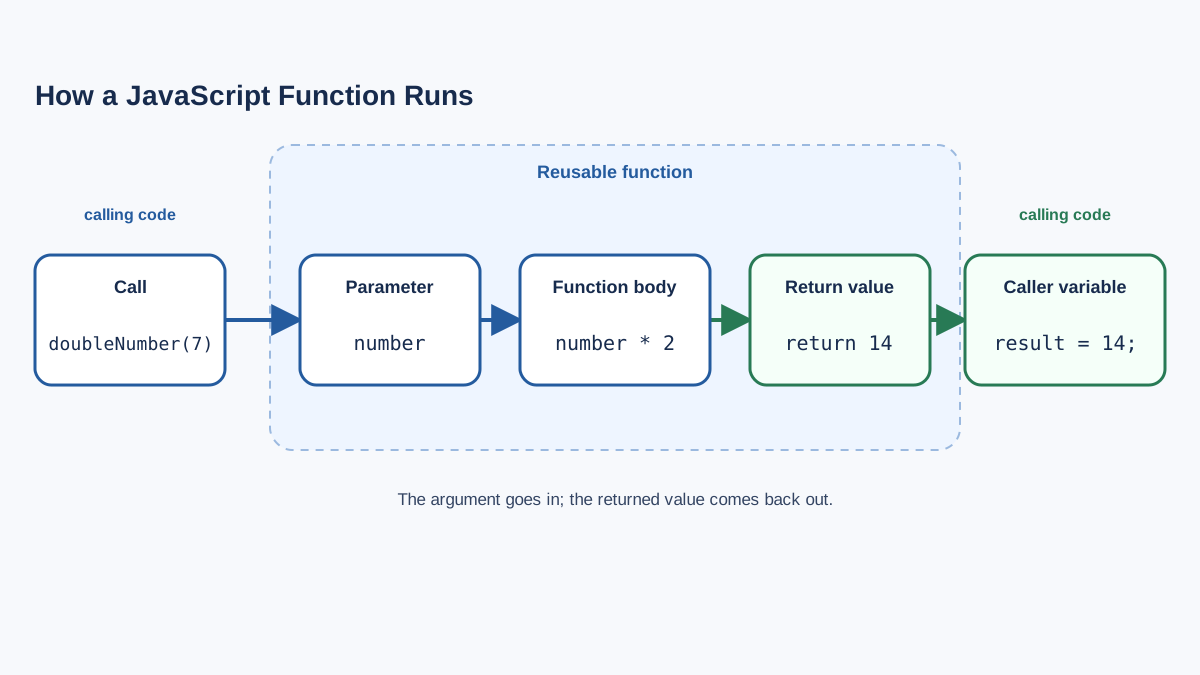
So far, our functions have been printing messages to the console. But sometimes you want a function to hand a value back to the code that called it, so you can store that value in a variable or use it in another calculation.
That's what the return keyword does. It sends a value back to the caller.
function doubleNumber(number) {
  return number * 2;
}

let result = doubleNumber(7);
console.log(result);
14
Here's what's happening step by step:
doubleNumber(7)calls the function with7as the argument.- Inside the function,
numberbecomes7. - The
returnstatement calculates7 * 2and sends14back. - The returned value gets stored in the
resultvariable. console.log(result)prints14.
The difference between printing and returning matters. A function that uses console.log shows output on the screen, but it doesn't give you anything you can use in your code. A function that uses return hands back a value you can store, compare, or pass to another function.
Common mistake: Expecting a function without
returnto hand back a value. If you don't includereturn, the function returnsundefined—even if it printed something to the console.
Where Functions Show Up in Real Web Projects
These small examples might feel far from a real website, but functions are the building blocks behind almost everything interactive on the web.
In a real project, you might write a function that calculates the total price of an order including tax:
function calculateTotal(price, taxRate) {
  return price + (price * taxRate);
}
Or a function that checks whether a form field has been filled in:
function validateField(value) {
  if (value === "") {
    return "This field is required.";
  }
  return "";
}
Or a function that builds a personalized greeting for a logged-in user:
function buildWelcomeMessage(username) {
  return "Welcome back, " + username + "!";
}
When a user clicks a button, submits a form, or triggers any action on a page, the browser calls a function to respond. Those functions might update text on the page, validate input, fetch data, or change what the user sees. That connection between user actions and functions is called an event, and it's the natural next step after you're comfortable with functions themselves.
Common Beginner Mistakes
Every programmer makes these mistakes. Here's how to spot and fix them quickly.
Forgetting the parentheses when calling a function.
// Wrong: this doesn't run the function
greetUser;

// Right: this runs it
greetUser();
Without the parentheses, you're just referring to the function itself, not executing it.
Defining a function but never calling it.
If you write a function and run your script, but nothing appears in the console, check that you actually called the function. Defining it is only half the job.
Expecting a value from a function without return.
function add(a, b) {
  let sum = a + b;
  // No return statement here!
}

let result = add(3, 4);
console.log(result); // undefined
If you need the result, include return. If you only need to display something, console.log inside the function is fine.
Your Turn
The best way to make functions click is to write a few yourself. Open your browser's console (press F12 and look for the Console tab) and try this:
- Write a function called
greetthat takes anameparameter and prints a greeting. - Write a function called
doubleNumberthat takes a number and returns it doubled. - Call each function at least twice with different arguments.
Here's a starting point:
function greet(name) {
  console.log("Hi, " + name + "!");
}

greet("Sam");
Hi, Sam!
Once you're comfortable defining and calling functions, you're ready for the next step: making your web pages respond to what users actually do. That's where events come in—the clicks, keystrokes, and form submissions that trigger your functions in the browser.
Knowledge check
Final check
Finish the article by checking the ideas you just learned.
References
Want a more structured JavaScript path?
Use the JavaScript for AI Applications Starter Pack to turn individual tutorials into a focused path from language fundamentals to interactive AI applications.
JavaScript for AI Applications Starter Pack
Build the JavaScript foundation behind modern interactive applications. The JavaScript for AI Applications Starter Pack takes you from core language concepts through functions, browser events, forms, DOM updates, application state, debugging, and practical projects—so you can learn how interfaces take input, work with structured data, respond to users, and turn results into experiences people can actually use.
- 253-page illustrated PDF
- 12 guided JavaScript chapters
- Visual concept diagrams
- Self-assessment quizzes
- Bonus deep-dive sections
- DOM, events, forms & application state
- Browser projects, debugging & practical workflows
Coming soon


