
Arrow Functions Basics
JavaScript arrow functions let you write the same functions you already know in fewer lines. The idea isn't new—only the syntax is shorter.

Key topics
JavaScript arrow functions let you write the same functions you already know in fewer lines. The idea isn't new—only the syntax is shorter.
Why Arrow Functions Exist
You already know how to write a function. It looks something like this:
function double(number) {
  return number * 2;
}

console.log(double(5)); // 10
That's clear, but it takes four lines to say something simple: take a number, multiply it by two, give it back.
Arrow functions, introduced in ES6 (also called ECMAScript 6), give you a more compact way to write the same thing. They were added to JavaScript for two main reasons: shorter functions, and a different behavior with the this keyword. We'll keep this light for now—just know that arrow functions don't create their own this the way regular functions do. That matters later, but you don't need the full picture yet.
What you do need to know right now is that arrow functions are everywhere in modern JavaScript. Tutorials, documentation, frameworks, real projects—you'll see them constantly. Learning to read them is a core skill, like learning to read a keyboard shortcut instead of clicking through menus.
Turning a Regular Function Into an Arrow Function
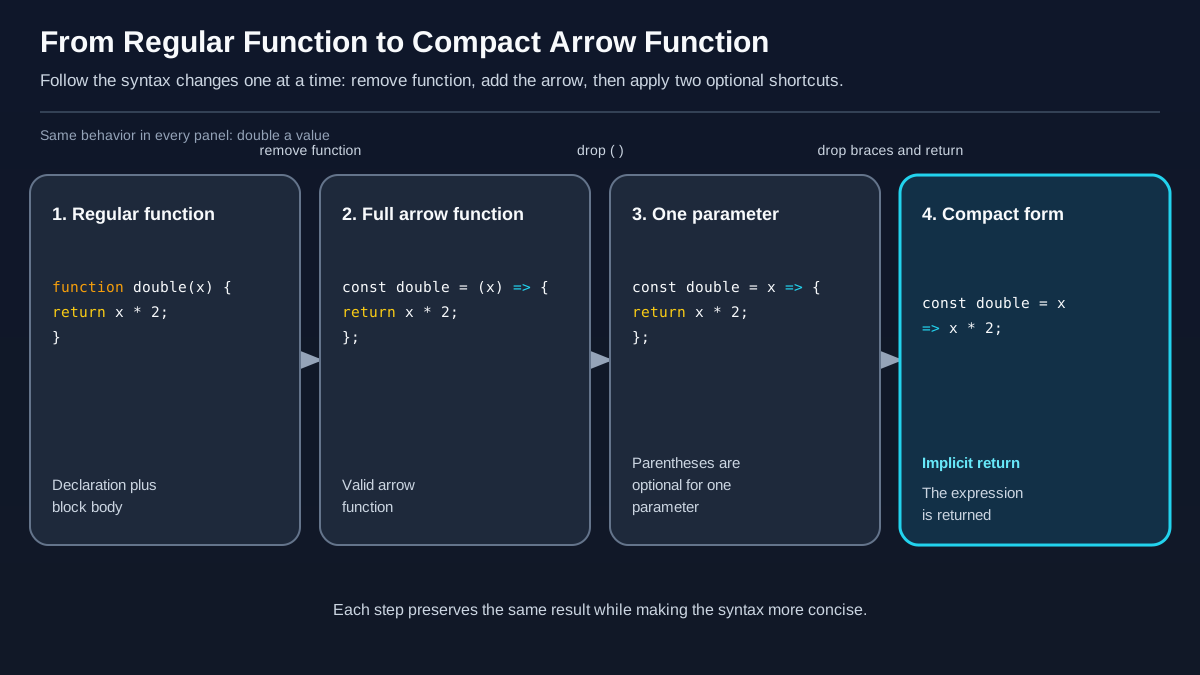
Here's the good news: arrow functions aren't a brand-new concept. They're a rewrite of something you already understand.
Let's take our double function and transform it step by step.
Step 1: Start with a regular function.
function double(number) {
  return number * 2;
}
Step 2: Remove the function keyword.
(number) => {
  return number * 2;
}
Step 3: Add an arrow => between the parameters and the body.
Step 4: Assign the whole thing to a variable.
const double = (number) => {
  return number * 2;
};
That's it. Three changes: drop function, add =>, assign to a variable. The function still takes a number, still multiplies it by 2, and still returns the result.
One important detail: arrow functions are always expressions, not declarations. That means you always assign them to a variable—you can't write function double() => {} the way you'd write a regular function declaration.
Let's verify it works:
const double = (number) => {
  return number * 2;
};

console.log(double(5)); // 10
10
Same output. Same job. Fewer words.
Knowledge check
Check your understanding
Answer this question before you continue.
The Shortcuts: When You Can Drop the Extra Words
The real power of arrow function syntax shows up when you start removing things that aren't strictly necessary.
Shortcut 1: One parameter means no parentheses
If your arrow function takes exactly one parameter, you can drop the parentheses around it:
const double = number => {
  return number * 2;
};
Cleaner, right? But if you have zero parameters, you still need empty parentheses:
const sayHello = () => {
  return "Hello!";
};
And if you have multiple parameters, keep the parentheses:
const add = (a, b) => {
  return a + b;
};
Knowledge check
Check your understanding
Answer this question before you continue.
Shortcut 2: One expression means no curly braces and no return
Here's where arrow functions get really compact. If your function body is a single expression—one thing that produces a value—you can drop the curly braces and the return keyword. The value gets returned automatically. This is called an implicit return.
const double = number => number * 2;
That one line does exactly what our original four-line function did. No function keyword. No curly braces. No return. Just the parameter, the arrow, and the expression.
Let's see both shortcuts together:
const double = number => number * 2;

console.log(double(8)); // 16
16
Here's a side-by-side comparison so you can see the transformation clearly:
| Version | Code |
|---|---|
| Regular function | function double(number) { return number * 2; } |
| Arrow, full form | const double = (number) => { return number * 2; }; |
| Arrow, one parameter | const double = number => { return number * 2; }; |
| Arrow, implicit return | const double = number => number * 2; |
The rules in one breath:
- One parameter? Drop the parentheses.
- Zero or multiple parameters? Keep the parentheses.
- Single expression body? Drop the curly braces and
return. - Multiple statements? Keep the curly braces and use an explicit
return.
Mixing these rules up is the most common beginner mistake with arrow function syntax. Let's look at the one that trips people up most often.
Knowledge check
Check your understanding
Answer this question before you continue.
A Common Mistake: Forgetting the Return
Here's a trap that catches almost everyone at some point:
const double = number => {
  number * 2;
};

console.log(double(5)); // undefined
undefined
What happened? The curly braces turned the body into a block—like the body of an if statement or a loop. And blocks don't return values on their own. The expression number * 2 gets evaluated, but nothing happens with the result. The function quietly returns undefined.
The fix is simple. Either add an explicit return inside the braces:
const double = number => {
  return number * 2;
};

console.log(double(5)); // 10
10
Or drop the braces entirely so the implicit return kicks in:
const double = number => number * 2;

console.log(double(5)); // 10
10
Both work. The version you choose depends on whether you need more than one statement in the function body.
This isn't a scary bug—it's a normal, recoverable mistake. Every JavaScript developer has written an arrow function with curly braces and forgotten the return at least once. Now you know what to check when a function mysteriously gives you undefined.
Knowledge check
Check your understanding
Answer this question before you continue.
When to Use Arrow Functions (and When Not To)
So which should you reach for? The real question isn't just how long the function is—it's what the function needs to do.
Use an arrow function when you need a short callback. Arrow functions shine when you need a small function to pass into something else—especially array methods like map, filter, and forEach. Here's what that looks like in practice:
const numbers = [1, 2, 3, 4];
const doubled = numbers.map(number => number * 2);

console.log(doubled); // [2, 4, 6, 8]
[2, 4, 6, 8]
The arrow function number => number * 2 is passed directly into map. No extra ceremony, no separate function definition—just the transformation, right where it's needed.
Use a regular function when you need a constructor or your own this. Arrow functions can't be used as constructors, so you can't call one with new. And because arrow functions don't have their own this, they inherit it from the surrounding code. That's actually useful in callbacks, but it's the wrong tool when you need a function with its own this behavior.
Use whichever reads more clearly for longer, reusable functions. If you need a named function that you'll call from multiple places in your file, a regular function declaration gives you a name that shows up in error messages and makes your intent obvious. That's a readability choice, not a hard rule.
You'll also see arrow functions in browser code, handling user actions. This example attaches a click handler to a button:
const button = document.querySelector("button");

button.addEventListener("click", () => {
  console.log("Button clicked!");
});
The arrow function here is perfect for the job: it's short, it's inline, and it inherits this from the surrounding code—which saves you from a whole category of confusing bugs when you start working with events.
Your Turn
Here's a concrete practice task. Take a regular function you've already written—maybe one that greets a user or calculates a total—and rewrite it as an arrow function. Then try the shortcuts:
- Write it with parentheses, curly braces, and an explicit
return. - Remove the parentheses if it takes one parameter.
- Remove the curly braces and
returnif the body is a single expression.
Run each version and confirm the output matches.
When you're comfortable with the syntax, the natural next step is learning how functions respond to user actions. That's where events come in—and arrow functions will be right there with you, handling clicks, keystrokes, and form submissions in callbacks.
Knowledge check
Final check
Finish the article by checking the ideas you just learned.
References
Want a more structured JavaScript path?
Use the JavaScript for AI Applications Starter Pack to turn individual tutorials into a focused path from language fundamentals to interactive AI applications.
JavaScript for AI Applications Starter Pack
Build the JavaScript foundation behind modern interactive applications. The JavaScript for AI Applications Starter Pack takes you from core language concepts through functions, browser events, forms, DOM updates, application state, debugging, and practical projects—so you can learn how interfaces take input, work with structured data, respond to users, and turn results into experiences people can actually use.
- 253-page illustrated PDF
- 12 guided JavaScript chapters
- Visual concept diagrams
- Self-assessment quizzes
- Bonus deep-dive sections
- DOM, events, forms & application state
- Browser projects, debugging & practical workflows
Coming soon


