
JavaScript Function Practice Exercises
Reading about functions feels clear. Writing one from scratch feels different. That gap is normal—and it closes the same way for everyone: by running code,…

Reading about functions feels clear. Writing one from scratch feels different. That gap is normal—and it closes the same way for everyone: by running code, inspecting the output, and fixing what breaks.
This article is a JavaScript function practice session. You will write small functions, test them, trace a couple of bugs, and build the kind of muscle memory that turns "I recognize this syntax" into "I can build with it."
Here is the practice loop we will use for every exercise:
- Read the goal.
- Try writing the code yourself.
- Run it and check the output.
- Compare your version with the solution.
- Study the explanation, then move on.
Getting stuck is part of the process. A wrong answer that teaches you something is worth more than a right answer you copied. Let's get your hands on the keyboard.
Why Practice Functions by Writing Them
If you have read about parameters and return values, you already know the pieces. You have seen what a function looks like and how calling one works. But recognizing syntax and producing it are different skills.
Think of it like learning a recipe. Reading the ingredient list is not the same as cooking the dish. The first time you cook it, you will misjudge measurements and forget steps. The second time is smoother. By the fifth time, you do not need the recipe.
Functions work the same way. The first few you write will feel awkward. That is not a sign you are bad at this. It is a sign you are practicing.
Before we start, make sure you can run JavaScript. The fastest way is the browser console:
- Open any web page in your browser.
- Press
F12(or right-click and choose Inspect). - Click the Console tab.
- Type your code there and press
Enter.
You can also create an HTML file, add a <script> tag, and open it in your browser. Either way works. What matters is that you can run code and see output—because that is where the real learning happens.
Exercise 1: A Greeting Function
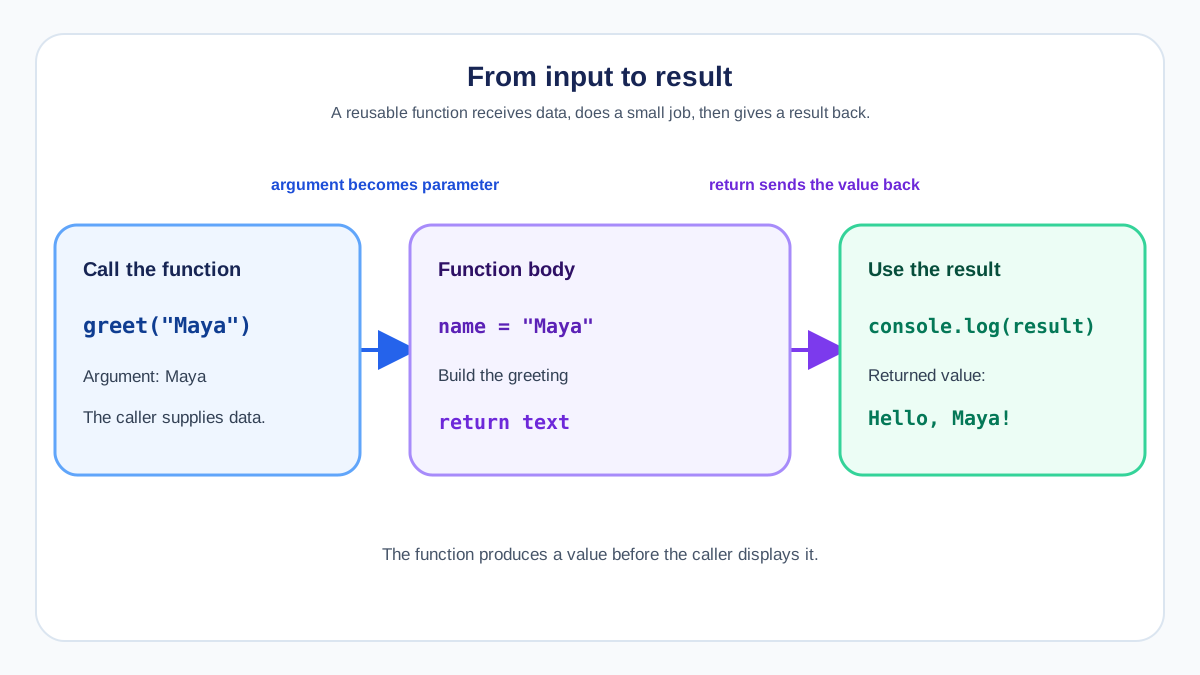
Let's start with something small so you can win early.
Goal: Write a function that takes a name and returns a greeting string.
Here is your starter code:
function greet(name) {
  // Your code goes here
}

console.log(greet("Maya"));
Target output:
Hello, Maya!
Hint: The function needs a return statement. You can build the string with concatenation ("Hello, " + name) or a template literal (`Hello, ${name}!`).
Try it now. When you are ready, compare your version with this solution:
function greet(name) {
  return "Hello, " + name + "!";
}

console.log(greet("Maya"));
Expected output:
Hello, Maya!
Why this matters: Notice that the function returns the greeting instead of logging it directly. That distinction is the heart of reusable functions. When you return a value, the caller decides what to do with it—log it, store it, or pass it to another function. If you console.log inside the function instead, the function produces output but no value, which limits what you can do with it.
Optional extension: Add a second parameter for the greeting word, so you can call greet("Maya", "Hi") and get "Hi, Maya!".
Knowledge check
Check your understanding
Answer this question before you continue.
Exercise 2: A Small Reusable Calculator
Now let's make a function that does a calculation. This is where functions start earning their keep: write the logic once, use it with any numbers.
Goal: Write a function that takes two numbers and returns their product.
function multiply(a, b) {
  // Your code goes here
}

console.log(multiply(4, 7));
Target output:
28
Hint: Use the return keyword with the multiplication operator (*). The function should not log anything itself—it should hand the result back.
Here is one solution:
function multiply(a, b) {
  return a * b;
}

console.log(multiply(4, 7));
Expected output:
28
Why this matters: This function is reusable because it does not care which numbers you pass in. multiply(4, 7) gives you 28. multiply(10, 10) gives you 100. The same three lines of logic serve every pair of numbers you can think of. That is the leverage functions give you: write the behavior once, apply it anywhere.
Optional extension: Change the function so it returns the sum instead of the product. Then call it with two different pairs of numbers and check that both results are correct.
Knowledge check
Check your understanding
Answer this question before you continue.
Exercise 3: Tracing a Missing Return
Here is the most common beginner bug in JavaScript functions. It looks correct. It runs without errors. And it still gives you the wrong result.
Look at this code:
function double(number) {
  let result = number * 2;
}

console.log(double(5));
What you want it to print:
10
What it actually prints:
undefined
What happened? The function computed 5 * 2 and stored it in result. But it never sent that value back. Without a return statement, a JavaScript function always produces undefined—the value that means "nothing was returned."
Trace it step by step:
double(5)is called withnumberset to5.resultbecomes10.- The function ends. Since there is no
return, the function hands backundefined. console.logprintsundefined.
The fix is one line:
function double(number) {
  let result = number * 2;
  return result;
}

console.log(double(5));
Expected output:
10
Why this matters: This bug is sneaky because nothing crashes. The code runs, the calculation happens, and the result quietly disappears. The only clue is the output. Reading output carefully is not a debugging skill—it is the debugging skill. When a function gives you undefined, your first question should always be: "Did I forget to return?"
Optional extension: Here is another broken function. Find and fix it:
function isEven(number) {
  if (number % 2 === 0) {
    return true;
  }
}

console.log(isEven(4));
console.log(isEven(7));
Hint: What happens when number is odd? The function enters the if block only when the number is even. When the number is odd, the if block never runs, and the function reaches its end without a return—so it hands back undefined.
Solution:
function isEven(number) {
  return number % 2 === 0;
}

console.log(isEven(4));
console.log(isEven(7));
Expected output:
true
false
Why this fix works: The expression number % 2 === 0 is already a boolean. When number is 4, the expression evaluates to true. When number is 7, it evaluates to false. Returning the expression directly means every possible input gets a value back—there is no path where the function forgets to return.
Knowledge check
Check your understanding
Answer this question before you continue.
Exercise 4: Tracing Wrong Arguments
Functions read arguments by position. The first value you pass becomes the first parameter, the second value becomes the second parameter, and so on. That sounds simple—until you pass things in the wrong order.
Look at this function:
function subtract(a, b) {
  return a - b;
}

console.log(subtract(2, 10));
What you probably want it to print:
8
What it actually prints:
-8
The function works exactly as written. a is 2, b is 10, and 2 - 10 is -8. The problem is not the function—it is the call. The arguments are in the wrong order.
To trace this bug, start at the call site and work backward:
- Look at the call:
subtract(2, 10). - Check the function definition:
function subtract(a, b). - Match positions:
agets2,bgets10. - The result is
2 - 10, which is-8.
The fix is to pass the arguments in the order the function expects:
console.log(subtract(10, 2));
Expected output:
8
Why this matters: The function does not know what you meant to pass. It only knows what you actually passed. This is why reading the function definition before calling it is a good habit. Check what parameters it expects, then match your arguments to that order.
Optional extension: Write a function with three parameters—say, makeSentence(subject, verb, object)—and call it correctly. Then call it with the arguments scrambled and watch what happens.
Knowledge check
Check your understanding
Answer this question before you continue.
Your Turn: Three Quick Challenges
Now it is time to practice without a safety net. These three JavaScript function exercises use the same skills you have been building. Try each one first. When you are ready—or if you get stuck—compare your version with the solution below it.
Challenge 1: Write a function that takes two numbers and returns the larger one. If they are equal, return either one.
function max(a, b) {
  // Your code goes here
}

console.log(max(3, 9));  // Should print 9
console.log(max(7, 2));  // Should print 7
Hint: An if statement can compare the two parameters and return the right one.
Solution:
function max(a, b) {
  if (a > b) {
    return a;
  }
  return b;
}

console.log(max(3, 9));
console.log(max(7, 2));
Expected output:
9
7
Why this works: When a is greater than b, the function returns a. Otherwise, it returns b. If the numbers are equal, returning b is fine because both values are the same.
Optional extension: Add a third parameter, c, and make the function return the largest of all three numbers.
Challenge 2: Write a function that converts Celsius to Fahrenheit. The formula is: multiply by 9, divide by 5, then add 32.
function celsiusToFahrenheit(celsius) {
  // Your code goes here
}

console.log(celsiusToFahrenheit(0));   // Should print 32
console.log(celsiusToFahrenheit(100)); // Should print 212
Hint: Follow the formula exactly: (celsius * 9) / 5 + 32. The parentheses keep the order of operations clear.
Solution:
function celsiusToFahrenheit(celsius) {
  return (celsius * 9) / 5 + 32;
}

console.log(celsiusToFahrenheit(0));
console.log(celsiusToFahrenheit(100));
Expected output:
32
212
Why this works: The function takes one input, applies the conversion formula, and returns the result. You can now convert any Celsius temperature without rewriting the math.
Optional extension: Write the reverse function, fahrenheitToCelsius, using the formula: subtract 32, multiply by 5, then divide by 9.
Challenge 3: Write a function that takes a number and returns a message. If the number is greater than 10, return "That is a big number!". Otherwise, return "That is a small number."
function describeNumber(number) {
  // Your code goes here
}

console.log(describeNumber(25)); // Should print "That is a big number!"
console.log(describeNumber(4));  // Should print "That is a small number."
Hint: Use an if statement to check the condition, and make sure every path returns a string.
Solution:
function describeNumber(number) {
  if (number > 10) {
    return "That is a big number!";
  }
  return "That is a small number.";
}

console.log(describeNumber(25));
console.log(describeNumber(4));
Expected output:
That is a big number!
That is a small number.
Why this works: The function checks the condition once. When the number is greater than 10, it returns the big-number message. For every other value, it returns the small-number message. Both paths return a string, so the function never produces undefined.
Optional extension: Change the boundary so numbers greater than 100 get a third message: "That is a huge number!"
These small reusable functions are the same shape as the ones used in real projects. A function that validates a form field, calculates a price, or formats a date all follow this pattern: take input, do something, return a result.
Common Mistakes to Watch For
As you keep practicing, you will probably hit these again. Here is a quick reference so you can diagnose your own code faster.
| Mistake | Symptom | Fix |
|---|---|---|
Forgetting return | Function logs undefined | Add return before the value you want to send back |
| Arguments in the wrong order | Output is wrong but the code runs | Check the function definition, then match argument order to parameter order |
| Calling without parentheses | Function never runs | Call it with parentheses: greet("Maya"), not greet |
| Wrong number of arguments | Missing parameters become undefined | Count the parameters, then pass the same number of arguments |
Using console.log instead of return | Function prints output but returns undefined | Return the value; let the caller decide whether to log it |
Missing return on one branch | Some inputs work, others give undefined | Check that every path through the function returns a value |
A practical habit: When a function misbehaves, run this three-step check:
- Read the output. What did it actually print?
- Trace the call. What arguments did you pass, and in what order?
- Check the return. Does the function send a value back on every path, or does it just compute and stop?
That sequence catches most beginner function bugs. It is also the same reasoning you will use for every debugging problem ahead: observe, trace, fix.
Keep the Momentum Going
You have now written functions, tested them, traced a missing return, and fixed wrong arguments. That is real progress—you are no longer just recognizing syntax. You are building with it.
Here is one more suggestion: revisit the three challenges and rewrite them from memory. Not tomorrow. Today. The second pass is where the learning sticks.
When you are ready for the next step, take these same functions and connect them to the browser. In JavaScript, functions are what respond when a user clicks a button, types in a field, or submits a form. The skills you just practiced—passing inputs, returning values, tracing bugs—are exactly the skills event handling builds on.
Run the exercises. Break a few functions. Fix them. That loop is not just how you learn functions. It is how you learn every concept ahead.
Knowledge check
Final check
Finish the article by checking the ideas you just learned.
References
Want a more structured JavaScript path?
Use the JavaScript for AI Applications Starter Pack to turn individual tutorials into a focused path from language fundamentals to interactive AI applications.
JavaScript for AI Applications Starter Pack
Build the JavaScript foundation behind modern interactive applications. The JavaScript for AI Applications Starter Pack takes you from core language concepts through functions, browser events, forms, DOM updates, application state, debugging, and practical projects—so you can learn how interfaces take input, work with structured data, respond to users, and turn results into experiences people can actually use.
- 253-page illustrated PDF
- 12 guided JavaScript chapters
- Visual concept diagrams
- Self-assessment quizzes
- Bonus deep-dive sections
- DOM, events, forms & application state
- Browser projects, debugging & practical workflows
Coming soon


