
Handle Delayed Project Results with JavaScript Promises and async/await
Your first projects probably felt instant. Click a button, the counter goes up. Type a task, it appears in the list. Every value was ready the moment you…

Key topics
Your first projects probably felt instant. Click a button, the counter goes up. Type a task, it appears in the list. Every value was ready the moment you asked for it.
Then you try something new — loading a quote, saving data, fetching anything from outside your file — and the value is empty. You log it, and you see undefined. Nothing is broken. The result simply has not arrived yet.
That gap between asking and arriving is where promises and async/await live. Once you see the mechanism, the confusion disappears.
Why Your Value Is Empty Before You Use It
Here is the symptom, in the smallest possible form:
let quote = "loading...";

setTimeout(() => {
  quote = "The best way out is always through.";
}, 1000);

console.log(quote);
loading...
You might expect the final line to print the quote. It prints loading... instead, because the timer has not fired yet. JavaScript did not wait. It ran the console.log immediately and moved on.
This is the part that trips up almost every beginner: JavaScript does not pause the whole program while it waits for something. It keeps running other code. When the delayed work finishes, it comes back and runs the callback you gave it.
You have already seen this behavior with click handlers. When you write button.addEventListener("click", ...), the function inside does not run at that moment. It runs later, when the click happens. A delayed result is the same idea — the value shows up when the work finishes, not when you ask for it.
So the real question is not "why is my value undefined?" The real question is: how do I write code that waits for a result without freezing everything else?
A Promise Is a Placeholder for a Later Value
A promise is an object that represents a result that may arrive later. It is a placeholder — a receipt for work that is already in progress.
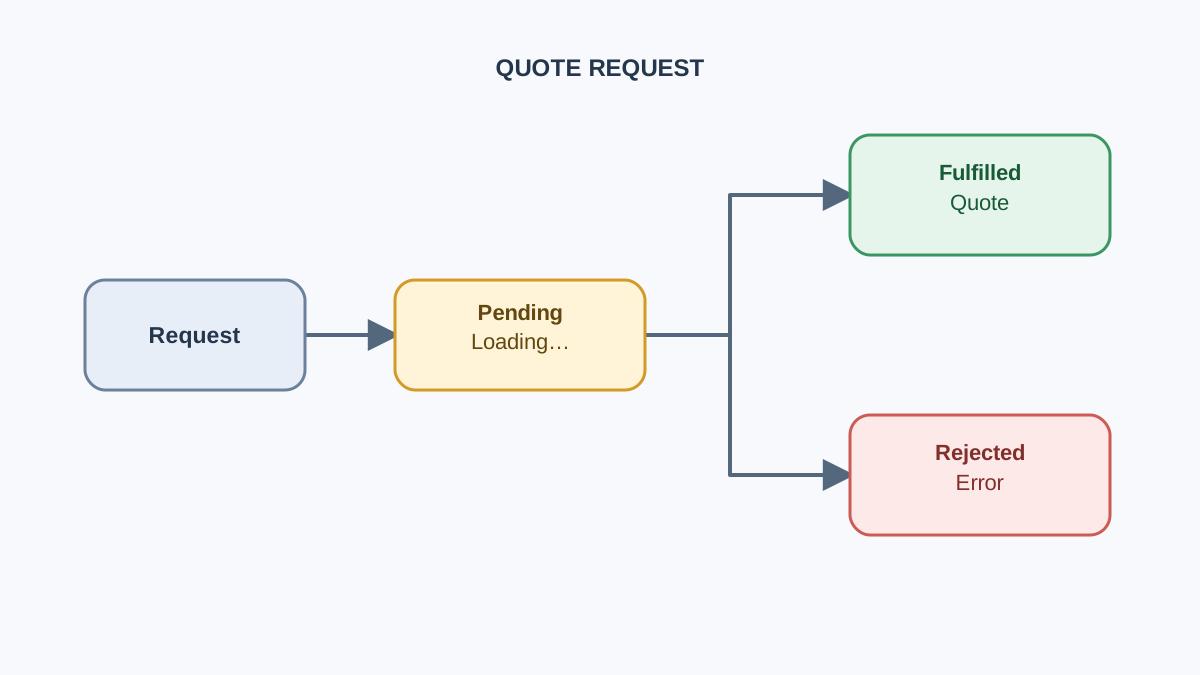
A promise is always in one of three states:
- Pending — the work is still running. No value yet.
- Fulfilled — the work finished successfully, and there is a value.
- Rejected — the work failed, and there is a reason (usually an error).
Once a promise is fulfilled or rejected, it is settled and never changes again. That is the whole model. Everything else is syntax.
Here is a tiny promise you can run right now:
function getQuote() {
  return new Promise((resolve) => {
    setTimeout(() => {
      resolve("The best way out is always through.");
    }, 1000);
  });
}

console.log("before");
getQuote().then((value) => console.log(value));
console.log("after");
before
after
The best way out is always through.
Notice the order. before and after print first, then the quote arrives a second later. The promise did not make the code asynchronous — the setTimeout was already asynchronous. The promise just gives you a clean way to receive the result when it lands.
Note: A promise does not slow anything down or speed anything up. It represents work that is already happening in the background.
Knowledge check
Check your understanding
Answer this question before you continue.
Meet await: Pause One Function, Not the Page
The .then() style works, but it gets awkward fast. Modern JavaScript gives you a cleaner option: async and await.
asyncgoes before a function. It marks the function as one that returns a promise.awaitgoes inside anasyncfunction. It pauses that function until the promise settles, then hands back the value.
The critical word is that function. The page keeps responding. Buttons still click. Scrolling still works. Only the function you marked pauses.
Here is the same example rewritten:
function getQuote() {
  return new Promise((resolve) => {
    setTimeout(() => {
      resolve("The best way out is always through.");
    }, 1000);
  });
}

async function showQuote() {
  console.log("before");
  const value = await getQuote();
  console.log(value);
  console.log("after");
}

showQuote();
before
The best way out is always through.
after
Read that output slowly. Now after prints last, because await paused showQuote until the quote arrived. The rest of the page was free to keep running the whole time.
One more thing worth knowing: await also works on plain values. await 20 just gives you 20. That means you can use await freely without worrying about whether something is a promise.
Knowledge check
Check your understanding
Answer this question before you continue.
Handle Success and Failure with try/catch
So far every promise has succeeded. Real work fails. A network call drops, a file is missing, a server returns an error.
When a promise is rejected, await throws the reason — exactly like a normal error. That means you can catch it with the same try/catch you already use for regular errors.
function getQuote(shouldFail) {
  return new Promise((resolve, reject) => {
    setTimeout(() => {
      if (shouldFail) {
        reject(new Error("Could not load quote."));
      } else {
        resolve("The best way out is always through.");
      }
    }, 1000);
  });
}

async function showQuote(shouldFail) {
  try {
    const value = await getQuote(shouldFail);
    console.log("Success:", value);
  } catch (error) {
    console.log("Failure:", error.message);
  }
}

showQuote(false);
showQuote(true);
Success: The best way out is always through.
Failure: Could not load quote.
Two runs, two outcomes, both handled. The try block holds the code that might fail. The catch block runs only if something goes wrong.
Why does this matter so much? Because an unhandled rejection is invisible. Your page just stops updating and you have no idea why. Wrapping the await in try/catch turns a silent failure into a message you can actually read.
Common mistake: Catching the error and doing nothing with it. An empty
catchblock hides the real cause. At minimum, log the reason or show a message on the page.
Knowledge check
Check your understanding
Answer this question before you continue.
Build It: A Quote Loader with a Loading and Error State
Now let us put the pieces together in a small browser project. This one is different from a random quote generator that picks from an array — here the value arrives late, and the page has to show that honestly.
The goal: a button that loads a quote, shows "Loading…" while waiting, then shows either the quote or an error message.
Save this as index.html and open it in your browser. Everything lives in one file, so there is nothing to wire up separately.
<!DOCTYPE html>
<html lang="en">
<head>
  <meta charset="UTF-8">
  <title>Quote Loader</title>
</head>
<body>
  <button id="loadBtn">Load a quote</button>
  <p id="output">Click the button to begin.</p>

  <script>
    function loadQuoteFromServer(shouldFail) {
      return new Promise((resolve, reject) => {
        setTimeout(() => {
          if (shouldFail) {
            reject(new Error("Server is down."));
          } else {
            resolve("The best way out is always through.");
          }
        }, 1500);
      });
    }

    const button = document.getElementById("loadBtn");
    const output = document.getElementById("output");

    async function loadQuote() {
      output.textContent = "Loading...";

      try {
        const quote = await loadQuoteFromServer(false);
        output.textContent = quote;
      } catch (error) {
        output.textContent = "Sorry, something went wrong. Try again.";
      }
    }

    button.addEventListener("click", loadQuote);
  </script>
</body>
</html>
Click the button and watch the page. You will see three visible states:
- "Loading…" appears immediately — the promise is pending.
- The quote replaces it after about a second and a half — the promise is fulfilled.
- An error message would replace it if the promise rejected — the promise is rejected.
The three states of the promise map directly to the three states of your page. That is not a coincidence. It is the whole point of the pattern: your interface tells the truth about what the code is doing.
Tip: I use a simulated delay here so you can see the loading state without a network call. When you swap in a real request later, the structure stays exactly the same.
Knowledge check
Check your understanding
Answer this question before you continue.
See the Error State in the Same Project
The success path is working. Now prove the failure path is real, without leaving the file you just built.
Change one line inside loadQuote. Pass true instead of false:
const quote = await loadQuoteFromServer(true);
Save the file, reload the page, and click the button again. You should see:
Sorry, something went wrong. Try again.
That message comes from your catch block. The promise rejected, await threw the error, and catch caught it. Nothing crashed. Nothing went blank. The page told the truth about what happened.
This is the moment the pattern clicks for most beginners: the same function handles both outcomes, and the only difference is which branch of the promise ran.
Warning: If you forget the
try/catchand the promise rejects, the error becomes an unhandled rejection. The page may look frozen, and the console will show a warning you might miss. Always wrapawaitintry/catchwhen the work can fail.
Common Beginner Mistakes with Promises and await
Most "async is broken" moments are actually one of these five mistakes. Learn to recognize them and you will save yourself hours.
Forgetting async on the function. If you use await outside an async function, you get a syntax error: await is only valid in async function. The fix is simple — add async before the function that contains the await.
Logging the promise instead of the value. If you write console.log(getQuote()) without await, you will see Promise { <pending> }. That is the promise object, not the result. Add await to unwrap it.
Forgetting to return or await inside a helper. If a helper function starts async work but does not return or await it, the caller gets a promise it never waits for. The value arrives, but nobody is listening.
Swallowing the error. An empty catch block is worse than no catch at all, because it looks like you handled the problem. Log the reason or show the user something.
Reading the error too fast. When something fails, find the await line first. Ask: was the promise actually awaited? Was it returned? Nine times out of ten, the answer is there.
When to Use await and When Not To
await is not free. Every await pauses the function until that promise settles. That is exactly what you want when the next step depends on the previous result — and exactly what you do not want when two tasks are independent.
Compare these two versions:
// Sequential: waits for each one before starting the next
async function slow() {
  const a = await fetchA();
  const b = await fetchB();
  return [a, b];
}

// Parallel: starts both, then waits for both
async function fast() {
  const [a, b] = await Promise.all([fetchA(), fetchB()]);
  return [a, b];
}
If fetchA and fetchB each take one second, the first version takes two seconds. The second takes one. Same results, half the time.
The rule I use: await for order, Promise.all for speed when order does not matter. If step two needs the result of step one, use await. If the two steps are independent, start them together.
You do not need to master this today. Just know that await is a tool for sequencing, not a default you sprinkle everywhere.
Practice: Break It on Purpose
The fastest way to lock in the failure path is to force it yourself. You already flipped the flag to true in the build. Now go further.
Add a Retry button to the page that calls the same loadQuote function again. Notice that nothing about the async logic changes. You just call the function a second time, and the same three states play out again.
Then try one extension: make the promise fail the first time and succeed the second time. A simple counter inside loadQuoteFromServer can do it. Watch how the loading state, the error state, and the success state all reuse the same code path.
What you should walk away with: the try/catch is what turns a failure into a visible, recoverable state. Without it, the failure is invisible. With it, the user sees a message and can try again.
Where This Goes Next
When a result may arrive later, the pattern is always the same: wrap the work in an async function, await the promise, and put the await inside try/catch so both outcomes are handled.
That single pattern is the foundation for almost everything asynchronous you will build. The next practical step is to use await with a real browser API like fetch, which returns a promise for data from a server. The structure you just wrote — loading state, success state, error state — carries over unchanged. You will also see the same pattern when you save and load data, read files, or call any API.
Pick one project you have already built and ask: does anything here arrive late? If the answer is yes, you now know how to handle it.
Knowledge check
Final check
Finish the article by checking the ideas you just learned.
References
Want a more structured JavaScript path?
Use the JavaScript for AI Applications Starter Pack to turn individual tutorials into a focused path from language fundamentals to interactive AI applications.
JavaScript for AI Applications Starter Pack
Build the JavaScript foundation behind modern interactive applications. The JavaScript for AI Applications Starter Pack takes you from core language concepts through functions, browser events, forms, DOM updates, application state, debugging, and practical projects—so you can learn how interfaces take input, work with structured data, respond to users, and turn results into experiences people can actually use.
- 253-page illustrated PDF
- 12 guided JavaScript chapters
- Visual concept diagrams
- Self-assessment quizzes
- Bonus deep-dive sections
- DOM, events, forms & application state
- Browser projects, debugging & practical workflows
Coming soon


