
Next Steps in JavaScript
You finished the basics. You built a calculator, a to-do list, and maybe a number guessing game. The code runs. The buttons work. And now the map runs out.

Key topics
You finished the basics. You built a calculator, a to-do list, and maybe a number guessing game. The code runs. The buttons work. And now the map runs out.
This is the plateau every self-taught JavaScript learner hits. The basics feel comfortable, small projects come together, but the path forward suddenly looks blurry. Another syntax tutorial feels wrong, yet you are not sure what to build next.
Here is the truth: your next step in JavaScript is not another lesson. It is a direction. And the right direction depends on what you want to build next.
You Finished the Basics. Now What?
If you have built a calculator, a to-do list, and a guessing game, you have already proven something important: you can turn an idea into working code. That is the hard part of programming, and you have done it more than once.
The reason the path forward feels unclear is not a knowledge problem. It is a direction problem. You have been following tutorials that told you exactly what to build. Now you need to choose what to build yourself, and that choice feels bigger than it is.
This article is a practical JavaScript learning path from where you are now to real-world projects. Not a list of every topic in the language. A route.
What "Mastering the Basics" Actually Means
Before you move forward, do a quick self-check. You are ready for the next stage if you can do these three things:
- Read your own project code and explain it. Open your calculator project. Can you walk through what each function does and why it exists?
- Debug a broken feature. If a button stops working, can you find the error and fix it?
- Build a small feature from scratch. Can you add a new button to your to-do list without following a tutorial step by step?
If you answered yes to all three, you are ready. If you answered no to one of them, go back and rebuild one small project without a tutorial open. That is not a setback. It is the fastest way to close the gap.
Here is something I want you to internalize: not remembering every method is normal. Professional developers look things up constantly. The difference between a beginner and an experienced developer is not memory. It is knowing what to look up and where the answer fits.
The decision rule is simple. If you can build and debug small projects without a tutorial open, you are ready to move forward.
Knowledge check
Check your understanding
Answer this question before you continue.
The Skills That Matter Next
The gap between beginner projects and real-world JavaScript is not more syntax. It is working with data.
Your calculator and to-do list manipulated the page directly. You clicked a button, and JavaScript changed the text or added an element. Real applications do something bigger: they fetch data from somewhere else, organize it, and display it.
Four skills bridge that gap. Think of them as tools you pull out when a project needs them, not a checklist you must master before you build anything else.
1. Working with arrays and objects. Real data comes in collections. A list of users, a set of search results, a batch of weather readings. Arrays and objects are how JavaScript stores and organizes that data. You already touched arrays in your projects. The next step is learning to transform them: filter a list, sort it, or pull out specific values.
2. Fetching data from an API. An API is a service that sends data to your code. Weather services, movie databases, and news sites all offer APIs. When your JavaScript asks an API for data and displays it, your page stops being static. It becomes dynamic.
3. Handling forms and user input. Your to-do list handled typed input, but real forms need more care. What happens when a user submits an empty field? What if they type letters where numbers belong? Validating input is how you keep your app from breaking.
4. Asynchronous JavaScript. When your code asks an API for data, the response takes time. Asynchronous JavaScript is how your program waits for that response without freezing the page. You will hear terms like promises and async/await. At this stage, you only need the concept: some operations take time, and your code needs a way to handle the wait.
These skills are not a mandatory sequence. They are directions you choose based on the project in front of you. The smallest path looks like this: represent data locally, render and filter it, then add a network request when your project actually needs one.
Knowledge check
Check your understanding
Answer this question before you continue.
Choose a Direction, Not a Syllabus
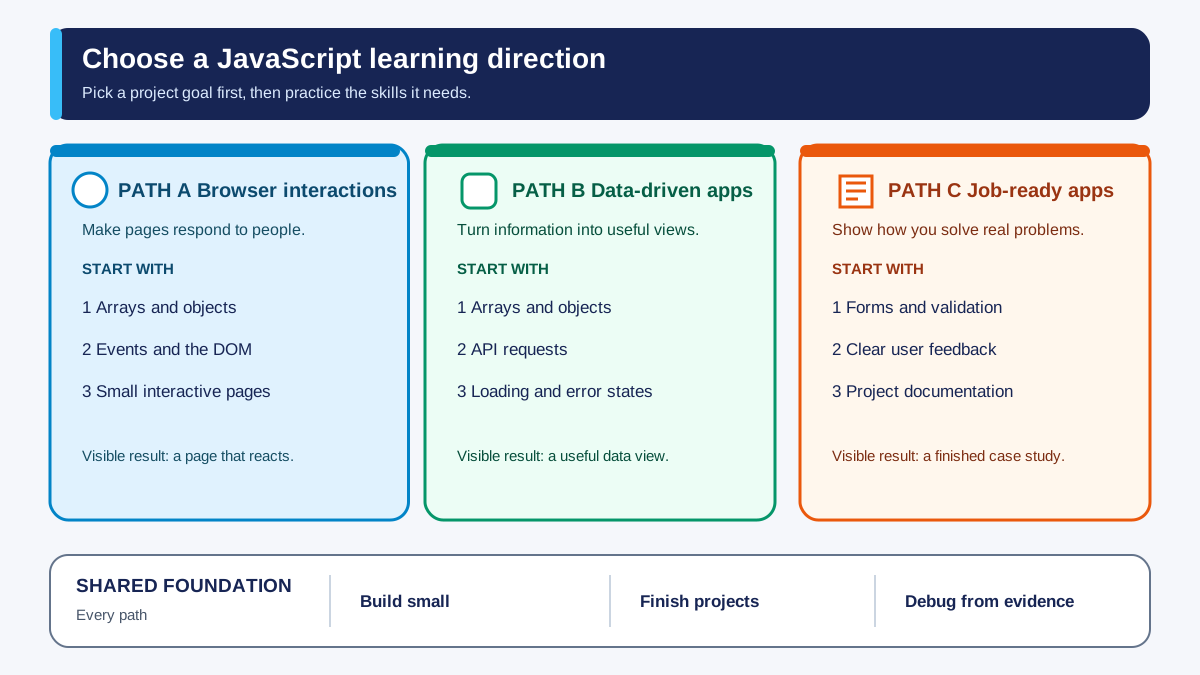
Here is where most learning paths go wrong. They hand you a list of topics and tell you to work through it top to bottom. That is a syllabus, not a direction. A direction starts with a goal and pulls in only the skills that goal demands.
Ask yourself one question: What kind of app do you most want to build?
Path 1: Interactive browser apps. You want to build tools that feel like real products: searchable lists, filterable collections, dashboards. Start with arrays and objects. Learn filter, map, and find. Build a searchable list of anything you care about: movies, books, recipes, games. When you can filter and display data smoothly, add forms so users can add their own items.
Path 2: Data-driven apps. You want to build apps that pull in outside information: weather, news, sports scores. Start with arrays and objects, then move to APIs. Your first milestone is not a polished weather app. It is one successful request: your code asks an API for data, and you see the response in your browser. Once that works, display the data on the page. Then handle what happens when the request fails.
Path 3: Job-oriented application building. You want to build projects that demonstrate real-world skills to employers. Start with Path 1, then add forms and validation. Finish each project with a short README that explains what it does, how to run it, and what you learned. Employers are not looking for perfect apps. They are looking for evidence that you can make decisions, handle problems, and explain your work.
All three paths share the same foundation: build small, finish what you start, and debug from evidence. The paths diverge only in which skills you practice first.
Knowledge check
Check your understanding
Answer this question before you continue.
How to Practice Like a Builder
I have watched beginners learn faster when they run code, inspect the output, make a small change, and observe the consequence. Passive reading does not stick. Running code does.
Here is how to practice like a builder:
Build one small project at a time. Watching tutorials feels productive, but it is not the same as building. Every project you finish teaches you something a video cannot: what it feels like to push through the middle, when the novelty wears off and the work becomes persistence.
Break every feature into small steps. Do not write a whole feature at once. Write one small piece, test it, and then write the next piece. A feature is just a sequence of small steps that each work on their own.
Treat debugging as the lesson. When your code breaks, the error message is not a failure. It is information about what your program is actually doing. Read the error. Trace your variables. Find the assumption that was wrong. That process is where real learning happens.
Make each project count as evidence. A finished project is proof of progress. Make it prove more than "I followed a tutorial." Add one feature the tutorial did not show you. Write a short description of what the app does and what you learned building it. Handle one bad input gracefully. These small additions turn a demo into evidence of real ability.
Knowledge check
Check your understanding
Answer this question before you continue.
Common Mistakes That Stall Beginners
These are the traps I see beginners fall into most often, and how to recover from each one.
Tutorial hell. You watch tutorial after tutorial, but you never build anything independently. The recovery move: close the video and build the project from memory. If you get stuck, look up one specific answer, not a full walkthrough.
Jumping to a framework too early. React and other frameworks are powerful, but they add a layer of abstraction on top of JavaScript. If your core JavaScript is shaky, the framework will confuse you more than it helps. The recovery move: build three or four solid vanilla JavaScript projects first. Frameworks are a later direction, not a shortcut past the foundation.
Copy-pasting code you cannot explain. If you paste code and it works, you have not learned anything. The recovery move: type the code yourself, then delete it and rewrite it from memory. If you cannot explain what each line does, you are not ready to use it.
Trying to learn everything at once. JavaScript has a huge surface area. Trying to learn every feature is how you end up knowing a little about everything and nothing well. The recovery move: follow one path and learn what you need for your current project.
Your Next Project: Start Small and Finish
You now have a JavaScript learning path. The last step is to start walking it.
Pick one project from the path that matches your goal. If you chose interactive browser apps, build a searchable list. If you chose data-driven apps, build a weather app or a random fact generator that pulls from a public API.
Whichever you choose, start with the smallest possible version. For an API project, that means:
- Display hardcoded data first. Create an object with the data you expect to receive and render it on the page. This proves your display code works before you add network requests.
- Fetch one response. Ask the API for data and log the response to the console. Your goal is one successful request, not a polished app.
- Render the response. Replace the hardcoded data with the data from the API.
- Handle failure. What happens if the API is down or the user types an invalid city? Show a friendly message instead of a silent break.
Then follow the same build loop you used for your earlier projects:
- Plan the feature. Write down what the app should do in plain sentences.
- Write the code. Build one small piece at a time.
- Test it. Run it and see what happens.
- Break it. Try an input you did not expect.
- Fix it. Use the error to understand what went wrong.
The path from JavaScript basics to real-world projects is not one more tutorial. It is a sequence of small, finished projects. Each one teaches you something the last one could not.
Pick your direction. Pick your project. Break it into small steps. Start building.
Knowledge check
Final check
Finish the article by checking the ideas you just learned.
References
Want a more structured JavaScript path?
Use the JavaScript for AI Applications Starter Pack to turn individual tutorials into a focused path from language fundamentals to interactive AI applications.
JavaScript for AI Applications Starter Pack
Build the JavaScript foundation behind modern interactive applications. The JavaScript for AI Applications Starter Pack takes you from core language concepts through functions, browser events, forms, DOM updates, application state, debugging, and practical projects—so you can learn how interfaces take input, work with structured data, respond to users, and turn results into experiences people can actually use.
- 253-page illustrated PDF
- 12 guided JavaScript chapters
- Visual concept diagrams
- Self-assessment quizzes
- Bonus deep-dive sections
- DOM, events, forms & application state
- Browser projects, debugging & practical workflows
Coming soon


