
How JavaScript Runs in Your Browser
You click a button and a menu slides open. You type in a form and it checks your input before you hit submit. You scroll and new content appears without a…

You click a button and a menu slides open. You type in a form and it checks your input before you hit submit. You scroll and new content appears without a page reload. That is JavaScript running live on your own machine—and understanding how JavaScript runs in browser is the difference between copying code and knowing what your code will do.
Most beginners carry a mental model that is too simple. They picture the browser reading JavaScript like a person reads a sentence, and then the page just updates. The real mechanism has a boundary running through it, and that boundary explains most of the bugs you will ever chase.
The Boundary That Explains Everything
Here is the single idea worth keeping for the whole article: some JavaScript runs the moment the browser loads it, and other JavaScript waits for an event before it runs at all.
That split is not a detail. It is the organizing rule. Once you can tell which of the two a piece of code belongs to, most confusing page behavior stops being mysterious.
Let me show you the boundary with the smallest possible example. Save this as demo.html and open it in your browser:
<!DOCTYPE html>
<html>
  <body>
    <button id="btn">Click me</button>
    <script>
      console.log("script loaded");

      document.getElementById("btn").addEventListener("click", function () {
        console.log("button clicked");
      });
    </script>
  </body>
</html>
Open the browser console and reload the page. You will see script loaded appear right away. The button clicked message stays silent until you actually click the button.
script loaded
Then click the button and watch the second line appear:
button clicked
That gap is the boundary. The top-level console.log ran the instant the script was evaluated. The click handler was only registered, not executed. It ran later, when the browser decided the moment had arrived.
Knowledge check
Check your understanding
Answer this question before you continue.
Two Parts Working Together
To understand why that gap exists, you need to see that JavaScript does not run alone. It runs as a language engine working inside a host that supplies the tools.
- The JavaScript engine runs the language. It reads your code, translates it, and executes it.
- The browser is the host. It provides the objects and APIs that let your code touch the page, react to clicks, and fetch data.
The engine does not own the page. It runs the language. When your code needs to change a heading, respond to a click, or load data, it calls out to browser-provided features. That handoff is where a lot of real behavior lives.
In the example above, console.log is a browser-provided tool. So is the document object your code used to find the button. The engine executed the language; the browser supplied the page and the console.
Each major browser ships its own engine—Chrome and Edge use V8, Firefox uses SpiderMonkey, and Safari uses JavaScriptCore. You do not need to memorize these names to write code, but knowing they exist explains why the same script can behave slightly differently across browsers.
Note: JavaScript can also run outside the browser, such as in Node.js on a server. For building websites, the browser is where most beginners start, and it is the environment this guide focuses on.
Knowledge check
Check your understanding
Answer this question before you continue.
How the Browser Finds Your Code
When you visit a page, the browser first loads the HTML. As it reads through that HTML, it watches for <script> tags. Those tags are the browser's signal that JavaScript is coming.
JavaScript reaches the page in two common ways:
- Inline JavaScript: the code sits directly inside a
<script>tag in the HTML file. - External JavaScript: the code lives in a separate
.jsfile, and a<script>tag points the browser to it.
Either way, the moment the browser hits the <script> tag, it hands that code to its JavaScript engine.
Knowledge check
Check your understanding
Answer this question before you continue.
What the Engine Does With Your Code
The engine does not read your code like a human reads a sentence. It has to translate your code into instructions the computer's processor can actually execute, because the processor only understands low-level machine code.
Here is a simplified model of what happens:
- Parse the code. The engine reads your JavaScript and breaks it into a structure that represents every keyword, variable, and expression.
- Compile and execute. Modern engines translate your code into runnable instructions on the fly, then run them.
This happens in milliseconds, which is why a click feels instant. But the parsing step is exactly why a single typo can stop an entire script: if the engine cannot parse your code, it never reaches the execution stage.
Knowledge check
Check your understanding
Answer this question before you continue.
Why Some Code Waits
Back to the boundary. When a script loads, the code that runs immediately is only the top-level part. A click handler, a timer, or a fetch callback does not run the instant the page loads. It runs later, when the browser reports the event.
Here is the constraint that shapes how real websites behave. In each browser tab, most JavaScript runs on a single main thread, and that thread can run only one task at a time.
That means your code does not run in parallel with the page's rendering. If a script is busy doing heavy work, the page cannot respond to a click or repaint smoothly until that work finishes. When a single task runs long enough, the page feels sluggish or frozen.
This is why you will hear experienced developers talk about keeping the main thread free. It is also why browsers offer web workers, which let certain JavaScript run on a separate thread so heavy work does not block the interface. You do not need to master workers as a beginner, but knowing the main thread exists explains a lot of real-world page behavior you will eventually debug.
Common mistake: Assuming JavaScript runs in parallel with everything else on the page. It does not. Most of it runs one task at a time on the main thread, so long-running code can make a page feel unresponsive.
Putting the Whole Flow Together
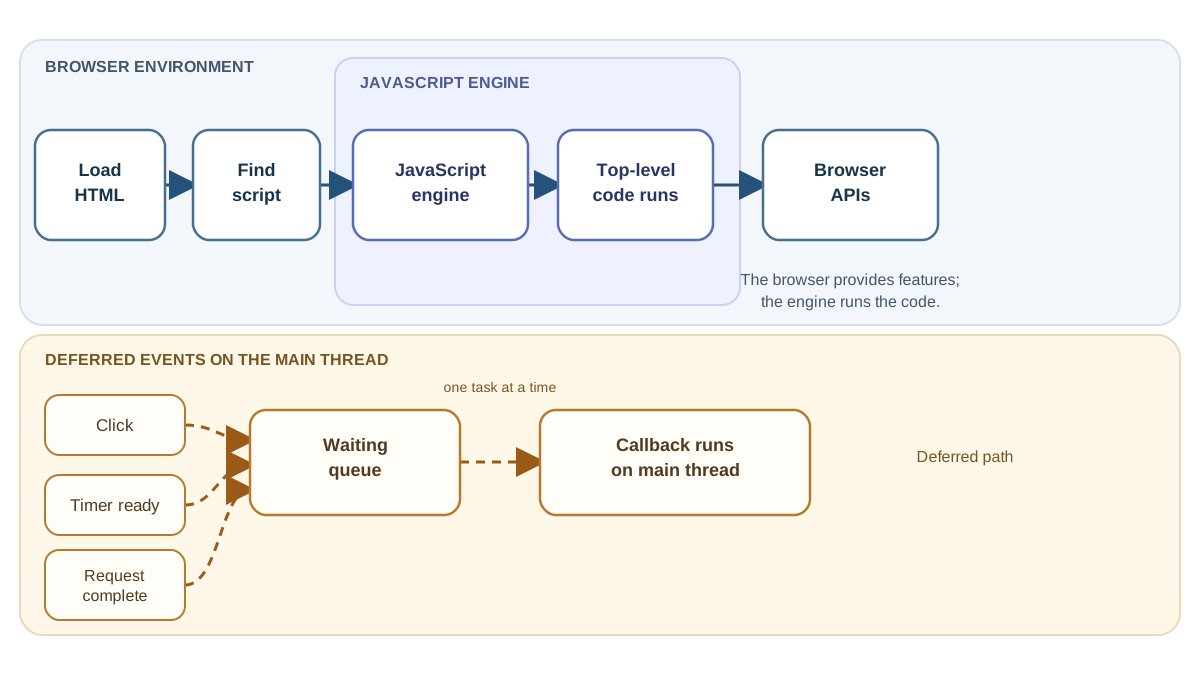
Here is the complete journey from page load to running code:
- The browser loads the HTML and scans for
<script>tags. - When it finds one, it sends the code to its JavaScript engine.
- The engine parses the code, translates it, and executes the top-level statements.
- As that code runs, it can call browser-provided features to read and modify the page, respond to user actions, and fetch new data.
- Callbacks for clicks, timers, and completed requests run later, one task at a time on the main thread.
Your Next Step: Debug With the Boundary
Reading about engines is useful, but the mechanism becomes real when you observe it. Open any website, press F12 (or right-click and choose Inspect), and click the Console tab. Type a simple command and press Enter:
console.log("hello from the browser");
The message appears instantly. Now make a deliberate mistake:
console.log("hello from the browser";
The engine cannot parse the missing parenthesis, so it throws an error and runs nothing.
Now you have a debugging sequence to carry forward. When a page does not behave, ask which layer failed:
- Did the script load? If the file or tag is wrong, the engine never sees your code.
- Did parsing succeed? A syntax error stops the whole script before anything runs.
- Did top-level code run? If not, the failure happened during immediate execution.
- Is the code waiting for an event? A click handler or timer that never fires is not broken—it is waiting for a moment that has not arrived.
Run the demo file from earlier alongside this console test, and you will see both halves of the story at once: code that runs immediately, and code that waits for an event. Watch the output, break the code, read the error, and the boundary stops being abstract.
That is how JavaScript runs in your browser. When code misbehaves, do not guess. Ask whether it should have run now or is still waiting—and the error will point you to the answer.
Knowledge check
Final check
Finish the article by checking the ideas you just learned.
References
Want a more structured JavaScript path?
Use the JavaScript for AI Applications Starter Pack to turn individual tutorials into a focused path from language fundamentals to interactive AI applications.
JavaScript for AI Applications Starter Pack
Build the JavaScript foundation behind modern interactive applications. The JavaScript for AI Applications Starter Pack takes you from core language concepts through functions, browser events, forms, DOM updates, application state, debugging, and practical projects—so you can learn how interfaces take input, work with structured data, respond to users, and turn results into experiences people can actually use.
- 253-page illustrated PDF
- 12 guided JavaScript chapters
- Visual concept diagrams
- Self-assessment quizzes
- Bonus deep-dive sections
- DOM, events, forms & application state
- Browser projects, debugging & practical workflows
Coming soon


