
JavaScript Closures: How Functions Remember Variables
A function can outlive the variables it was born next to. That sentence sounds wrong until you run it.

Key topics
A function can outlive the variables it was born next to. That sentence sounds wrong until you run it.
Here is the smallest version of the puzzle. Read it, then predict what prints before you scroll.
function makeGreeting() {
  const name = "Ada";

  function greet() {
    console.log("Hello, " + name);
  }

  return greet;
}

const sayHello = makeGreeting();
sayHello();
Hello, Ada
Look at the order of events. makeGreeting() runs, declares name, declares greet, and returns greet. Then the outer call is finished. By the rule most beginners carry around — "local variables disappear when the function ends" — name should be gone by the time sayHello() runs.
It isn't. The function still reads it.
That is a closure in JavaScript: a function bundled with the environment where it was written. Not a copy of the values. A live connection to the place those variables live.
What a Closure Actually Captures
When JavaScript creates a function, it links that function to the lexical environment where it was written. Plain English: the set of names the function could see at that spot in the source code, plus a link to the environment around it.
You already met this idea when you learned scope. A function can read variables declared outside it. Closures are the part of that rule that keeps working after the outer function returns.
The correction that matters: the function keeps a reference, not a snapshot. If the outer variable changes later, the function sees the new value, because it is looking at the same variable, not a photocopy of it.
Common mistake: Assuming the closure froze the value at creation time. It didn't. It holds the variable itself.
Knowledge check
Check your understanding
Answer this question before you continue.
Trace a Closure Step by Step
The classic example is a counter. Run it and watch the number climb across separate calls.
function makeCounter() {
  let count = 0;

  return function () {
    count = count + 1;
    return count;
  };
}

const counter = makeCounter();
console.log(counter());
console.log(counter());
console.log(counter());
1
2
3
Three separate calls, one shared count. The outer function ran only once, so only one count was ever created — and the returned function keeps reaching back into it.
Here is the tracing checklist I use when a closure confuses me:
- Find where the function was declared. Not where it is called.
- List the outer names it actually uses. Those are the bindings it reaches back to.
- Follow the calls. Each call reuses the same captured environment unless a new outer call created a fresh one.
That third point is the one people miss. A closure is decided by where the function is written, not where it is invoked. You can pass counter into another function, store it in an array, or hand it to a timer — it still reads its original environment.
Knowledge check
Check your understanding
Answer this question before you continue.
Two Counters, Two Separate Memories
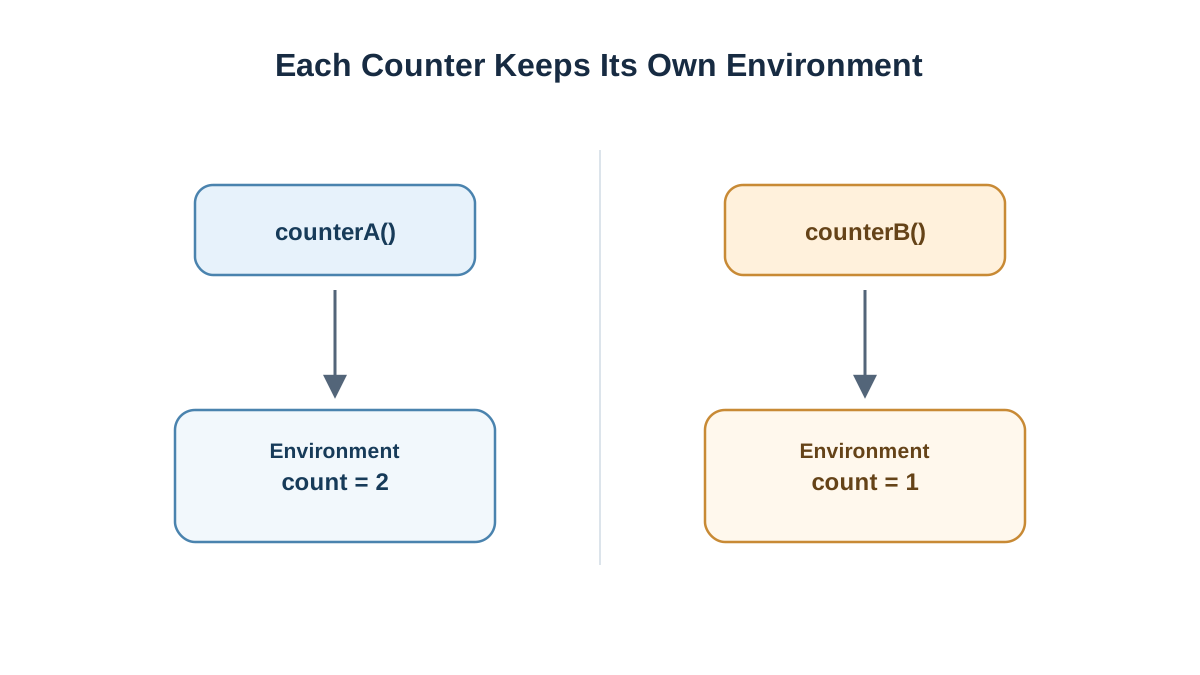
Now call the outer function twice.
const counterA = makeCounter();
const counterB = makeCounter();

console.log(counterA());
console.log(counterA());
console.log(counterB());
1
2
1
counterB starts at 1 even though counterA is already at 2. Each call to makeCounter() created a separate lexical environment with its own count. The returned function from the first call retains access to the first environment; the returned function from the second call retains access to the second. Two calls, two environments, two independent memories.
This is the mechanism behind private state with closures. The count variable is not a property on the returned function. It is not reachable from outside at all. The only code that can touch it is the code that was written inside makeCounter.
Knowledge check
Check your understanding
Answer this question before you continue.
Keeping State Private
You can share one private variable across several functions by returning an object of methods.
function createWallet() {
  let balance = 0;

  return {
    add(amount) {
      balance = balance + amount;
    },
    spend(amount) {
      balance = balance - amount;
    },
    getBalance() {
      return balance;
    },
  };
}

const wallet = createWallet();
wallet.add(50);
wallet.spend(20);
console.log(wallet.getBalance());
console.log(wallet.balance);
30
undefined
add, spend, and getBalance all close over the same balance. They can read and change it. From outside, wallet.balance is undefined — there is no such property. The state lives in the closed-over environment, and the only doors into it are the methods you chose to expose.
That is data hiding without classes, and it is one of the most practical reasons closures exist.
Knowledge check
Check your understanding
Answer this question before you continue.
Where Closures Show Up in Real Code
You have probably already used closures without naming them.
- Event handlers. A click handler that reads a variable from the surrounding setup code is closing over it.
- Callbacks. When you pass a function to
setTimeoutor an array method, it remembers the variables where it was defined. - Function factories. A
makeDiscount(rate)that returns a pricing function is a closure holding ontorate.
In every case, the pattern works for the same reason: the function carries its environment with it, so setup code can finish and the behavior still holds.
When to Reach for a Closure, and When Not To
Use a closure when a small piece of state should stay hidden and only a few functions should touch it. That is the sweet spot.
Skip it when a plain object, a function parameter, or a module-level variable is clearer. If nothing needs hiding, a closure just adds indirection.
Warning: The most common beginner surprise is expecting a snapshot. If a loop variable changes after a function is created, the function sees the final value, not the value at creation time. When that bites you, the fix is usually to create a new environment per iteration.
Your Next Step
Write one outer function that returns two functions sharing a single private counter — say, increment and reset. Before you run it, write down what you expect each call to print. Then run it and compare.
When that matches, move on to closures inside callbacks and event handlers. That is where the concept stops being an exercise and starts being the reason your code works.
Knowledge check
Final check
Finish the article by checking the ideas you just learned.
References
Want a more structured JavaScript path?
Use the JavaScript for AI Applications Starter Pack to turn individual tutorials into a focused path from language fundamentals to interactive AI applications.
JavaScript for AI Applications Starter Pack
Build the JavaScript foundation behind modern interactive applications. The JavaScript for AI Applications Starter Pack takes you from core language concepts through functions, browser events, forms, DOM updates, application state, debugging, and practical projects—so you can learn how interfaces take input, work with structured data, respond to users, and turn results into experiences people can actually use.
- 253-page illustrated PDF
- 12 guided JavaScript chapters
- Visual concept diagrams
- Self-assessment quizzes
- Bonus deep-dive sections
- DOM, events, forms & application state
- Browser projects, debugging & practical workflows
Coming soon


