
Recursion in JavaScript: Base Cases and Step-by-Step Tracing
That is the normal first experience with recursion. The function calls itself, the answer appears, and somewhere in the middle your mental model goes dark.…

Key topics
You run the code. It prints the right number. And you still cannot explain why.
That is the normal first experience with recursion. The function calls itself, the answer appears, and somewhere in the middle your mental model goes dark. This article fixes that by slowing the whole thing down: find the base case, watch the calls pile up, watch the values come back down.
You already know functions, if/else, and loops, so you have everything you need. If any of those feel shaky, a quick review of function parameters and return values will make this much easier.
What Makes a Function Recursive
A recursive function is a function that calls itself by name inside its own body. That is the whole definition. No magic, no special syntax.
Every recursive function needs exactly two parts:
- A base case: a condition that returns a value without calling the function again.
- A recursive step: a call to the function with a smaller or simpler input.
The recursive step must move toward the base case. If the input never gets smaller, the calls never stop.
If you have written a while loop, you already understand the shape of this. A loop repeats code until a condition turns false. Recursion repeats a function call until a condition turns true. Same goal, different machinery.
Here is the mental model that makes everything else click: each call pauses and waits. When a function calls itself, the current call does not finish. It stops at that line and waits for the next call to hand back a value. Those paused calls stack up like sticky notes on a desk, and they only get resolved in reverse order.
Knowledge check
Check your understanding
Answer this question before you continue.
Your First Recursive Function: Countdown
Start with something small enough to hold in your head.
function countdown(n) {
  if (n === 0) {
    console.log("Done!");
    return;
  }
  console.log(n);
  countdown(n - 1);
}

countdown(3);
3
2
1
Done!
Two lines matter here. The if (n === 0) block is the base case — it stops the calls. The countdown(n - 1) line is the recursive step — it calls the function again with a smaller number.
Notice that the output appears in the same order you would get from a loop. That is because this particular function does its work before the recursive call. The interesting part comes later, when a function does work after the call returns.
Knowledge check
Check your understanding
Answer this question before you continue.
The Base Case: The Brake, Not the Boring Part
Beginners tend to treat the base case as a formality. It is actually your first diagnostic tool. If you cannot point at the line that stops the calls, the function is not finished.
Remove the base case and see what happens:
function countdown(n) {
  console.log(n);
  countdown(n - 1);
}

countdown(3);
3
2
1
0
-1
-2
... (continues until the engine stops it)
Eventually the engine throws an error like this:
RangeError: Maximum call stack size exceeded
That is a stack overflow. Every paused call takes up memory, and the engine has a limit. When you exceed it, the program crashes. Recognizing this error by sight saves you real debugging time, because it almost always means one of two things:
- There is no base case at all.
- There is a base case, but the input never reaches it.
The second one is sneakier. Consider this:
function countdown(n) {
  if (n === 0) {
    return;
  }
  console.log(n);
  countdown(n); // forgot to subtract
}
The base case exists. The condition is correct. But countdown(n) passes the same n forever, so n never becomes 0. The fix is one character: countdown(n - 1).
Common mistake: Writing the base case but forgetting to change the argument in the recursive call. The function looks correct at a glance and crashes at runtime.
A good beginner instinct: after writing any recursive function, ask yourself, "What value does this argument have on the next call, and is it closer to the base case?" If you cannot answer in one sentence, the function is not ready.
Knowledge check
Check your understanding
Answer this question before you continue.
Tracing a Recursive Call Step by Step
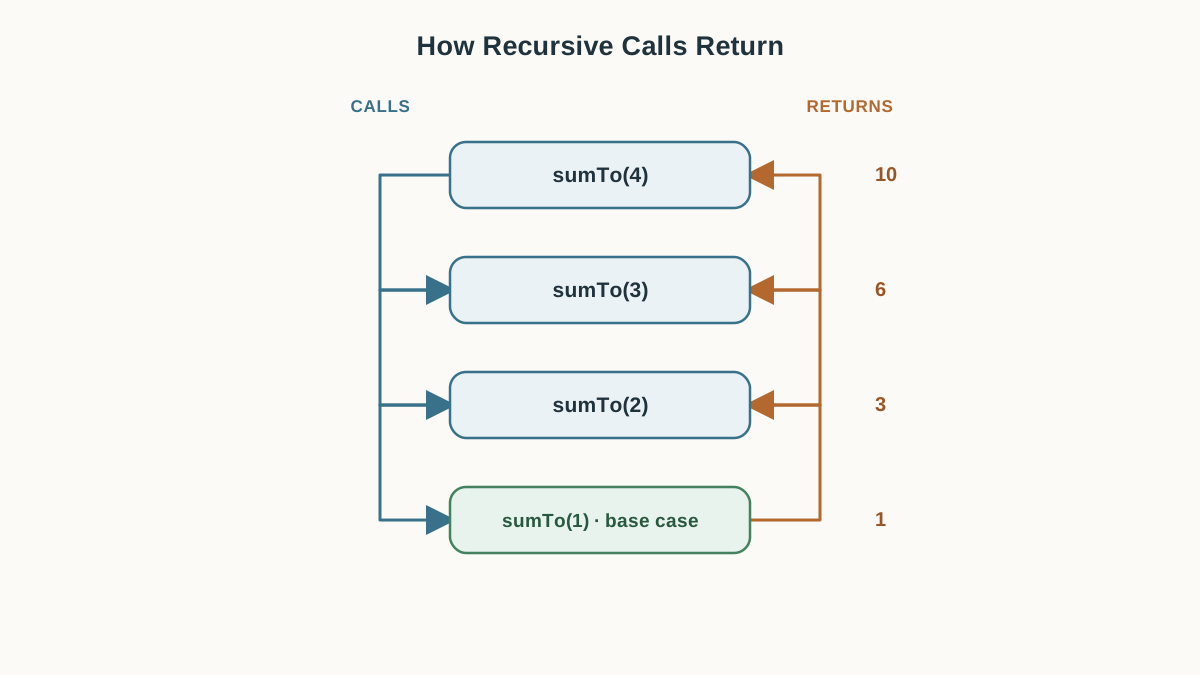
Now the real skill. Tracing means following the calls by hand, one at a time, until you can predict the output before running it.
Here is a small function that adds up all the numbers from 1 to n:
function sumTo(n) {
  if (n === 1) {
    return 1;
  }
  return n + sumTo(n - 1);
}

console.log(sumTo(4));
10
Why 10? Trace it. Write one line per call and mark which call is currently waiting.
The downward phase — each call checks its base case and prepares the next argument, but the addition itself is left pending:
sumTo(4)checks4 === 1→ false. It needs4 + sumTo(3). Waiting.sumTo(3)checks3 === 1→ false. It needs3 + sumTo(2). Waiting.sumTo(2)checks2 === 1→ false. It needs2 + sumTo(1). Waiting.sumTo(1)checks1 === 1→ true. It returns1immediately. No waiting.
The upward phase — the base case returns first, then each paused call finishes:
| Call | Waiting for | Receives | Returns |
|---|---|---|---|
sumTo(1) | nothing | — | 1 |
sumTo(2) | sumTo(1) | 1 | 2 + 1 = 3 |
sumTo(3) | sumTo(2) | 3 | 3 + 3 = 6 |
sumTo(4) | sumTo(3) | 6 | 4 + 6 = 10 |
The answer is assembled on the way back up, not on the way down. This is the part beginners miss. Each call on the way down still does real work: it checks the base case and computes the next argument. What gets deferred is the addition that sits around the recursive call. That arithmetic happens in reverse order as the values return.
Tip: When tracing on paper, draw an arrow down for each new call and an arrow back up for each return value. If you can fill in the "Returns" column without running the code, you understand the function.
Knowledge check
Check your understanding
Answer this question before you continue.
Recursion vs a Loop: Which One Should You Write?
For flat, countable work — summing numbers, walking an array, counting down — a for or while loop is usually shorter, faster, and easier to debug. I reach for a loop by default.
Recursion earns its place when the data itself is nested: folders inside folders, comments inside comments, DOM nodes inside DOM nodes. The shape of the data decides the tool.
| Loop | Recursion | |
|---|---|---|
| Use this when | The data is flat: a list, a range, a count | The data is nested or tree-shaped |
| Readability | Shorter for simple repetition | Clearer when the structure repeats itself |
| Memory cost | One set of variables, reused | One paused call per level of depth |
| Beginner mistake | Off-by-one in the condition | Missing or unreachable base case |
The honest tradeoff: every recursive call uses stack space, so deep recursion can crash where a loop would keep going. If you are processing a list of ten thousand items, a loop is the safer choice. If you are walking a tree that is five levels deep, recursion is the readable choice.
A simple rule: choose the loop when the shape of the data is flat; choose recursion when the shape of the data is recursive.
Where Recursion Shows Up in Real Code
You will meet recursion again in practical work, usually without anyone calling it that.
Walking a nested tree structure is the classic case. A file system is folders containing folders containing files. A comment thread is comments containing replies containing replies. A DOM node is an element containing child elements. In each case, the data has unknown depth, and a recursive function handles that naturally.
Processing nested data of unknown depth is the second case. If you receive a JSON object where values can themselves be objects, a recursive function can visit every level without you knowing the depth in advance.
Later, when you meet searching and sorting algorithms, you will find that the recursive versions are often the readable ones. That is a topic for another day — for now, the goal is recognizing the shape.
Practice: Trace It, Then Rewrite It
Two short tasks. Do them on paper before you run anything.
Task 1: Trace this function.
function mystery(n) {
  if (n === 0) {
    return 0;
  }
  return n + mystery(n - 1);
}

console.log(mystery(3));
Write out the call order and the value each call returns. Then run it and compare.
Hint: Build a table like the one in the tracing section. The downward phase has four calls; the upward phase has four returns.
What a correct trace looks like: mystery(3) waits for mystery(2), which waits for mystery(1), which waits for mystery(0). The base case returns 0. Then mystery(1) returns 1, mystery(2) returns 3, and mystery(3) returns 6.
Task 2: Rewrite it as a loop.
Take the sumTo function from earlier and rewrite it using a for loop. Then compare the two versions side by side.
Hint: Start with a variable set to 0, loop from 1 to n, and add each number.
What to notice: The loop version is shorter and does not pause anything. The recursive version mirrors the mathematical definition more directly. Neither is wrong — but for this flat, countable task, the loop is the version I would ship.
Optional extension: Take the broken countdown(n) from the base case section, add the missing - 1, and watch the stack overflow error disappear.
What to Carry Forward
When you meet a recursive function in the wild, do three things in order. Find the base case. Confirm the input shrinks toward it. Trace the calls on paper before trusting the output.
Recursion feels slippery for the first few attempts. That is not a sign you are bad at it — it is a sign that you are holding several paused calls in your head at once, which is genuinely new work. Tracing small examples is the normal way it clicks, and it clicks faster than you expect.
Your next practical step: take an array of objects — say, a list of categories where each category can contain subcategories — and write a function that visits every item at every level. That is where recursion stops being an exercise and starts being the obvious tool.
Knowledge check
Final check
Finish the article by checking the ideas you just learned.
References
Want a more structured JavaScript path?
Use the JavaScript for AI Applications Starter Pack to turn individual tutorials into a focused path from language fundamentals to interactive AI applications.
JavaScript for AI Applications Starter Pack
Build the JavaScript foundation behind modern interactive applications. The JavaScript for AI Applications Starter Pack takes you from core language concepts through functions, browser events, forms, DOM updates, application state, debugging, and practical projects—so you can learn how interfaces take input, work with structured data, respond to users, and turn results into experiences people can actually use.
- 253-page illustrated PDF
- 12 guided JavaScript chapters
- Visual concept diagrams
- Self-assessment quizzes
- Bonus deep-dive sections
- DOM, events, forms & application state
- Browser projects, debugging & practical workflows
Coming soon


