
JavaScript Object Methods and this: Use Data Inside a Method
You copy a method into a new variable, call it, and get undefined instead of the name you expected. Nothing in the object changed. Nothing in the function…

Key topics
You copy a method into a new variable, call it, and get undefined instead of the name you expected. Nothing in the object changed. Nothing in the function changed. Only the call site changed — and that is the whole story of this.
By the end of this article, you will be able to attach behavior to an object, read that object's own data from inside a method, and explain why extracting a method can quietly break it.
From Data Object to Object With Behavior
You already know two things. An object groups related data under named keys:
const user = {
  name: "Ada",
  age: 36
};
And a function is a reusable block you call with parentheses. Those two ideas combine more simply than they sound.
A method is just a property whose value is a function. Nothing exotic is happening. You are storing a function in a key instead of a string or a number.
There are two ways to write one:
const user = {
  name: "Ada",
  sayHi: function () {
    console.log("Hi there!");
  }
};
const user = {
  name: "Ada",
  sayHi() {
    console.log("Hi there!");
  }
};
The second form is called method shorthand. It does the same job with less noise, and in practice you will almost always see it in modern code. I recommend you use it from day one.
Calling a method uses dot notation plus parentheses:
user.sayHi();
Hi there!
The parentheses are what actually run the function. user.sayHi without them is just the function itself, sitting there unexecuted — a distinction that matters a lot later in this article.
This is not a niche trick. Browser objects, DOM elements, and library objects all expose behavior this way. array.push(), element.addEventListener(), and console.log() are all methods. Once you can write your own, those stop looking like magic.
Knowledge check
Check your understanding
Answer this question before you continue.
Why this Exists: The Object Before the Dot
Here is the problem this solves. Suppose your method wants to greet the user by name. The naive version hard-codes the variable:
const user = {
  name: "Ada",
  sayHi() {
    console.log("Hi, " + user.name);
  }
};

user.sayHi();
Hi, Ada
That works — until the object moves. Reassign user to something else, or copy the object into a new variable, and the method is now reading the wrong thing. The function is fine. The reference is stale.
this fixes that by pointing at the object used to call the method. The rule is short enough to memorize:
The rule: in
obj.method(),thisis the object to the left of the dot at call time.
Let me prove it. Here is one function assigned to two different objects:
function sayHi() {
  console.log("Hi, " + this.name);
}

const user = { name: "Ada", sayHi: sayHi };
const admin = { name: "Grace", sayHi: sayHi };

user.sayHi();
admin.sayHi();
Hi, Ada
Hi, Grace
Same function. Two different outputs. The only thing that changed was which object sat before the dot.
Two things are worth noticing here. First, this is not a variable — it is a keyword, and you cannot assign to it. Its value is set by the call, not by where the function was written. Second, this is exactly why the hard-coded version is fragile: this follows the caller, while user.name follows a name that might not mean what you think anymore.
There are other call styles — standalone calls, event handlers, strict mode — that set this differently. We will stay focused on methods here; those other cases are worth learning later, once this one is solid.
Knowledge check
Check your understanding
Answer this question before you continue.
Build a Small Object That Uses Its Own Data
Let's make something slightly more useful: a shopping cart that can summarize itself.
const cart = {
  owner: "Ada",
  items: ["book", "pen"],
  summary() {
    return this.owner + " has " + this.items.length + " item(s)";
  },
  addItem(item) {
    this.items.push(item);
    return this.summary();
  }
};

console.log(cart.summary());
console.log(cart.addItem("notebook"));
Ada has 2 item(s)
Ada has 3 item(s)
Walk through the first call. cart.summary() puts cart before the dot, so inside the method this is cart. this.owner resolves to "Ada". this.items.length resolves to 2. Both reads point at the same object that called the method.
Now look at addItem. It takes an argument like any function, mutates this.items with push, and then calls this.summary(). That inner call still has cart before the dot, so this is still cart. Methods can call sibling methods through this without any extra ceremony.
Tip: Keep your first object small — one or two data properties and two or three methods. A cart that summarizes itself teaches the mechanism better than a half-built storefront.
Knowledge check
Check your understanding
Answer this question before you continue.
The Extraction Trap: When this Stops Pointing at Your Object
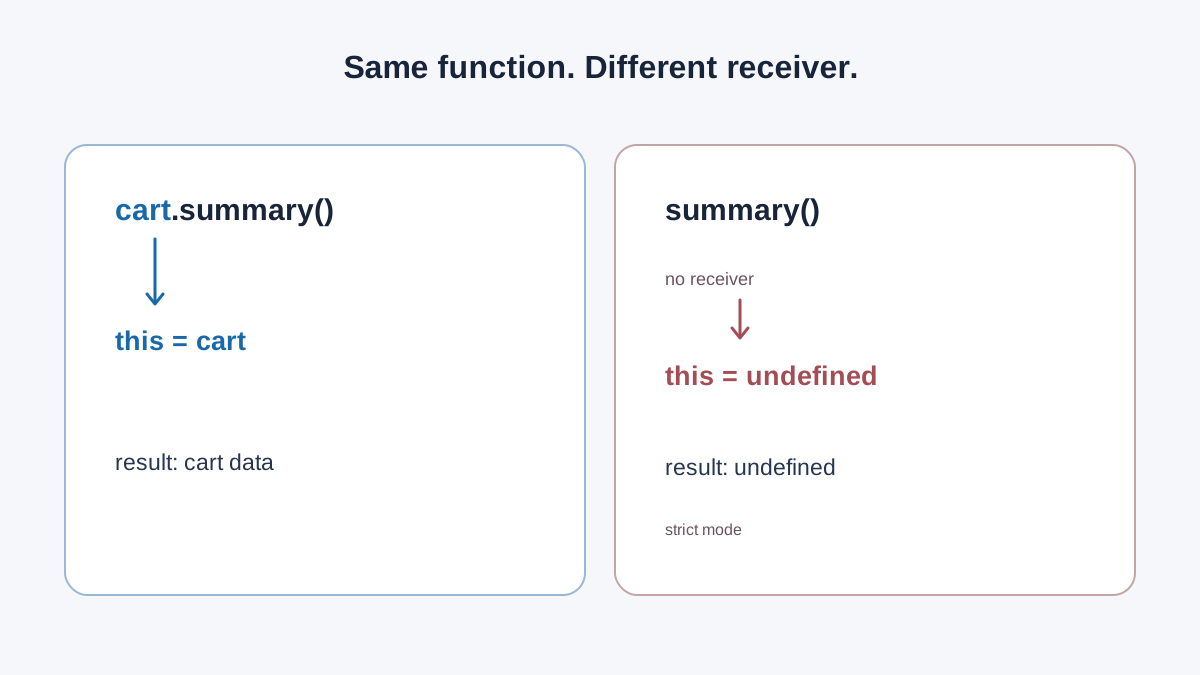
This is the part that trips up nearly every beginner, and it is worth slowing down for.
const summary = cart.summary;
console.log(summary());
undefined has undefined item(s)
The function ran. The body is identical. So why did it fall apart?
Because this is decided by the call site, not the definition. cart.summary() has an object before the dot, so this is cart. summary() has nothing before the dot, so this is no longer your cart — and this.owner reads a property that does not exist there.
Depending on what the method touches, you may see undefined values or a TypeError instead. Both are the same underlying problem: the method got detached from its object.
This happens in more places than you would expect. Passing a method as a callback, storing it in a variable, or pulling it out with destructuring all separate the function from the object it was meant to serve.
Common mistake: When a method prints
undefined, beginners rewrite the method body. The body is usually fine. Check the call site first — is there an object before the dot?
The good news is that JavaScript gives you tools to reattach this on purpose: bind, call, and apply. Those deserve their own lesson, and we will get to them. For now, just know they exist and that they solve exactly this problem.
Knowledge check
Check your understanding
Answer this question before you continue.
When to Use a Method and When to Keep It a Plain Function
Once methods click, there is a temptation to wrap everything in an object. Resist it.
| Use a method when… | Use a plain function when… |
|---|---|
| The behavior belongs to one kind of thing and needs that thing's data | The logic is general and takes its inputs as arguments |
| A cart totals itself, a user formats its own name | formatPrice(amount) does not need to belong to anything |
The method reads this | The function never touches this |
Two warning signs are worth remembering. If a method never reads this, it probably should not be a method. And if you find yourself passing the object in as the first argument, you may actually want a method instead.
Note: This is a decision rule, not a philosophy of object-oriented design. Pick the version that makes the data flow obvious, and move on.
Practice: Give an Object a Voice
Try this in your browser console or a small script file.
Step 1. Create a player object with name and score, then add a describe() method that returns a sentence using both values through this. Log the result.
Step 2. Copy describe into a new variable and call it. Watch what happens. Write down, in your own words, what this was during each call.
Step 3. Fix it by calling through the object again, and explain in one sentence why that works.
Hint: Check the dot. If there is no object before the dot, there is no object for
this.
Extension. Add a levelUp() method that increases this.score and returns the new value. Then call it twice and log the score.
What to Carry Forward
When this surprises you, read the call site, not the definition. That single habit will save you more debugging time than any memorized rule.
Your next step is learning how bind, call, and apply let you set this deliberately — and how arrow functions behave differently, which matters before you start passing methods around as callbacks in real projects.
Knowledge check
Final check
Finish the article by checking the ideas you just learned.
References
Want a more structured JavaScript path?
Use the JavaScript for AI Applications Starter Pack to turn individual tutorials into a focused path from language fundamentals to interactive AI applications.
JavaScript for AI Applications Starter Pack
Build the JavaScript foundation behind modern interactive applications. The JavaScript for AI Applications Starter Pack takes you from core language concepts through functions, browser events, forms, DOM updates, application state, debugging, and practical projects—so you can learn how interfaces take input, work with structured data, respond to users, and turn results into experiences people can actually use.
- 253-page illustrated PDF
- 12 guided JavaScript chapters
- Visual concept diagrams
- Self-assessment quizzes
- Bonus deep-dive sections
- DOM, events, forms & application state
- Browser projects, debugging & practical workflows
Coming soon


