
JavaScript Scope: Global, Function, and Block Scope
You write a variable inside a function, log it, and it prints perfectly. You move that same console.log two lines down, outside the function, and suddenly…

Key topics
You write a variable inside a function, log it, and it prints perfectly. You move that same console.log two lines down, outside the function, and suddenly JavaScript throws a ReferenceError. Nothing about the value changed. What changed is where you asked for it.
That is scope in JavaScript: the set of names you can actually see at a specific line of code. Not a property of the value. A property of the position.
Once you can answer one question reliably — at this line, which names can I see? — most of the confusing errors beginners hit stop being mysterious. So let's build that rule instead of memorizing a list.
Why a Variable Works Here but Not There
Here is the smallest version of the problem:
function greet() {
  const message = "Hello from inside";
  console.log(message);
}

greet();
console.log(message);
Hello from inside
ReferenceError: message is not defined
The first log works because it runs inside greet, where message was declared. The second log runs outside greet, in the global code, where message simply does not exist. JavaScript is not being difficult — it is answering the only question it knows how to answer: is this name visible from here?
You already know how to declare variables and call functions. Scope is the missing piece that explains where those declarations live and how far their visibility reaches.
Knowledge check
Check your understanding
Answer this question before you continue.
The Three Places a Declaration Can Live
Before we drill into each one, here is the map. Every declaration you write lands in one of three scopes:
- Global scope — declared outside any function or block. Visible everywhere in the script.
- Function scope — declared inside a function. Visible only within that function.
- Block scope — declared inside curly braces with
letorconst. Visible only inside those braces.
Think of nested rooms. The global scope is the whole house. A function is a room inside it. A block is a closet inside that room. You can always look outward from where you stand, but you cannot see into a closet you are not standing in.
There is also module scope, which matters once you start using import and export. We are leaving it aside here so the three core scopes stay clear.
Global Scope: Visible Everywhere, and That Is the Risk
A declaration outside any function or block is global. Every other part of the script can read it.
const appName = "Notes";

function showAppName() {
  console.log(appName);
}

showAppName();
Notes
That convenience is also the danger. In a browser script, global var and function declarations become properties of the global object, which means two separate scripts on the same page can collide on the same name. The second one silently overwrites the first. No error. Just a value that quietly changed.
My rule is simple: keep globals few and intentional. If a function needs a value, pass it in as an argument rather than reaching out to a global. That keeps the dependency visible in the function signature instead of hidden somewhere above it.
Knowledge check
Check your understanding
Answer this question before you continue.
Function Scope: What Happens Inside Stays Inside
Every function creates its own scope. Variables declared inside it — with var, let, or const — are local to that function.
Parameters count too. A parameter behaves like a local variable, which surprises a lot of beginners:
function double(value) {
  const result = value * 2;
  console.log(result);
}

double(5);
console.log(result);
10
ReferenceError: result is not defined
value and result both exist only while double is running. Once the function returns, they are not reachable from the code outside it. And because each function has its own scope, two functions can both use a variable named result without ever stepping on each other.
One nuance worth filing away for later: a function's local names are not visible from outside, but an inner function can still hold onto them after the outer function returns. That is a closure, and it is the next topic — not something you need to untangle yet.
Knowledge check
Check your understanding
Answer this question before you continue.
Block Scope: Curly Braces as a Boundary
A block is any pair of curly braces: an if, an else, a for, a while, or even a bare { }. Variables declared with let and const inside a block are visible only inside that block.
Here is where var breaks the pattern:
if (true) {
  var escaped = "I leak out";
  let contained = "I stay in";
}

console.log(escaped);
console.log(contained);
I leak out
ReferenceError: contained is not defined
Read that output twice. var ignored the block and attached itself to the surrounding function or global scope. let respected the braces and stayed inside. This single difference is the most surprising behavior beginners run into, and it is the reason modern code defaults to let and const.
Knowledge check
Check your understanding
Answer this question before you continue.
How let, const, and var Differ in Visibility
The cleanest way to think about this is the nearest enclosing boundary rule. let and const stop at the nearest block. var skips blocks and stops at the nearest function (or the global scope if there is no function). A function body is itself a block, which is why let and const declared at the top of a function behave like function-scoped variables there.
| Keyword | Nearest boundary it respects | Reassignable? | Read before declaration? |
|---|---|---|---|
const | Nearest block | No | ReferenceError |
let | Nearest block | Yes | ReferenceError |
var | Nearest function (or global) | Yes | undefined |
That last column is the temporal dead zone: the window between entering a block and reaching the let or const declaration line. Reading inside that window throws a ReferenceError. A var read before its declaration returns undefined instead — quieter, but usually not what you wanted.
My default: reach for const, switch to let when the binding genuinely needs to change, and treat var as legacy code you will read but rarely write.
The Scope Chain: How JavaScript Finds a Name
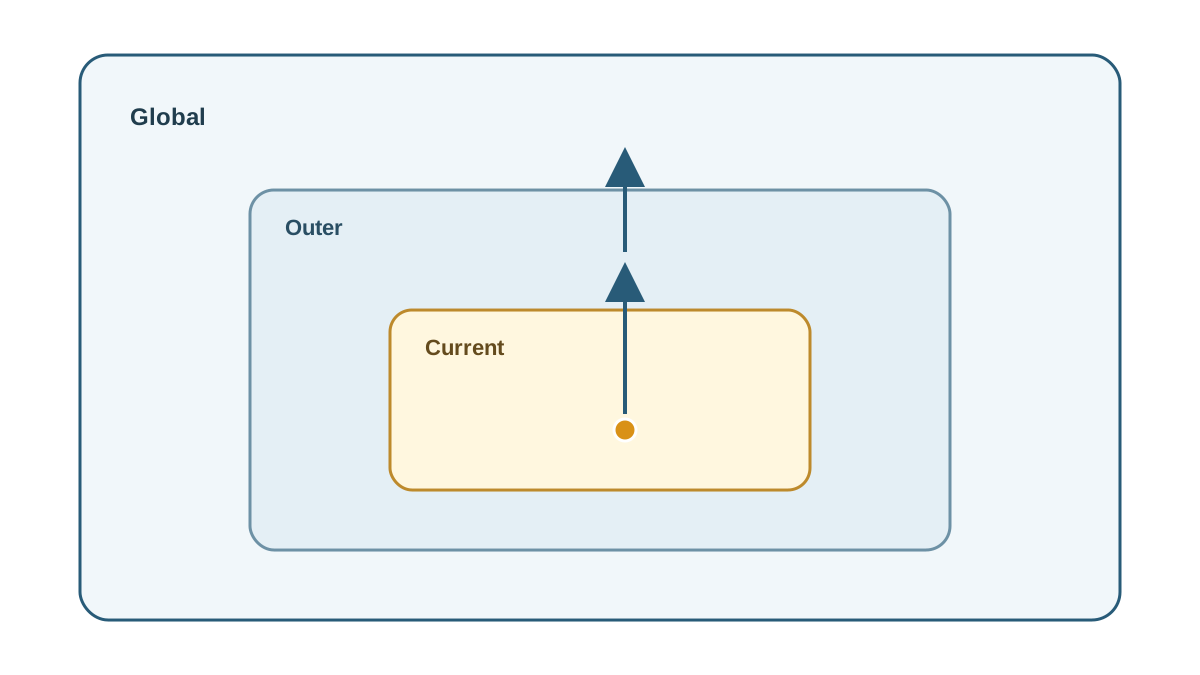
When you use a name, JavaScript searches the current scope first. If it does not find it, it walks outward through the enclosing scopes until it reaches the global scope. That search path is the scope chain, and it is decided by where the code is written — not where it is called. That is what people mean by lexical scope.
const greeting = "Hello";

function outer() {
  const name = "Sam";

  function inner() {
    console.log(`${greeting}, ${name}`);
  }

  inner();
}

outer();
Hello, Sam
inner has no greeting or name of its own, so it walks outward and finds both. If inner declared its own name, that inner declaration would shadow the outer one — the closer name wins.
Common Beginner Mistakes to Expect
- Reading
letorconstbefore its declaration. You get aReferenceError, notundefined. Fix: move the declaration above the first use. - Assuming
varinside anifblock is contained by it. It is not. Fix: useletorconst. - Forgetting that a parameter shadows an outer variable. A parameter named
namehides any outernameinside that function. Fix: rename one of them. - Assigning to an undeclared name.
total = 5with no declaration creates a global. Fix: always declare withlet,const, orvar.
Where Scope Shows Up in Real Code
Loop counters are the everyday case. Using let in a for loop gives each iteration its own binding:
for (let i = 0; i < 3; i++) {
  console.log(`Iteration ${i}`);
}
Iteration 0
Iteration 1
Iteration 2
The same pattern shows up in event handlers, where a variable declared in an outer function stays reachable inside a callback, and in keeping helper variables out of the global namespace so two scripts on one page do not collide.
Practice: Trace the Scope Before You Run It
Write down your prediction before running each snippet. That is the whole drill.
const a = 1;
function one() {
  const b = 2;
  console.log(a, b);
}
one();
console.log(b);
function two(x) {
  let y = x + 1;
  return y;
}
console.log(two(4));
console.log(y);
if (true) {
  var leaked = "var";
  let kept = "let";
}
console.log(leaked);
console.log(kept);
Run each one and compare. A wrong prediction is the useful signal — it points at the exact rule you have not internalized yet.
When you can trace these without guessing, you are ready for closures, which are simply the scope chain doing its job after the outer function has already returned.
Knowledge check
Final check
Finish the article by checking the ideas you just learned.
References
Want a more structured JavaScript path?
Use the JavaScript for AI Applications Starter Pack to turn individual tutorials into a focused path from language fundamentals to interactive AI applications.
JavaScript for AI Applications Starter Pack
Build the JavaScript foundation behind modern interactive applications. The JavaScript for AI Applications Starter Pack takes you from core language concepts through functions, browser events, forms, DOM updates, application state, debugging, and practical projects—so you can learn how interfaces take input, work with structured data, respond to users, and turn results into experiences people can actually use.
- 253-page illustrated PDF
- 12 guided JavaScript chapters
- Visual concept diagrams
- Self-assessment quizzes
- Bonus deep-dive sections
- DOM, events, forms & application state
- Browser projects, debugging & practical workflows
Coming soon


