
JavaScript Destructuring and Spread Syntax for Arrays and Objects
Three lines, three property reads, three variables. It works, and it is honest code. But then you see a modern codebase do the same job in one line, with…

Key topics
You have probably written this before:
const user = { name: "Ada", age: 36, city: "London" };

const name = user.name;
const age = user.age;
const city = user.city;
Three lines, three property reads, three variables. It works, and it is honest code. But then you see a modern codebase do the same job in one line, with curly braces sitting on the left side of an equals sign, and it looks like a typo that somehow compiles.
That single line is JavaScript destructuring, and the three dots you keep seeing nearby are not an ellipsis meaning "and so on." They are an instruction: copy this, or collect the rest.
By the end of this tutorial, you will be able to read that modern code, write it yourself, and — most importantly — predict whether it copies your data or quietly shares it.
Why Destructuring Exists
Destructuring is the reverse of building an array or object literal. When you write const user = { name: "Ada" }, you pack a value into a shape. Destructuring unpacks it back out.
You already know how to read user.name and items[0]. Destructuring is just a shorter way to bind those same values to names. The left side mirrors the shape of the right side.
const user = { name: "Ada", age: 36, city: "London" };

const { name, age, city } = user;

console.log(name, age, city);
Ada 36 London
Notice what happened. The braces on the left are not a block and not an object literal. They are a pattern that says: pull the name, age, and city properties out of user and create variables with those names.
That is the whole mental model. Everything else in this article is a variation on it.
Array Destructuring Basics
Arrays are ordered, so array destructuring is positional. The first name gets index 0, the second gets index 1, and so on.
const scores = [90, 75, 88];

const [first, second, third] = scores;

console.log(first, second, third);
90 75 88
You can skip a value by leaving an empty slot between commas:
const scores = [90, 75, 88];

const [first, , third] = scores;

console.log(first, third);
90 88
The double comma is not a typo. It means "skip index 1."
Default values
If an array is shorter than your pattern, the missing variables become undefined. You can supply a fallback:
const [a = 1, b = 2] = [10];

console.log(a, b);
10 2
Here is the rule that trips people up: a default only applies when the value is undefined. If the value is null, 0, or an empty string, the default is ignored.
const [x = 5] = [null];

console.log(x);
null
Common mistake: Expecting
= 5to rescue anullvalue. It will not. Defaults are for missing values, not falsy ones.
Array destructuring pairs naturally with functions that return arrays, like split():
const [firstName, lastName] = "Ada Lovelace".split(" ");

console.log(firstName, lastName);
Ada Lovelace
Knowledge check
Check your understanding
Answer this question before you continue.
Object Destructuring Basics
Objects are keyed, so order does not matter. The property name is the lookup key.
const user = { name: "Ada", age: 36 };

const { age, name } = user;

console.log(name, age);
Ada 36
Swapping the order on the left changes nothing. You are naming keys, not positions.
Renaming
Sometimes the property name collides with an existing variable. Use a colon to rename:
const user = { name: "Ada" };

const { name: userName } = user;

console.log(userName);
Ada
Read it as: "take the name property, and call the variable userName." The left side of the colon is the source key; the right side is the new variable.
Default values
The same undefined-only rule applies:
const user = { name: "Ada" };

const { name, role = "guest" } = user;

console.log(name, role);
Ada guest
Why the parentheses matter
This works:
const { a } = obj;
This does not:
{ a } = obj; // SyntaxError
The problem is that a line starting with { looks like a block statement, not a destructuring pattern. Wrap it in parentheses to tell JavaScript it is an expression:
let a;
({ a } = obj);
Tip: If you are declaring with
constorlet, you rarely hit this. It shows up when you reassign into variables that already exist.
Nested Destructuring Without the Headache
You can mirror nested shapes:
const data = { user: { name: "Ada", age: 36 } };

const { user: { name } } = data;

console.log(name);
Ada
Notice that user is not a variable here. It is a path. If you want both the parent and the child, name them both:
const { user, user: { name } } = data;

console.log(user, name);
{ name: 'Ada', age: 36 } Ada
The failure mode is worth knowing. If the parent is undefined, destructuring into it throws:
const data = {};

const { user: { name } } = data;
TypeError: Cannot destructure property 'name' of 'data.user' as it is undefined.
You can guard it with a default on the parent:
const data = {};

const { user: { name } = {} } = data;

console.log(name);
undefined
Keep nested destructuring for cases where you genuinely need it. Deeply nested patterns hide which level failed, and that makes debugging slower.
Knowledge check
Check your understanding
Answer this question before you continue.
Rest Syntax: Collecting What Is Left
The three dots inside a destructuring pattern are rest syntax. They collect whatever is left over into a new array or object.
const [first, ...others] = [1, 2, 3, 4];

console.log(first, others);
1 [ 2, 3, 4 ]
For objects, rest collects the remaining own enumerable properties:
const record = { id: 7, name: "Ada", role: "admin" };

const { id, ...rest } = record;

console.log(id, rest);
7 { name: 'Ada', role: 'admin' }
This is genuinely useful when you want to strip a field before passing an object onward — for example, removing an id before sending a payload somewhere else.
One hard rule: rest must be last. Anything after it is a syntax error.
const [...rest, last] = [1, 2, 3]; // SyntaxError
Knowledge check
Check your understanding
Answer this question before you continue.
Spread Syntax: Copying and Combining
The same three dots, used outside a pattern, are spread syntax. Rest collects into a pattern; spread expands into a new literal. Same symbol, opposite job.
Copy an array:
const original = [1, 2, 3];
const copy = [...original];

copy.push(4);

console.log(original, copy);
[ 1, 2, 3 ] [ 1, 2, 3, 4 ]
Combine arrays:
const a = [1, 2];
const b = [3, 4];

console.log([...a, ...b]);
[ 1, 2, 3, 4 ]
Merge objects, with the last value winning on duplicate keys:
const defaults = { theme: "light", fontSize: 14 };
const userPrefs = { theme: "dark" };

const settings = { ...defaults, ...userPrefs };

console.log(settings);
{ theme: 'dark', fontSize: 14 }
Override a single property without mutating the original:
const settings = { ...defaults, theme: "dark" };

console.log(settings, defaults);
{ theme: 'dark', fontSize: 14 } { theme: 'light', fontSize: 14 }
Here is a quick way to keep rest and spread straight:
| Feature | Where it appears | Job | Result |
|---|---|---|---|
| Rest | Inside a pattern, left of = | Collect leftovers | New array or object |
| Spread | Inside a literal or call, right of = | Expand values out | New array or object |
If the dots are pulling values into a name, it is rest. If they are pushing values into a new structure, it is spread.
Shallow Copy vs Shared Reference
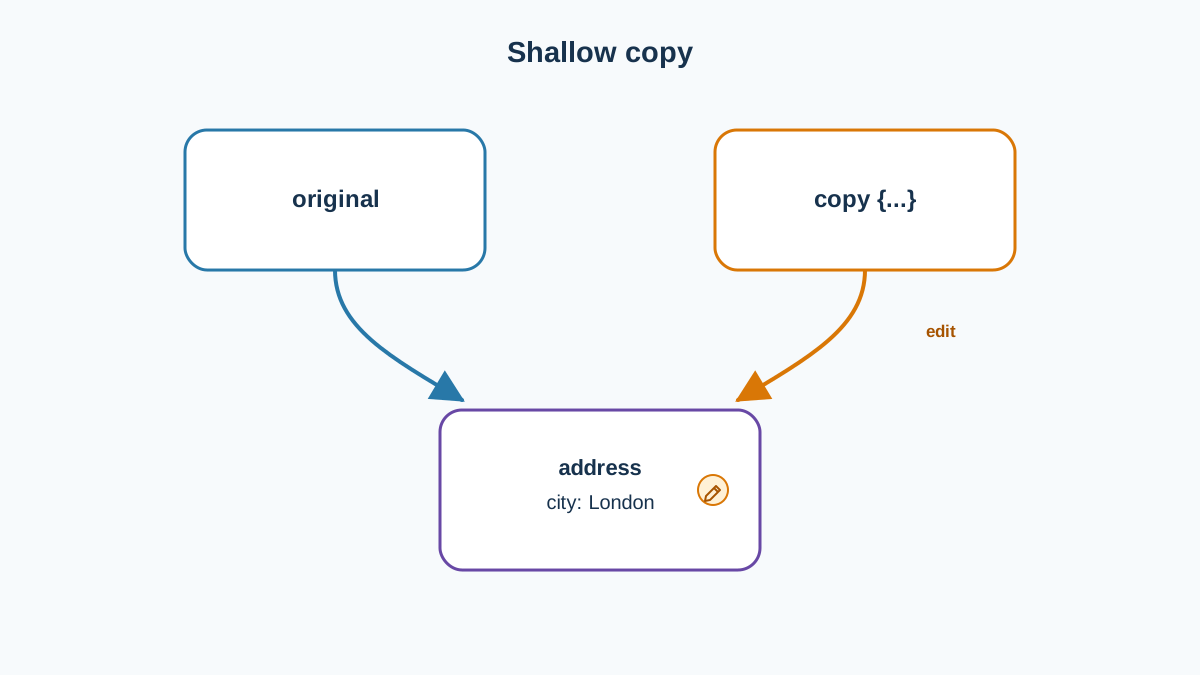
This is the part that matters most, so read it twice.
Spread and rest create a new outer array or object. But nested objects and arrays inside are still shared references. The copy holds the same reference values, not deep clones.
const original = { name: "Ada", address: { city: "London" } };
const copy = { ...original };

copy.address.city = "Paris";

console.log(original.address.city);
Paris
The original changed. That surprises almost everyone the first time. The outer object is new, but address inside both objects points at the same nested object. Change it through one name, and you see it through the other.
Warning:
{ ...obj }is a shallow copy JavaScript pattern. It is not a deep clone.
Here is the decision rule I use:
- If you only add, remove, or replace top-level properties, a shallow copy is enough.
- If you plan to mutate nested data, you need a deep copy. JavaScript provides
structuredClone()for that.
const original = { name: "Ada", address: { city: "London" } };
const deep = structuredClone(original);

deep.address.city = "Paris";

console.log(original.address.city, deep.address.city);
London Paris
Now the two are independent. Use structuredClone() when nested mutation is on the table, and keep shallow spread for the everyday case.
Knowledge check
Check your understanding
Answer this question before you continue.
Common Beginner Mistakes
- Confusing rest and spread. Both use
.... Check whether the dots are inside a pattern (rest) or inside a literal (spread). - Putting rest in the middle.
[a, ...rest, b]is a syntax error. Rest must be last. - Expecting defaults to catch
null. Defaults only fire onundefined. - Assuming
{ ...obj }is a deep copy. It is not. Nested values are shared. - Forgetting parentheses when reassigning.
({ a } = obj);needs the wrapping parens;const { a } = obj;does not.
When to Use This and When Not To
Destructuring is a readability tool, not a rule. Use it when you need two or more values from the same structure, or when a function takes an options object:
function createUser({ name, role = "guest" }) {
  return { name, role };
}

console.log(createUser({ name: "Ada" }));
{ name: 'Ada', role: 'guest' }
Skip it when you only need one property. user.name is clearer than a destructuring line that exists to pull a single value. Avoid deeply nested patterns that hide which level failed. And be deliberate about spread: it is excellent for merging configuration, handling API responses, and building new objects — but it is not a deep clone.
You will see these patterns constantly in real code: function parameters, API response handling, and configuration merging. Recognizing them is half the battle.
Practice: Predict the Output
Before running each task, write down what you expect. Then run it and compare. The gap between your prediction and the output is where the learning happens.
Task 1 — Array with a skip and a default
const [a, , c = 99] = [1, 2];
console.log(a, c);
What are a and c?
Task 2 — Rename and default an object property
const { title: heading = "Untitled" } = { title: "Home" };
console.log(heading);
What prints, and why is the default not used?
Task 3 — Rest to split an object
const { id, ...payload } = { id: 1, name: "Ada", role: "admin" };
console.log(id, payload);
What is inside payload?
Task 4 — Shallow copy surprise
const original = { tags: ["js", "web"] };
const copy = { ...original };
copy.tags.push("beginner");
console.log(original.tags);
Why does the original change? What would you use instead if you needed independence?
Run each one. Compare against your prediction. If a result surprised you, that is the exact spot to revisit before moving on.
Where to Go Next
Destructuring is for pulling values out. Rest is for collecting what is left. Spread is for building something new. All three copy only one level deep.
The fastest way to make this stick is to use it in real code this week. Start with a function parameter list — replace function createUser(options) with function createUser({ name, role = "guest" }) and notice how much clearer the call site becomes. Then try it when handling a small object of settings or an API response.
Once these patterns feel natural, the next practical step is pairing them with array methods like map, filter, and reduce, where destructuring inside callbacks becomes a daily habit.
Knowledge check
Final check
Finish the article by checking the ideas you just learned.
References
Want a more structured JavaScript path?
Use the JavaScript for AI Applications Starter Pack to turn individual tutorials into a focused path from language fundamentals to interactive AI applications.
JavaScript for AI Applications Starter Pack
Build the JavaScript foundation behind modern interactive applications. The JavaScript for AI Applications Starter Pack takes you from core language concepts through functions, browser events, forms, DOM updates, application state, debugging, and practical projects—so you can learn how interfaces take input, work with structured data, respond to users, and turn results into experiences people can actually use.
- 253-page illustrated PDF
- 12 guided JavaScript chapters
- Visual concept diagrams
- Self-assessment quizzes
- Bonus deep-dive sections
- DOM, events, forms & application state
- Browser projects, debugging & practical workflows
Coming soon


