
Loops: for and while
Five console.log statements will print five numbers. Fifty will print fifty. Five hundred will print five hundred—if you have the patience to write them…

Key topics
Five console.log statements will print five numbers. Fifty will print fifty. Five hundred will print five hundred—if you have the patience to write them all.
console.log(1);
console.log(2);
console.log(3);
console.log(4);
console.log(5);
That approach works, but it does not scale. The moment your task grows from 5 numbers to 500, copying and pasting stops being "easy" and starts being a typo factory. This is the problem that JavaScript loops solve: you write the instruction once, and the computer handles the repetition.
A loop tells the computer: do this action, then check whether you should do it again. Each single pass through the loop is called an iteration. Think of it like a lap around a track—one lap is one iteration, and the loop keeps sending you around until some condition tells it to stop.
Here is a tiny example you can run right now. It prints the numbers 1 through 5 using a for loop:
for (let i = 1; i <= 5; i++) {
  console.log(i);
}
Expected output:
1
2
3
4
5
That is the whole idea. One small block of code did the work of five separate lines. Change 5 to 500, and the same loop prints 500 numbers without you writing another line.
If you have already learned about if/else statements, you have seen comparison operators like < and <=. Loops use those same comparisons to decide when to keep going and when to stop.
The for loop: counter logic in one place
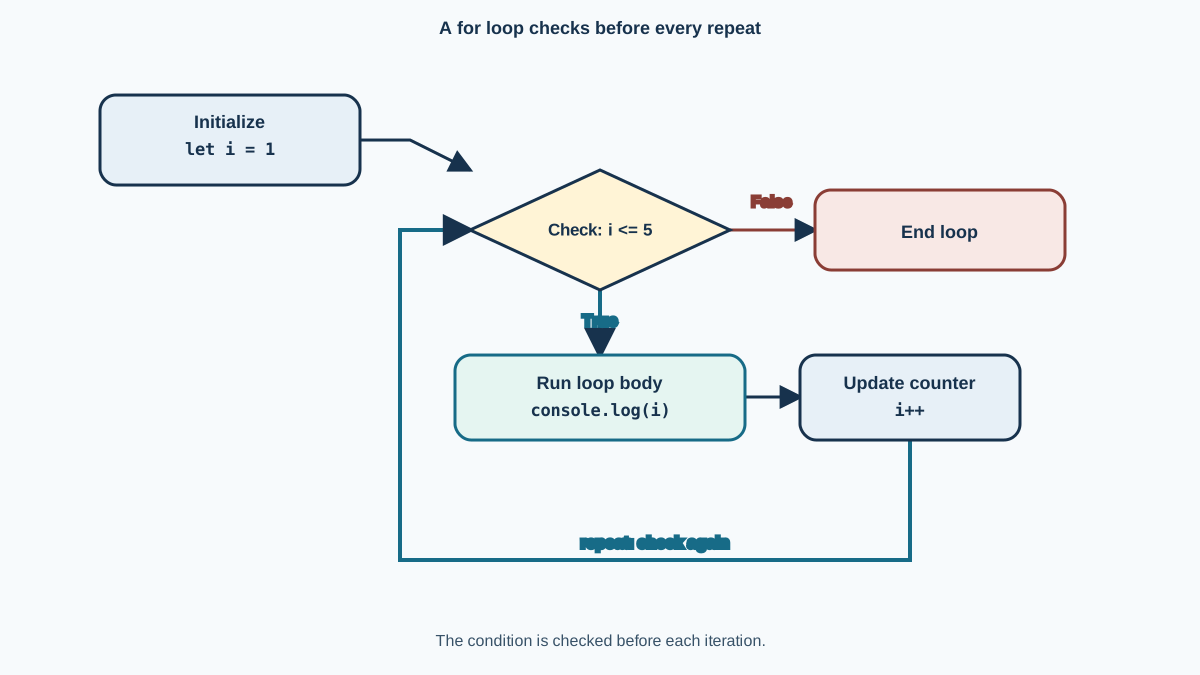
The for loop looks intimidating at first, but it is really three small jobs packed into one line. Let us break down its anatomy:
for (let i = 1; i <= 5; i++) {
  console.log(i);
}
There are three parts inside the parentheses, separated by semicolons:
- The starting point:
let i = 1— This creates a counter variable and gives it a starting value. Think of it as setting your counter to 1 before you begin. - The checkpoint:
i <= 5— This is the condition that keeps the loop running. Before each iteration, JavaScript checks this condition. If it istrue, the loop body runs. If it isfalse, the loop stops. - The step forward:
i++— This updates the counter after each iteration. The++operator means "add 1 to this variable." It is what moves your counter forward so you do not get stuck.
Here is what happens on each iteration, step by step:
- Iteration 1:
iis 1. Check: is 1 <= 5? Yes. Run the body, printing1. Theni++makesibecome 2. - Iteration 2:
iis 2. Check: is 2 <= 5? Yes. Print2. Thenibecomes 3. - Iteration 3:
iis 3. Check: is 3 <= 5? Yes. Print3. Thenibecomes 4. - Iteration 4:
iis 4. Check: is 4 <= 5? Yes. Print4. Thenibecomes 5. - Iteration 5:
iis 5. Check: is 5 <= 5? Yes. Print5. Thenibecomes 6. - Iteration 6:
iis 6. Check: is 6 <= 5? No. The loop stops.
One detail worth knowing: the variable i declared with let inside the loop parentheses only exists inside the loop. You cannot use it after the loop finishes. That is a feature, not a limitation—it keeps the loop's internal counter from cluttering up the rest of your code.
Note: The name
iis a tradition that stands for "index" or "iterator." You can name it anything you want—count,step,n—but you will seeieverywhere in JavaScript code, so it is worth getting comfortable with it.
Knowledge check
Check your understanding
Answer this question before you continue.
The while loop: repeat until a condition changes
The while loop takes a different approach. Instead of packing the counter setup and update into one line, it gives you just a condition and a body. The loop checks the condition first; if it is true, the body runs, and then the condition gets checked again.
Think of a while loop as a repeating if statement. An if statement checks a condition once and runs its body if the condition is true. A while loop does the same thing—but after the body finishes, it checks the condition again, and again, until the condition finally becomes false.
Here is a while loop that prints the same numbers 1 through 5:
let i = 1;

while (i <= 5) {
  console.log(i);
  i++;
}
Expected output:
1
2
3
4
5
Notice what is different from the for loop. The counter variable i is declared before the loop. The condition i <= 5 sits in the parentheses after while. And the update i++ lives inside the loop body, at the end.
Because the condition is checked before the body runs, a while loop with a false condition never runs at all:
let i = 10;

while (i <= 5) {
  console.log(i);
  i++;
}
Expected output:
Nothing prints. The condition 10 <= 5 is false from the start, so JavaScript skips the body entirely.
Here is the same task written both ways so you can see they express the same repetition:
// for loop
for (let i = 1; i <= 5; i++) {
  console.log(i);
}

// while loop
let i = 1;
while (i <= 5) {
  console.log(i);
  i++;
}
Both produce the same output. The for loop keeps all the counter logic in one visible place. The while loop spreads it out but reads more like plain English: while this condition is true, keep doing this work.
Knowledge check
Check your understanding
Answer this question before you continue.
When a while loop earns its keep
The while loop becomes genuinely useful when the stopping condition depends on state that changes inside the loop—not on a counter you control from a tidy header.
Here is a small example. Imagine you have a queue of tasks represented as a number, and each pass through the loop removes one unit of work until the queue is empty:
let tasksRemaining = 3;

while (tasksRemaining > 0) {
  console.log("Processing task. Tasks left: " + tasksRemaining);
  tasksRemaining--;
}
Expected output:
Processing task. Tasks left: 3
Processing task. Tasks left: 2
Processing task. Tasks left: 1
The condition checks tasksRemaining > 0. The body changes tasksRemaining by decrementing it. When the value reaches 0, the condition becomes false and the loop stops.
This pattern matters because the loop does not care how many iterations will run. It cares about the state of tasksRemaining. You could start with 3 tasks or 300 tasks, and the same loop handles both. That is the real reason to reach for while: the stopping condition is tied to changing state, not to a counter you are stepping through a known range.
Knowledge check
Check your understanding
Answer this question before you continue.
for or while: which one should you use?
Beginners often wonder which loop to pick. Here is the practical rule I teach:
- Prefer a
forloop when your repetition fits a compact counter pattern: a starting value, a stopping test, and an update that all belong together in one header. - Prefer a
whileloop when the stopping condition depends on state that changes inside the body—and you cannot predict how many iterations will run.
for loop | while loop | |
|---|---|---|
| Use this when | Repetition fits a counter/range pattern | Stopping depends on changing state |
| What the condition checks | Whether the counter has reached its limit | Whether some state is still true |
| Where the counter lives | In the loop header, all in one place | You manage it yourself inside the body |
| Typical use case | Counting through a known range, like 1 to 100 | Processing until a value hits a boundary |
A real-world example of a for loop: you are building a countdown timer and need to display every second from 10 down to 1. You know the range in advance, and the counter logic fits neatly in the header.
A real-world example of a while loop: you are asking a user to enter a valid number, and you keep asking until they enter one. You do not know how many tries it will take, so you loop while the input is still invalid.
Tip: When you catch yourself writing a
whileloop that needs a counter variable you set up before the loop and update at the end of the body, ask whether aforloop would make the structure clearer. Both work—theforloop just makes the counter logic easier to see at a glance. And if you start with aforloop but find yourself changing the counter in complicated ways inside the body, that is a sign the repetition is really state-driven and awhileloop may fit better.
Knowledge check
Check your understanding
Answer this question before you continue.
The infinite loop: a mistake worth making once
Here is the mistake that nearly every JavaScript beginner makes at least once. Watch what happens when we forget to update the counter inside a while loop:
let i = 1;

while (i <= 5) {
  console.log(i);
  // i++ is missing!
}
The condition i <= 5 is true, so the body runs and prints 1. Then the loop checks the condition again. Is i still <= 5? Yes, because i never changed. So the body runs again, printing 1 again. And again. And again.
This is called an infinite loop, and it will run forever—or until your browser gives up. In practice, the page will freeze or crash because JavaScript is stuck in a loop it can never escape.
The same thing can happen with a for loop if you accidentally write a condition that never becomes false, but it is easier to do with while because the update step is not built into the syntax. The condition checks the value of i, and nothing inside the loop ever changes i. The loop has no way out.
The fix is simple: make sure something inside the loop changes the value that the condition checks.
let i = 1;

while (i <= 5) {
  console.log(i);
  i++; // Now i changes each iteration, so the loop can end.
}
If you do trigger an infinite loop in your browser console, do not panic. You can usually recover by refreshing the page. If the browser is completely frozen, you may need to close the tab. Then look at your loop and ask: what value is the condition checking, and where does that value change?
Common mistake: Forgetting to update the counter inside a
whileloop. The condition never becomes false, and the loop runs forever. This is a normal rite of passage—every programmer has frozen a browser this way. The fix is to make sure the value your condition checks actually changes inside the loop body.
Practice: make the loops yours
Reading about loops teaches you the pattern. Running them teaches you the feel. Try these two tasks in your browser console or a JavaScript file:
Task 1: Use a for loop to print the even numbers from 2 to 10.
Expected output:
2
4
6
8
10
Hint: you can start your counter at 2 and add 2 each iteration with i += 2, or you can loop through every number and use the modulo operator (%) to check for evenness.
Task 2: Use a while loop to count down from 5 to 1.
Expected output:
5
4
3
2
1
Hint: start your counter at 5 and make the condition check that it is still greater than or equal to 1. Remember to decrease the counter inside the body.
After you get each task working, make one small change and observe the effect. Change 2 to 3 in the first task. Change the starting number in the second. This habit—run it, inspect the output, change one thing, run it again—is how you build a real feel for what loops do.
Loops become genuinely powerful when you pair them with arrays, which let you store lists of data. Instead of printing numbers, you will loop through a list of names, products, or scores and do something with each item. That is the natural next step after you are comfortable with for and while.
For now, remember the decision rule: use for when the repetition fits a compact counter pattern, and use while when the stopping condition depends on state that changes inside the body. Run the practice tasks, break a loop or two on purpose, and watch what happens. That is how the mechanism becomes yours.
Knowledge check
Final check
Finish the article by checking the ideas you just learned.
References
Want a more structured JavaScript path?
Use the JavaScript for AI Applications Starter Pack to turn individual tutorials into a focused path from language fundamentals to interactive AI applications.
JavaScript for AI Applications Starter Pack
Build the JavaScript foundation behind modern interactive applications. The JavaScript for AI Applications Starter Pack takes you from core language concepts through functions, browser events, forms, DOM updates, application state, debugging, and practical projects—so you can learn how interfaces take input, work with structured data, respond to users, and turn results into experiences people can actually use.
- 253-page illustrated PDF
- 12 guided JavaScript chapters
- Visual concept diagrams
- Self-assessment quizzes
- Bonus deep-dive sections
- DOM, events, forms & application state
- Browser projects, debugging & practical workflows
Coming soon


