
JavaScript Set and Map: When to Use Each Collection
You have a list of tags with duplicates, or you want to count visits per user object, and your array or plain object starts fighting you. Here are the two…

Key topics
You have a list of tags with duplicates, or you want to count visits per user object, and your array or plain object starts fighting you. Here are the two structures that fix it.
Arrays and objects cover a lot of ground. You already use them for lists and keyed data. But two specific jobs keep showing up that they handle awkwardly: keeping values unique, and pairing values with keys that aren't strings. JavaScript gives you two built-in collections for exactly those jobs — Set and Map.
By the end of this article, you'll be able to create, inspect, update, and iterate both, and you'll have a simple rule for choosing between a Set, a Map, an array, and a plain object.
Why Arrays and Objects Stop Being Enough
Quick recap: arrays hold ordered lists, and objects hold keyed data. You don't need to re-learn those here — just notice where they get clumsy.
Gap one: arrays allow duplicates. If you collect tags from user input, the same tag can appear five times. To keep only unique values, you have to write a loop and check includes() on every pass. That works, but it's manual bookkeeping you shouldn't have to do.
Gap two: plain object keys are always converted to strings. This causes two problems. First, the number 1 and the string "1" become the same key, so they collide. Second, you can't use an object as a key at all — it gets stringified into something like "[object Object]", which is useless as an identifier.
Set and Map exist to close those gaps. A Set is a collection of unique values. A Map is a collection of key-value pairs where the key can be any type — including an object.
Your First Set: Unique Values in One Line
Here's the smallest useful example. You have an array with duplicates, and you want the unique values:
const tags = ["css", "html", "css", "javascript", "html"];
const uniqueTags = new Set(tags);

console.log(uniqueTags);
console.log(uniqueTags.size);
Set(3) { 'css', 'html', 'javascript' }
3
Notice two things. The duplicate "css" and "html" disappeared, and the order stayed as first-seen: css, then html, then javascript. A Set keeps insertion order, so iteration is predictable.
Core Set operations
const seen = new Set();

seen.add("a");        // add a value
seen.add("b");
seen.add("a");        // ignored — "a" already exists

console.log(seen.has("a"));   // true
console.log(seen.has("z"));   // false

seen.delete("b");             // remove a value
console.log(seen.size);       // 1

seen.clear();                 // remove everything
console.log(seen.size);       // 0
true
false
1
0
A Set stores values, not key-value pairs. That's the whole point — it answers the question "is this value in here?" without you writing a loop.
A practical use: deduplicating a list of user IDs before sending them to an API, so you don't process the same user twice.
Knowledge check
Check your understanding
Answer this question before you continue.
Your First Map: Keyed Data With Real Keys
A Map looks like an object at first glance, but the key rules are different. You create one with new Map(), or from an array of [key, value] pairs:
const visits = new Map();

visits.set("ana", 3);
visits.set("ben", 1);

console.log(visits.get("ana"));    // 3
console.log(visits.get("zoe"));    // undefined — key not present
console.log(visits.has("ben"));    // true
console.log(visits.size);          // 2
3
undefined
true
2
get() returns undefined for a missing key. That's your signal to check with has() first if you need to distinguish "missing" from "present with value undefined."
Keys keep their type
This is the difference that matters most. In a plain object, 1 and "1" collide. In a Map, they don't:
const m = new Map();
m.set(1, "number key");
m.set("1", "string key");

console.log(m.get(1));    // "number key"
console.log(m.get("1"));  // "string key"
number key
string key
And you can use an object as a key, which a plain object cannot do:
const ana = { name: "Ana" };
const visitsByUser = new Map();

visitsByUser.set(ana, 5);
console.log(visitsByUser.get(ana));   // 5
5
This is where Map earns its place. Counting visits per user object, caching results keyed by a request object, or tracking state tied to a specific instance — all of these need a real key, not a stringified one.
Warning: Writing
map[key] = valuedoes not use Map methods. It silently treats the Map like a plain object, so you lose type-preserving keys and thesizeproperty. Always usemap.set(key, value)andmap.get(key).
Knowledge check
Check your understanding
Answer this question before you continue.
Iterating a Set and a Map
You already know for...of from loops. Both collections work with it directly.
A Set yields values:
const colors = new Set(["red", "green", "blue"]);

for (const color of colors) {
  console.log(color);
}
red
green
blue
A Map yields [key, value] pairs, which destructure cleanly:
const scores = new Map([
  ["ana", 90],
  ["ben", 75],
]);

for (const [name, score] of scores) {
  console.log(`${name}: ${score}`);
}
ana: 90
ben: 75
Both preserve insertion order. forEach also exists on both, but I'd keep for...of as your default — it reads clearly and works with break and continue.
One limitation to remember: you can't index into these collections by number the way you can with an array. There's no set[0] or map[1]. You iterate, or you look up by key.
Knowledge check
Check your understanding
Answer this question before you continue.
Set vs Map vs Array vs Object: A Comparison Table
Here's the four-way choice compressed into one table. Use it as a lookup, not a second article.
| Array | Object | Set | Map | |
|---|---|---|---|---|
| Stores | Ordered values | Key-value pairs | Unique values | Key-value pairs |
| Duplicates allowed | Yes | Keys unique | No | Keys unique |
| Key types | Index (number) | Strings/symbols only | N/A (values only) | Any type |
| Check membership | includes() | key in obj | has() | has() |
| Get size | length | Object.keys().length | size | size |
| Iterate with | for...of, forEach | for...in, Object.entries | for...of | for...of |
The most common beginner mix-up: reaching for a plain object when the key needs to be a non-string. If your key is a number, a boolean, or an object, an object will quietly convert it and you'll get collisions you didn't expect.
When to Use Each One
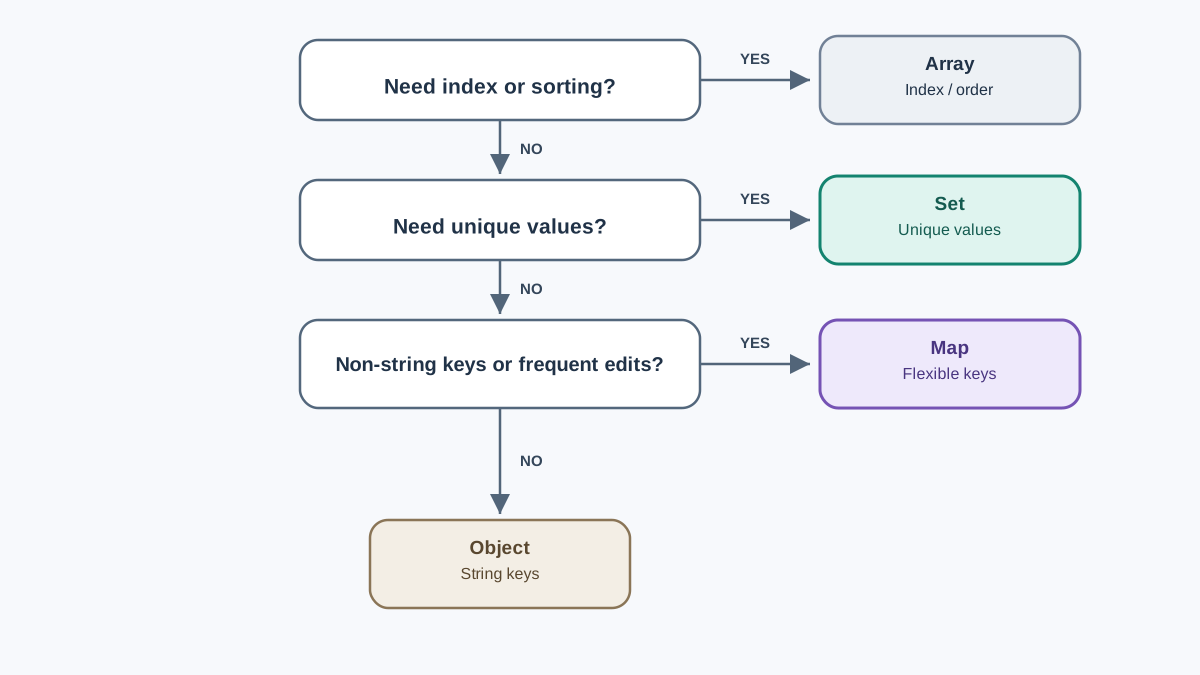
Turn the table into a decision rule.
Use a Set when the question is "have I seen this value?" or "give me the unique ones." Deduplicating tags, tracking which IDs you've already processed, checking membership fast — Set is the tool.
Use a Map when you're pairing values with keys that aren't plain strings, or when you add and remove entries often. Counting per-object, caching by request, storing state keyed by an instance — Map handles keys that objects can't.
Use an array when order and index access matter more than uniqueness. If you need items[0] or you're sorting, an array is still right.
Use a plain object when keys are simple strings and you want to pass the data to JSON or other code that expects an object. JSON.stringify handles objects naturally; a Map needs a conversion step first.
When not to use a Map: Don't reach for a Map just because it sounds more advanced. If your keys are strings and you're not adding and removing entries constantly, a plain object is simpler and works with more existing code.
Converting Between Them
You rarely have to commit to one structure forever. These conversions come up constantly.
Array to Set and back:
const arr = [1, 2, 2, 3];
const set = new Set(arr);
const backToArray = [...set];

console.log(backToArray);
[ 1, 2, 3 ]
Plain object to Map, and back:
const obj = { ana: 90, ben: 75 };
const map = new Map(Object.entries(obj));

console.log(map.get("ana"));   // 90

const backToObj = Object.fromEntries(map);
console.log(backToObj);
90
{ ana: 90, ben: 75 }
Object.entries turns an object into [key, value] pairs — exactly what the Map constructor wants. Object.fromEntries reverses it. This is your escape hatch when a function expects a different shape than the one you built.
Common Beginner Mistakes
These are the errors that actually break beginner code. Each one shows the wrong line, the surprising output, and the fix.
Mistake 1: Using map[key] instead of map.get(key)
const m = new Map();
m.set("ana", 5);

console.log(m["ana"]);   // undefined — wrong access
console.log(m.get("ana")); // 5 — correct
undefined
5
Bracket access treats the Map as a plain object and looks for a property named "ana", which doesn't exist. Always use get() and set().
Knowledge check
Check your understanding
Answer this question before you continue.
Mistake 2: Expecting a Set to deduplicate objects by content
const a = { id: 1 };
const b = { id: 1 };
const s = new Set([a, b]);

console.log(s.size);   // 2, not 1
2
Set compares by reference, not by content. Two objects with the same properties are still two different objects. If you need content-based uniqueness, deduplicate by a primitive key first — like an ID string.
Mistake 3: Forgetting reference comparison in has and get
const key = { id: 1 };
const m = new Map();
m.set(key, "value");

console.log(m.get({ id: 1 }));   // undefined — different object
console.log(m.get(key));         // "value" — same reference
undefined
value
You must hold onto the exact same object reference to look it up later. This is a feature, not a bug — it's what lets you key by instance — but it surprises beginners who expect value matching.
Practice: Pick the Right Structure
Here's a task that forces the decision rule and uses both collections.
You have an array of visitor objects, with some visitors appearing more than once:
const visits = [
  { id: "u1", name: "Ana" },
  { id: "u2", name: "Ben" },
  { id: "u1", name: "Ana" },
  { id: "u3", name: "Cleo" },
  { id: "u2", name: "Ben" },
];
Produce two things: a unique list of visitors, and a count of visits per visitor.
Hint: You'll need both a Set and a Map. The object identity rule from the mistakes section matters here — the two { id: "u1" } entries are different objects, so you can't rely on reference equality. Use the id string as your uniqueness key.
Expected behavior: your unique list should contain three visitors, and your count map should show u1 with 2, u2 with 2, and u3 with 1.
Try it before reading further. The struggle is where the mental model sets.
Once you've solved it, the natural next step is using these structures inside loops and functions — building a small script that reads data, deduplicates it, and reports counts. That's the shape of real data cleanup work, and it's where Set and Map stop being syntax and start being tools.
The rule to carry forward: if the question is about uniqueness, reach for a Set. If it's about pairing values with keys that aren't plain strings, reach for a Map. Otherwise, stay with the array or object you already know.
Knowledge check
Final check
Finish the article by checking the ideas you just learned.
References
Want a more structured JavaScript path?
Use the JavaScript for AI Applications Starter Pack to turn individual tutorials into a focused path from language fundamentals to interactive AI applications.
JavaScript for AI Applications Starter Pack
Build the JavaScript foundation behind modern interactive applications. The JavaScript for AI Applications Starter Pack takes you from core language concepts through functions, browser events, forms, DOM updates, application state, debugging, and practical projects—so you can learn how interfaces take input, work with structured data, respond to users, and turn results into experiences people can actually use.
- 253-page illustrated PDF
- 12 guided JavaScript chapters
- Visual concept diagrams
- Self-assessment quizzes
- Bonus deep-dive sections
- DOM, events, forms & application state
- Browser projects, debugging & practical workflows
Coming soon


