
JavaScript if/else and Boolean Practice Exercises
You can write an if/else statement. You know where the braces go and what console.log does. But when the condition gets even slightly tricky, you hesitate.…

You can write an if/else statement. You know where the braces go and what console.log does. But when the condition gets even slightly tricky, you hesitate. You read the expression, make a guess, and sometimes the guess is wrong.
That hesitation is not a sign that conditionals are hard. It is a sign that the real bottleneck is somewhere else: reading the boolean expression inside the parentheses. The syntax of if/else is rarely the problem. The condition is.
This article is a drill. Each exercise asks you to predict what a condition evaluates to, run the code, compare the output to your prediction, and fix your mental model when they disagree. Work through them in order, and you will stop guessing and start tracing.
Why conditionals feel harder than they are
Here is what trips up most beginners: the if/else structure is simple, but the condition is a tiny program of its own. Before JavaScript decides which branch to run, it has to evaluate the expression in the parentheses down to a single true or false. That evaluation happens first, every time, before any code inside the braces runs.
A condition is just an expression that resolves to true or false. Comparison operators like ===, >, <, and !== produce those boolean values. The if/else statement then reacts to the result.
When you misread a condition, you are not struggling with if/else. You are struggling with the expression inside it. The fix is to practice evaluating expressions until tracing them feels natural, not magical.
The method you will use for every exercise in this article is simple:
- Predict what the code will output.
- Run the code.
- Compare the actual output to your prediction.
- Fix your mental model when they do not match.
This predict-run-compare-fix loop is how you build the skill. Do not skip the predict step. Guessing wrong is valuable, because a wrong prediction reveals exactly which part of the expression you misread.
How to read a boolean expression
Before the exercises, let us establish a reliable way to read a condition. You already know the comparison operators from earlier work, so this is a bridge, not a re-teaching.
A boolean expression is read left to right. Resolve the comparison first, then decide which branch runs.
const temperature = 28;

if (temperature > 25) {
  console.log("Warm day");
} else {
  console.log("Cool day");
}
Warm day
Trace through it: temperature holds 28. The expression temperature > 25 becomes 28 > 25, which is true. Because the condition is true, the first branch runs and prints "Warm day".
The key habit is to substitute the variable values first, then perform the comparison. Do not try to evaluate the whole line in your head at once. Break it into steps:
- What value does each variable hold?
- What does the comparison become after substitution?
- Is that comparison
trueorfalse? - Which branch runs?
That four-step trace is the entire skill. The exercises below give you repeated chances to practice it.
Tip: If you are unsure whether an expression is
trueorfalse, write it out on paper with the variable values substituted. Seeing28 > 25on the page is much easier than holding it in your head.
Knowledge check
Check your understanding
Answer this question before you continue.
Exercise 1: Spot the true and false
This first exercise isolates the core skill: evaluating boolean expressions without writing any branches.
Goal: State whether each expression below is true or false.
Starter code:
const age = 17;
const name = "Avery";
const score = 82;

// Expression 1: age >= 18
// Expression 2: name === "Avery"
// Expression 3: score < 80
// Expression 4: age !== 17
// Expression 5: score > age
Expected behavior: For each expression, you should be able to say true or false with confidence.
Hint: Substitute the variable values first, then compare. For Expression 5, both sides are numbers, so the comparison works directly.
Solution and explanation:
- Expression 1:
age >= 18becomes17 >= 18, which isfalse. - Expression 2:
name === "Avery"becomes"Avery" === "Avery", which istrue. - Expression 3:
score < 80becomes82 < 80, which isfalse. - Expression 4:
age !== 17becomes17 !== 17, which isfalse. The!==operator asks "are these not equal?" Since17is equal to17, the answer isfalse. - Expression 5:
score > agebecomes82 > 17, which istrue.
The common mistake here is Expression 4. Beginners often read !== as "is not" and assume it means the opposite of whatever they see. But !== specifically asks whether two values are different. If the values are the same, the expression is false.
Optional extension: Change age to 18 and re-evaluate all five expressions. Which ones flip? Which stay the same?
Knowledge check
Check your understanding
Answer this question before you continue.
Exercise 2: Write the branch that matches the goal
Now reverse the direction. Instead of reading a condition, you will translate a plain-English goal into an if/else branch.
Goal: Write an if/else that prints "Adult ticket" when a visitor is 18 or older, and "Child ticket" otherwise.
Starter code:
const visitorAge = 21;

if (/* your condition here */) {
  console.log("Adult ticket");
} else {
  console.log("Child ticket");
}
Expected behavior: With visitorAge set to 21, the code should print "Adult ticket".
Hint: Name the condition in plain English first. The goal is "visitor is 18 or older." Now convert that sentence into a comparison using the variable.
Solution:
const visitorAge = 21;

if (visitorAge >= 18) {
  console.log("Adult ticket");
} else {
  console.log("Child ticket");
}
Adult ticket
Explanation: The plain-English goal "visitor is 18 or older" translates directly to visitorAge >= 18. The >= operator includes 18 itself, which matters. If you used > instead, a visitor who is exactly 18 would incorrectly get a child ticket.
Optional extension: Change visitorAge to 15 and run the code again. The output should flip to "Child ticket". Then try 18 and confirm the boundary works correctly.
Common mistake: Using
=instead of>=or===. A single=assigns a value; it does not compare. If your condition uses=, JavaScript will not behave the way you expect. Always check that your comparisons use===,!==,>,<,>=, or<=.
Knowledge check
Check your understanding
Answer this question before you continue.
Combining conditions with logical operators
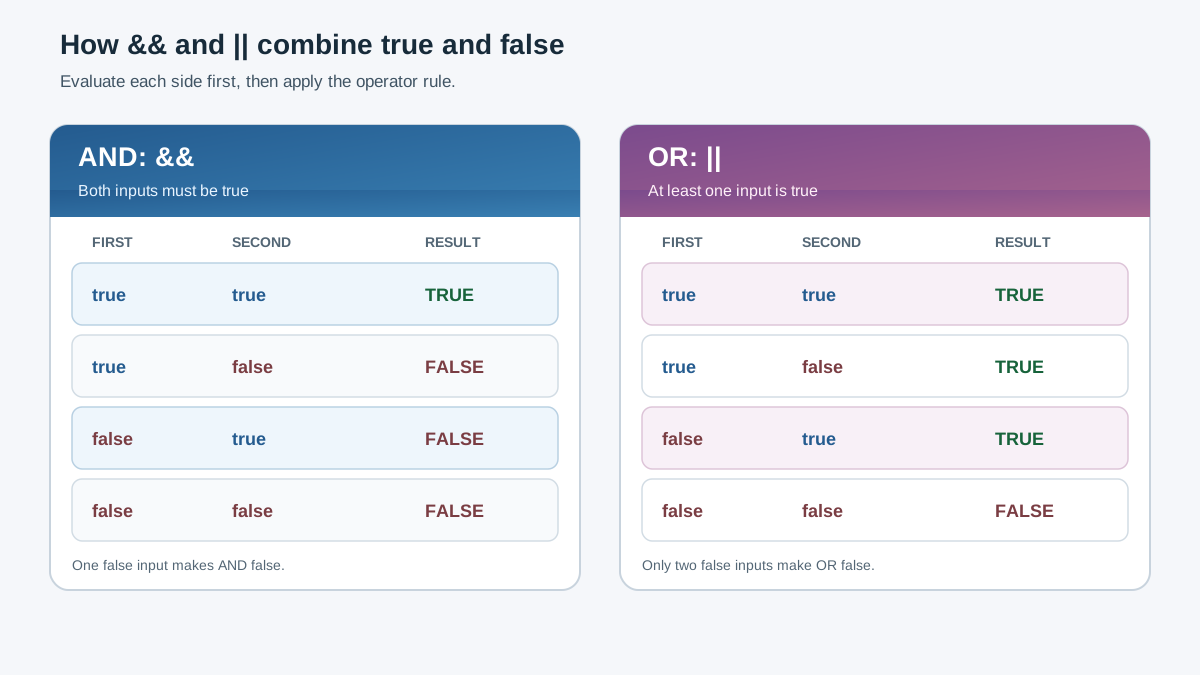
Real decisions rarely depend on a single comparison. A discount might apply only when a user is both logged in and a member. A warning might appear when a field is empty or the input is invalid.
To combine two simple conditions, JavaScript gives you two logical operators:
&&means both sides must betruefor the whole expression to betrue.||means at least one side must betruefor the whole expression to betrue.
The rule for reading combined conditions is the same as before, with one extra step: evaluate each side separately first, then combine the two true/false results.
const isLoggedIn = true;
const isMember = false;

if (isLoggedIn && isMember) {
  console.log("Member discount applied");
} else {
  console.log("No discount");
}
No discount
Trace it: isLoggedIn is true, and isMember is false. The expression becomes true && false. Since && requires both sides to be true, the whole expression is false, so the else branch runs.
The most common trap with logical operators is writing a condition that reads like English but evaluates differently than intended. For example, beginners sometimes write if (age === 18 || 21) expecting "age is 18 or 21." That does not work. JavaScript evaluates 18 || 21 as a separate expression, and the result is not what you expect. Each side of a logical operator needs its own complete comparison.
Exercise 3: Combine two conditions
Now you will combine two simple conditions into a single decision. This one has a small twist: one side of the decision is itself a choice between two options.
Goal: Write an if/else that prints "Weekend sale" only when both conditions are true: the day is Saturday or Sunday, and the shopper is a member.
Starter code:
const day = "Saturday";
const isMember = true;

if (/* your condition here */) {
  console.log("Weekend sale");
} else {
  console.log("Regular price");
}
Expected behavior: With day set to "Saturday" and isMember set to true, the code should print "Weekend sale".
Hint: Break the goal into two separate questions. First, is it a weekend day? That question itself has two parts: is the day Saturday, or is it Sunday? Second, is the shopper a member? Write each question as its own comparison, then join them with the operator that means "both must be true."
Solution:
const day = "Saturday";
const isMember = true;

if ((day === "Saturday" || day === "Sunday") && isMember) {
  console.log("Weekend sale");
} else {
  console.log("Regular price");
}
Weekend sale
Explanation: This condition has two main sides joined by &&, so both must be true for the sale to apply.
The left side is (day === "Saturday" || day === "Sunday"). The parentheses group the two day comparisons into one unit. Since day holds "Saturday", the first comparison is true. The || operator only needs one side to be true, so the whole grouped expression is true.
The right side is isMember, which holds true.
The full expression becomes true && true, which is true, so the first branch runs and prints "Weekend sale".
Now trace what happens when you change day to "Sunday". The first comparison, day === "Saturday", becomes false. But the second comparison, day === "Sunday", becomes true. Since || needs only one side to be true, the grouped expression is still true, and the sale still applies.
What if you change day to "Tuesday"? Both day comparisons become false, so the grouped expression is false. The full expression becomes false && true, which is false. The else branch runs and prints "Regular price".
The parentheses matter here. Without them, the condition would read as day === "Saturday" || day === "Sunday" && isMember, which JavaScript would group differently. The parentheses make it clear that the weekend check happens first, and the membership check applies to the whole weekend result.
Optional extension: Change day to "Sunday" and isMember to false. Predict the output, then run it. The sale should not apply, because the membership side is false. Then change day to "Friday" and isMember to true. The sale still should not apply, because Friday is not a weekend day.
Knowledge check
Check your understanding
Answer this question before you continue.
Debugging a decision that prints the wrong branch
Wrong output is not a mystery. It is evidence about a wrong assumption somewhere in your condition. When the code prints the wrong branch, your job is to find which assumption about the expression was incorrect.
Here is the debug method:
- State the expected output. Write down what you think the code should print.
- Run the code. Note the actual output.
- Compare. If they differ, the condition is not evaluating the way you think.
- Re-read the condition. Trace each comparison step by step, substituting values.
Let us apply this to a real example:
const score = 75;
const hasBonus = true;

if (score >= 80 || hasBonus) {
  console.log("Pass");
} else {
  console.log("Retry");
}
Pass
Suppose you expected "Retry" because you thought the score needed to be 80 or higher. Look at the condition again: score >= 80 || hasBonus. The || operator means only one side needs to be true. The score side is false (75 >= 80 is false), but the bonus side is true. Since at least one side is true, the whole condition is true, and the code prints "Pass".
If the goal was to require both a high score and a bonus, the condition was written wrong. It should use && instead of ||. The output revealed the mistake.
Three mistakes cause most wrong-branch bugs at this stage:
- Using
=instead of===for comparison. - Reversing the comparison direction, such as writing
18 >= agewhen you meantage >= 18. - Misreading
&&as||or vice versa.
When your output does not match your expectation, check those three before anything else. One of them is almost always the culprit.
Note: This mismatch between expectation and output is completely normal. It is not a sign that you are bad at programming. It is exactly how the skill gets built. Every wrong prediction teaches you something specific about how JavaScript evaluates expressions.
Your next practice move
The habit that matters is simple: predict, run, compare, fix — on every condition you write. Do not skip the predict step, even when you are confident. The moment you predict wrong and discover why is the moment your mental model improves.
Here is a small self-directed task to keep the momentum going. Write three if/else decisions from everyday situations:
- Print
"Coffee time"if the hour is before noon, otherwise print"Any time". - Print
"Weekend"if the day is Saturday or Sunday, otherwise print"Weekday". - Print
"Discount"if a customer is a member and their order total is over 50, otherwise print"Standard price".
For each one, trace the condition by hand before you run it. Predict the output, run the code, and compare.
The natural next step after conditionals is repeating decisions. When you need to check the same condition for every item in a list, or keep asking until a user gives valid input, you combine if/else with loops. That is where this practice pays off: once you can read a condition without guessing, you can drop that same condition into a loop and trust it to make the right call hundreds of times in a row. The same logic also powers everyday website behavior, like deciding whether to show a discount message or display a validation warning.
Knowledge check
Final check
Finish the article by checking the ideas you just learned.
References
Want a more structured JavaScript path?
Use the JavaScript for AI Applications Starter Pack to turn individual tutorials into a focused path from language fundamentals to interactive AI applications.
JavaScript for AI Applications Starter Pack
Build the JavaScript foundation behind modern interactive applications. The JavaScript for AI Applications Starter Pack takes you from core language concepts through functions, browser events, forms, DOM updates, application state, debugging, and practical projects—so you can learn how interfaces take input, work with structured data, respond to users, and turn results into experiences people can actually use.
- 253-page illustrated PDF
- 12 guided JavaScript chapters
- Visual concept diagrams
- Self-assessment quizzes
- Bonus deep-dive sections
- DOM, events, forms & application state
- Browser projects, debugging & practical workflows
Coming soon


