
JavaScript Truthiness: Falsy Values and Conditional Checks
A condition does not ask whether a value is true. It asks what that value becomes when JavaScript forces it into a yes-or-no decision.

Key topics
A condition does not ask whether a value is true. It asks what that value becomes when JavaScript forces it into a yes-or-no decision.
You already know how to write an if/else statement. The part that still surprises beginners is what goes inside the parentheses. You put a variable there, no comparison operator, and somehow a branch runs. Most of the time it works. Then you hit a value like 0 or "" and the wrong branch fires.
Here is the tiny version of that bug. Imagine you track loyalty points for a user:
const user = { name: "Maya", points: 0 };

if (user.points) {
  console.log(`You have ${user.points} points.`);
} else {
  console.log("No points on file.");
}
No points on file.
Maya has zero points, and the code says there are no points on file. Nothing is broken in the syntax. The problem is that you asked the wrong question. You asked "is this value truthy?" when you meant "does this value exist?"
That distinction is the whole article. Once you can predict how a value converts to true or false, you stop guessing and start choosing.
Why if (value) Behaves Differently Than You Expect
When you place a value in a condition slot, you are working in a boolean context. JavaScript does not check whether the value is literally true. It converts the value to a boolean first, then decides. That automatic conversion is called coercion, and it happens without any comparison operator.
So if (value) is shorthand for "if this value coerces to true." The value itself is the test.
Run this and watch the branches:
const values = [0, "", "hello"];

for (const value of values) {
  if (value) {
    console.log(`${JSON.stringify(value)} is truthy`);
  } else {
    console.log(`${JSON.stringify(value)} is falsy`);
  }
}
0 is falsy
"" is falsy
"hello" is truthy
Notice what you did not write. There is no === true anywhere. The condition did the conversion for you, and the branch followed the result.
That is the mental model to keep: the value is the test. Your job is to know which values pass.
Knowledge check
Check your understanding
Answer this question before you continue.
The Complete Falsy List (and Why It Is Short)
Here is the good news. JavaScript has a fixed, small list of values that coerce to false. Everything else is truthy.
The falsy values are:
false0and-00n(BigInt zero)""(empty string)nullundefinedNaN
That is the entire list. If a value is not on it, it is truthy. This is why the list is worth memorizing: one short list covers every case you will meet.
| Value | Truthy or falsy? | Branch that runs |
|---|---|---|
0 | Falsy | else |
"0" | Truthy | if |
"false" | Truthy | if |
"" | Falsy | else |
[] | Truthy | if |
{} | Truthy | if |
null | Falsy | else |
undefined | Falsy | else |
NaN | Falsy | else |
function () {} | Truthy | if |
The rows that trip up beginners are "0", [], and {}. A string containing a zero is not the number zero, so it is truthy. An empty array and an empty object are objects, and objects are always truthy. If you came from a language where empty containers count as false, this is the rule to unlearn.
Knowledge check
Check your understanding
Answer this question before you continue.
Truthiness Is Not the Same as == true
This is the section that prevents real bugs, so read it slowly.
Truthiness and loose equality are two different mechanisms. Truthiness converts a value to a boolean. Loose equality (==) compares two values after its own set of conversions. They do not always agree.
Look at this:
if ([]) {
  console.log("[] is truthy");
}

if ([] == false) {
  console.log("[] == false");
}
[] is truthy
[] == false
Both lines print. An empty array is truthy, and it is also loosely equal to false. That sounds like a contradiction until you see that the two checks are asking different questions.
The same split shows up elsewhere. NaN, undefined, and null are falsy, but none of them is loosely equal to false. The string "0" is truthy, yet "0" == false is true.
The practical rule: use truthiness for conditions, and do not use == against true or false to test truthiness. If you want to know whether a value is truthy, put it in the condition. If you want to compare against a specific value, compare against that value.
Knowledge check
Check your understanding
Answer this question before you continue.
When Truthiness Is Enough — and When It Is a Bug
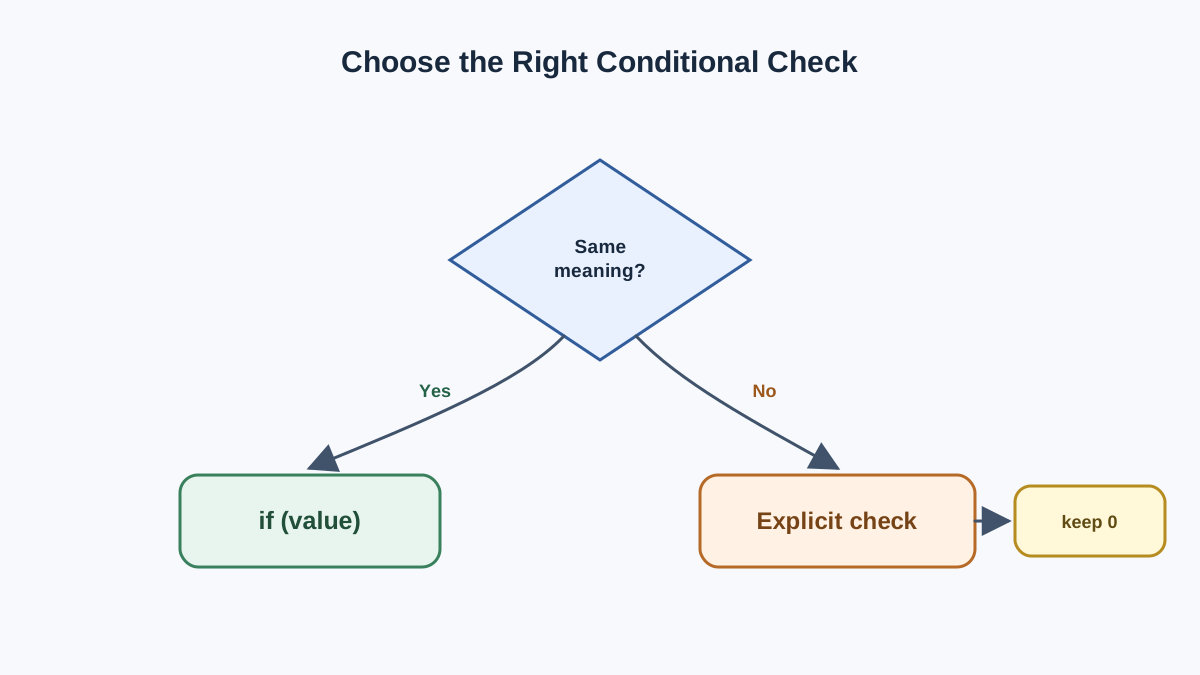
Now you can make the decision the article promised.
Use a short truthy check when every falsy value means the same thing in that spot. Missing input, an empty field, no result — if all of those should take the same path, if (value) is clear and correct.
Use an explicit comparison when different falsy values must be told apart. A count of 0 is not the same as a missing count. An empty string is not the same as undefined.
That is exactly the loyalty-points bug from the start. Both 0 and undefined are falsy, so both took the else branch. Fix it by asking the real question:
const user = { name: "Maya", points: 0 };

if (user.points !== undefined) {
  console.log(`You have ${user.points} points.`);
} else {
  console.log("No points on file.");
}
You have 0 points.
The explicit check says what you mean: "if this field exists, show it." A truthy check could never express that, because it throws away the difference between zero and nothing.
| Situation | Use this | Why |
|---|---|---|
| Any falsy value means "missing" | if (value) | Short and honest about intent |
0 is a valid value | if (value !== undefined) | Keeps zero out of the "missing" bucket |
| Empty string is valid | if (value !== "") | Distinguishes empty from absent |
Value might be null or undefined | if (value != null) | Catches both in one check |
Knowledge check
Check your understanding
Answer this question before you continue.
Where You Will Meet This in Real Code
Truthiness is not an exam topic. It is everywhere in beginner-visible code.
Form validation. if (!email) before submitting is a truthy check. It catches empty strings, null, and undefined in one line.
Default values. const name = input || "Guest"; falls back whenever input is falsy. That is a trap for 0 and "", which are valid values. The ?? operator only falls back on null and undefined, which is often what you actually want.
Guard clauses. if (!user) return; at the top of a function stops early when there is no user to work with.
Safe property access. user && user.name short-circuits when user is falsy, so you never read a property off nothing.
Each of these is a truthy check doing real work. The skill is knowing when the check is doing the right work.
Common Beginner Mistakes to Avoid
Assuming [] or {} is falsy. They are objects, and objects are always truthy. Check .length or use Object.keys(obj).length if you need to know whether a container is empty.
Writing if (value == true) or if (value === true). This tests for the boolean true specifically, not for truthiness. A truthy value like "hello" fails both checks.
Treating 0 as "no value." Zero is a legitimate number. If zero is a valid input, a truthy check will silently drop it.
Forgetting that an unassigned variable is undefined. A variable you declared but never set is falsy, which can hide a missing assignment.
Using new Boolean(...). It returns an object, and every object is truthy. Use Boolean(value) as a function instead.
Your Next Step
Here is the decision rule to carry forward: if every falsy value means the same thing in this spot, use a short truthy check; if 0, "", null, or undefined must be told apart, write the explicit comparison.
Now go find three if statements in code you have already written. For each one, ask: does it matter which falsy value showed up? If the answer is no, leave it short. If the answer is yes, rewrite it with an explicit check. That single habit will catch most of the truthiness bugs before they reach a user.
From here, the natural next step is to see how these checks combine with logical operators like &&, ||, and ?? — the tools that decide which value actually gets returned.
Knowledge check
Final check
Finish the article by checking the ideas you just learned.
References
Want a more structured JavaScript path?
Use the JavaScript for AI Applications Starter Pack to turn individual tutorials into a focused path from language fundamentals to interactive AI applications.
JavaScript for AI Applications Starter Pack
Build the JavaScript foundation behind modern interactive applications. The JavaScript for AI Applications Starter Pack takes you from core language concepts through functions, browser events, forms, DOM updates, application state, debugging, and practical projects—so you can learn how interfaces take input, work with structured data, respond to users, and turn results into experiences people can actually use.
- 253-page illustrated PDF
- 12 guided JavaScript chapters
- Visual concept diagrams
- Self-assessment quizzes
- Bonus deep-dive sections
- DOM, events, forms & application state
- Browser projects, debugging & practical workflows
Coming soon


