
Understanding JavaScript Syntax
JavaScript syntax is the grammar of your code: the rules that decide whether the browser can read what you wrote. Get the rules right and your program…

Key topics
JavaScript syntax is the grammar of your code: the rules that decide whether the browser can read what you wrote. Get the rules right and your program runs. Break them and the browser stops and points at the exact spot. This guide walks absolute beginners through the core rules and structure so you can read and write JavaScript with confidence.
What Is JavaScript Syntax?
Syntax is the set of rules that determines how a JavaScript program is written and arranged. It covers statements, expressions, variables, functions, operators, and control flow. Follow the rules and the JavaScript engine understands your instructions; break them and it gets confused.
This is JavaScript syntax for beginners who already know what a program looks like and now want to understand why it is written that way. If you have not written your first program yet, start there first, then come back to learn the rules behind what you typed.
The Building Blocks of a Line of Code
Before we look at punctuation, let's read one line of JavaScript from the inside out. Most code is built from the same small set of pieces: values, variables, expressions, and statements.
let name = "Ada";
Here is what each piece is doing:
"Ada"is a value — a piece of data the program can work with.nameis a variable — a name you give to a value so you can refer to it later.letis a keyword that tells JavaScript you are creating a new variable.- The whole line is a statement — one complete instruction for the program to run.
Now add an operation and you get an expression, which is a combination of values, variables, and operators that computes a result.
let score = 10 + 5;
console.log(score);
15
The expression 10 + 5 is computed first, and the result is stored in score. An expression produces a value; a statement is a complete instruction. When you can see that a line like let score = 10 + 5 is really "create a name, compute a value, and store it," the punctuation stops being a wall of symbols and starts being a readable sentence.
Knowledge check
Check your understanding
Answer this question before you continue.
Statements and Semicolons
A statement is a single instruction for the computer. Think of it as a sentence in a conversation with the program. Each statement tells JavaScript to do one thing, like show a message or store a value.
A semicolon marks the end of a statement. It tells JavaScript, "This instruction is finished. Move on to the next one."
let name = "Ada";
console.log(name);
Ada
JavaScript can often figure out where a statement ends even without a semicolon, because it automatically inserts them when needed. But semicolons are still part of the syntax, and there are cases where leaving them out causes confusing errors. My rule for beginners is simple: always include the semicolon. It removes an entire category of "why is this broken?" moments before you have the experience to debug them quickly.
Knowledge check
Check your understanding
Answer this question before you continue.
Grouping Code with Braces and Parentheses
Once you can read a single statement, the next step is grouping statements together.
Code Blocks with Braces
Curly braces { } group statements together into a block. You will see them in functions, loops, and conditionals. The braces tell JavaScript, "Run everything inside me as one unit."
let score = 12;
if (score > 10) {
  console.log("You win!");
  console.log("Nice work!");
}
You win!
Nice work!
Notice that score > 10 is an expression — it compares two values and produces a result the if statement can check.
Parentheses
Parentheses ( ) have two main jobs: they call functions and they hold conditions.
alert("Hi!");          // calling a function
if (score > 10) { }    // holding a condition
Knowledge check
Check your understanding
Answer this question before you continue.
A Common Beginner Mistake
The most frequent error I see from new learners is an unmatched brace or parenthesis. You open a block and forget to close it, and the program reports an error that points somewhere confusing. Count your opening and closing symbols, or use an editor that highlights matching pairs. That one habit saves beginners hours.
Comments in JavaScript
Comments are notes you leave in your code for humans. The program ignores them completely, so they are a safe place to explain what a line does or why you made a choice.
Single-Line Comments
Use // for a comment that lasts one line.
// This line shows a message
console.log("Hello!");
Multi-Line Comments
Use /* ... */ for comments that span several lines.
let price = 20;
let tax = 2;

/*
  This block of code calculates
  the total price including tax.
*/
let total = price + tax;
console.log(total);
22
Why Use Comments?
- Explain your code: Comments help you remember what a tricky line does when you return to it later.
- Help others: If someone reads your code, comments make your intent clear.
- Debugging: You can temporarily comment out a line to test whether it is causing a problem.
Syntax Errors vs. Logical Errors
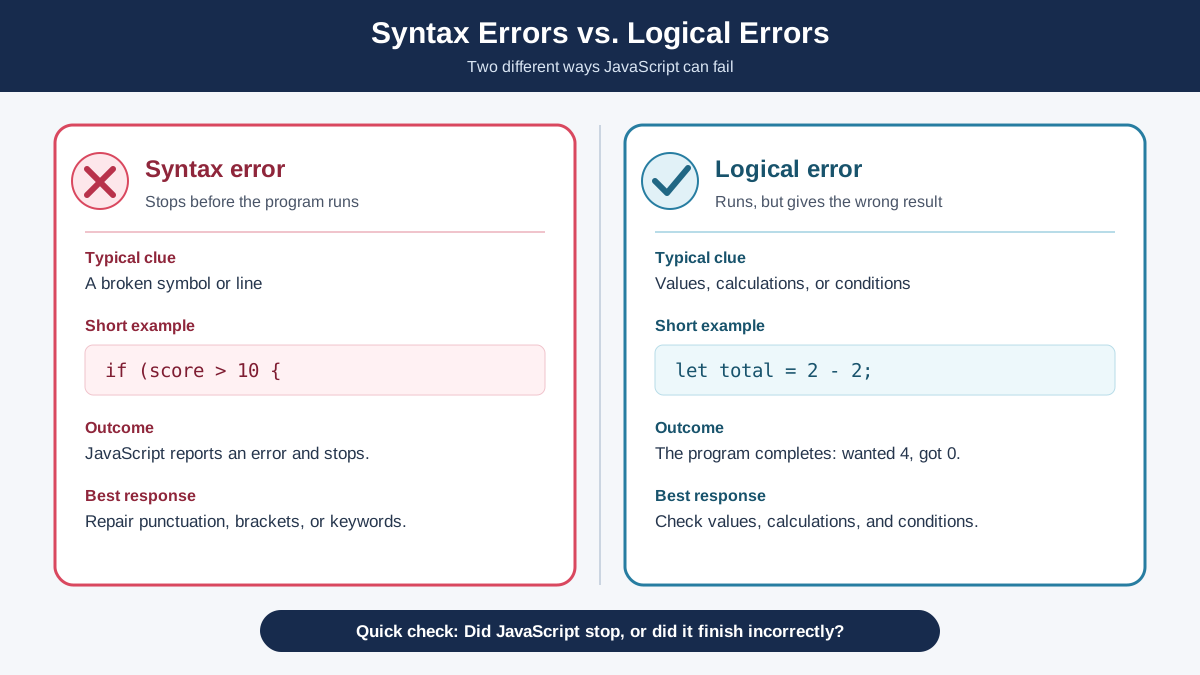
Beginners often assume that any wrong result means a syntax problem. That is not quite right, and telling the two apart saves you real time.
A syntax error means the program cannot even parse your code. It stops before running anything and points at the broken line. Here is an unmistakable one — a string that never gets closed:
let name = "Ada;
console.log(name);
The opening quote on the first line is never closed, so the program cannot tell where the string ends. JavaScript stops and reports a parse error.
A logical error means the code is perfectly valid syntax, but it produces the wrong result because the logic is off.
let score = 10 + 5;
console.log(score * 2); // prints 30, but you meant to print 15
30
Here is the decision rule: if the program refuses to run your code, it is a syntax error — read the message and fix the spot it names. If the code runs but prints the wrong thing, it is a logical error — trace your values and check your math or your conditions. Syntax errors stop parsing; logical mistakes can run and still be wrong.
Knowledge check
Check your understanding
Answer this question before you continue.
Common Syntax Mistakes and How to Avoid Them
Everyone makes syntax mistakes when learning. The goal is not to avoid them forever — it is to recognize them quickly and fix them.
Unmatched Braces or Parentheses
A missing closing brace or parenthesis will stop your code or make it behave unexpectedly. Use an editor that highlights matching pairs, and count your openings and closings when an error appears.
Misspelled Keywords
Writing consol.log instead of console.log, or funtion instead of function, is a classic beginner slip. Double-check spelling, especially for keywords like function, if, and let.
Case Sensitivity
JavaScript is case-sensitive — Name and name are two different things. Keep your naming consistent so you do not create a variable you can never find again.
How the Console Shows Syntax Errors
When there is a syntax problem, your browser's developer console shows an error message. Read it carefully — it usually tells you exactly where the problem is. The error is not a judgment on you; it is the program telling you precisely which rule you broke and where.
Tip: When you see a syntax error, do not rewrite everything. Read the message, find the line it points to, and fix that one spot. Most syntax errors are small and local.
Putting It Together
Here is a small program that uses values, variables, expressions, statements, semicolons, braces, parentheses, and comments together:
// Greet a user by name
function greet(name) {
  console.log("Hello, " + name + "!");
}

greet("Ada");
Hello, Ada!
Notice how each piece has a job: function declares the block, name is a variable that holds the input value, "Hello, " + name + "!" is an expression that builds a new string, the braces hold the instructions, and the parentheses call the function with a value.
Next Steps
Keep the mental model simple: JavaScript code is built from values, variables, expressions, and statements, then grouped into blocks with braces and called with parentheses. When something breaks, decide whether the program refused to run — a syntax error — or ran and gave the wrong answer — a logical error.
Your practice task: open your browser console and write a small program that declares two variables, adds them, and prints the result. Then deliberately break it — remove a closing brace — and read the error the browser gives you. Fix it, and you will have turned a mistake into a lesson you will not forget.
Knowledge check
Final check
Finish the article by checking the ideas you just learned.
References
Want a more structured JavaScript path?
Use the JavaScript for AI Applications Starter Pack to turn individual tutorials into a focused path from language fundamentals to interactive AI applications.
JavaScript for AI Applications Starter Pack
Build the JavaScript foundation behind modern interactive applications. The JavaScript for AI Applications Starter Pack takes you from core language concepts through functions, browser events, forms, DOM updates, application state, debugging, and practical projects—so you can learn how interfaces take input, work with structured data, respond to users, and turn results into experiences people can actually use.
- 253-page illustrated PDF
- 12 guided JavaScript chapters
- Visual concept diagrams
- Self-assessment quizzes
- Bonus deep-dive sections
- DOM, events, forms & application state
- Browser projects, debugging & practical workflows
Coming soon


