
What is JavaScript?
JavaScript is the language that turns a static web page into something that reacts to you. Click a button and a menu opens. Type into a form and it checks…

Key topics
JavaScript is the language that turns a static web page into something that reacts to you. Click a button and a menu opens. Type into a form and it checks your answer as you go. Scroll and new content slides into view. That behavior is JavaScript at work—and it is the reason the modern web feels alive instead of like a printed brochure.
If you have never written a line of code, this article is for you. My one piece of advice up front: start with the smallest visible behavior, not the whole ecosystem. You do not need frameworks, build tools, or a server to meet JavaScript. You need one page, one line of code, and the curiosity to change it and watch what happens.
Why Learn JavaScript?
Before you invest time in any language, it is fair to ask what you get back. JavaScript earns its place for three concrete reasons:
- It runs in the browser you already have. Nearly every modern website uses JavaScript in some way, from online stores to social platforms to the tools you use at work.
- It makes pages interactive. Without JavaScript, a web page is static—text and images that sit still. JavaScript lets a page respond to clicks, keystrokes, and scrolling.
- It gives you instant feedback. Because JavaScript runs in the browser, you can see results immediately without installing special software.
That last point matters most for a beginner. When you can run code, see the output, and change one line to watch the behavior shift, you are learning by experiment, not by memorizing rules in the abstract. I will prove that loop with one tiny example before you go anywhere else.
What is JavaScript?
So, what is JavaScript in plain terms? It is a programming language that adds interactivity and dynamic behavior to web pages. It is one of the three core technologies of the web, working alongside HTML and CSS.
Here is the mental model I want you to keep: HTML is the structure, CSS is the styling, and JavaScript is the behavior. A page can have perfect structure and beautiful styling and still feel dead until JavaScript gives it something to do.
JavaScript runs directly in your web browser. When you visit a site, the browser reads the JavaScript code and executes its instructions on your device. That is why a form can validate your input instantly or a button can respond the moment you click it—the code is running right there, not waiting on a distant server.
Note: JavaScript is not the same as Java. The names sound related, but the languages are separate and share almost nothing in practice. Java was popular when JavaScript launched in 1995, and the similar name was a marketing choice, not a technical connection.
Knowledge check
Check your understanding
Answer this question before you continue.
See It Yourself: One Line of Behavior
Let me make the "behavior layer" claim concrete instead of asking you to take it on faith. The easiest place to run your first line is a page you can safely change. Open a new tab in your browser and go to any simple site you do not mind altering temporarily—a search page works well. Then open the developer tools:
- In Chrome, Edge, or Brave, press
F12orCtrl+Shift+I(on a Mac,Cmd+Option+I). - In Firefox, press
F12orCtrl+Shift+I(on a Mac,Cmd+Option+I). - In Safari, first enable the Develop menu in Settings, then press
Cmd+Option+C.
Click the Console tab, type this line, and press Enter:
document.body.style.backgroundColor = "lightblue";
If the page background turns light blue, it worked. That single line did three things: it found the page's body, changed its style, and the browser redrew the page to match. No reload, no server, no installation—just code running on your machine and a visible result.
Now change one word and run it again:
document.body.style.backgroundColor = "lightyellow";
The background shifts again. That is the whole learning loop I promised: run code, observe the result, change one line, and watch the behavior move. Every interactive site you have enjoyed was built from this same cycle, repeated thousands of times.
Tip: If nothing happens, check that you typed the line exactly and that you are in the Console tab, not the Elements tab. If the page background does not change, try a different page—some sites lock their own styling. The browser is telling you something useful either way, and reading that message is part of the skill.
Knowledge check
Check your understanding
Answer this question before you continue.
JavaScript, HTML, and CSS: The Web's Building Blocks
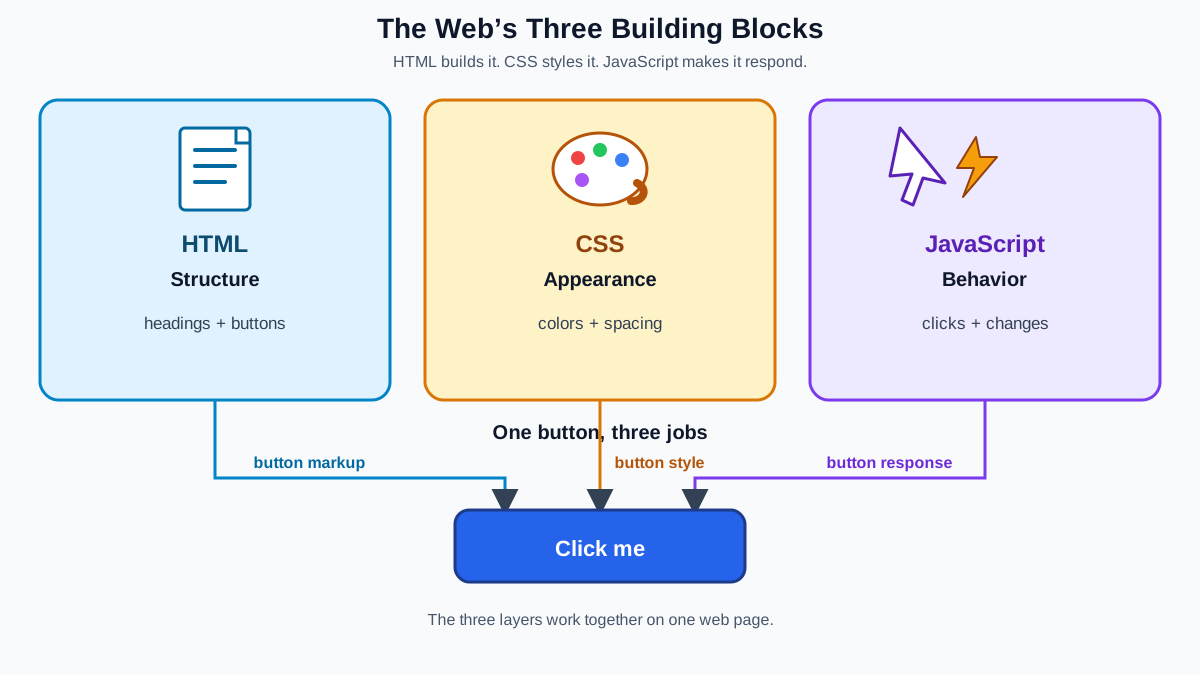
To understand JavaScript's role, it helps to see the three layers of a web page as a single team:
- HTML is the skeleton. It defines the structure—headings, paragraphs, images, buttons, and forms.
- CSS is the styling. It controls colors, fonts, spacing, and layout so the page looks the way the designer intended.
- JavaScript is the behavior. It lets the page react, update, and respond to the person using it.
All three work together on nearly every site you visit. Take a button that changes text when clicked. The button itself is defined in HTML. Its colors and shape come from CSS. And the action—what happens when you click it—is JavaScript. Remove the JavaScript and the button still looks like a button; it just stops responding to your click the way the page's author intended.
Knowledge check
Check your understanding
Answer this question before you continue.
What Can You Do With JavaScript?
Because JavaScript is the behavior layer of the web, it powers a wide range of everyday features:
- Interactive forms: checking that you filled out every field, or showing a hint as you type.
- Image sliders and galleries: browsing photos without reloading the page.
- Live content updates: showing new data, like a score or a notification, without a full refresh.
- Games and quizzes: from simple browser games to interactive learning tools.
- Web applications: chat apps, to-do lists, dashboards, and online stores.
One boundary is worth naming now so it does not confuse you later. JavaScript is the language; the browser is the environment that supplies extra capabilities like changing a page's style or responding to a click. The same language can also run outside the browser through tools like Node.js, which power servers and command-line programs. That is why JavaScript skills carry across front-end and back-end work. For now, though, the browser is the best place to start because it is free, built into your computer, and gives you instant feedback.
Knowledge check
Check your understanding
Answer this question before you continue.
Is JavaScript Hard to Learn?
JavaScript is approachable for a beginner, and that is by design. Three things make it a friendly first language:
- No setup required. You already have a browser, which means you already have a place to run JavaScript.
- Instant feedback. Write a line, run it, and see the result immediately. That loop is the fastest way to build intuition.
- A huge learning community. Countless tutorials and interactive lessons exist for JavaScript basics, so you are never stuck without help.
The honest part: JavaScript has some quirks that can confuse newcomers, and the ecosystem of tools around it grows quickly. Do not let that intimidate you. Start with the core language in the browser, build small things, and let the tooling come later when you actually need it.
Your Next Step
If you ran the experiment above, you have already watched JavaScript change a real page. Now make the loop yours with one narrow goal: change the background color of a page you visit often, then change it back. That single task uses only what you just learned and gives you a clean win before you add anything new.
When you are ready to work more systematically, write a small JavaScript program, include JavaScript in an HTML page, practice the basic syntax, and set up an editor workflow. Each step builds on the same loop you just ran: write code, run it, watch what happens, and change one thing to learn more.
Every interactive site you have enjoyed was built by someone who started exactly where you are now: with one line of code and the curiosity to see what it does.
Knowledge check
Final check
Finish the article by checking the ideas you just learned.


