
Create a Random Quote Generator
Click a button. Watch the page change. That small moment—where your JavaScript stops just running and starts doing something visible—is the bridge between…

Click a button. Watch the page change. That small moment—where your JavaScript stops just running and starts doing something visible—is the bridge between writing code and building software. This project is built to cross it.
You'll build a random quote generator: a page that shows a quote and its author, with a button that swaps in a new one each time you click. No servers, no APIs, no external data. Just a list of quotes you control and a few lines of JavaScript that bring them to life.
If you built the number guessing game, you already know how to respond to clicks. This project adds two new skills: storing data in an array and updating the page through the DOM. Think of an array as a numbered list, and the DOM as the bridge JavaScript uses to talk to the page. Together, they turn a static HTML file into something that responds.
Set Up the Project Files
Create a new folder called quote-generator (or any name you like). Inside it, create three files:
index.html— the page structurestyle.css— the styling (keep it light)script.js— the JavaScript logic
Open index.html and add the starter structure:
<!DOCTYPE html>
<html lang="en">
<head>
  <meta charset="UTF-8">
  <meta name="viewport" content="width=device-width, initial-scale=1.0">
  <title>Random Quote Generator</title>
  <link rel="stylesheet" href="style.css">
</head>
<body>
  <main>
    <p id="quote">Your quote will appear here.</p>
    <p id="author">— Unknown</p>
    <button id="new-quote">Show Another Quote</button>
  </main>

  <script src="script.js"></script>
</body>
</html>
Notice two things. First, the elements we want JavaScript to change have id attributes: quote, author, and new-quote. Those ids are how JavaScript will find them later.
Second, the <script> tag sits near the end of the body, not in the head. Why? Because the script needs the HTML elements to exist before it can work with them. If the script loads first, it might try to find elements that haven't been created yet. Placing it at the end keeps things simple and reliable.
Add a little CSS to make the page pleasant to look at:
body {
  font-family: Georgia, serif;
  display: flex;
  justify-content: center;
  align-items: center;
  min-height: 100vh;
  background: #f5f0e8;
}

main {
  max-width: 500px;
  text-align: center;
  padding: 2rem;
  background: white;
  border-radius: 8px;
  box-shadow: 0 2px 10px rgba(0, 0, 0, 0.1);
}

button {
  padding: 0.6rem 1.2rem;
  font-size: 1rem;
  cursor: pointer;
  border: none;
  background: #2c3e50;
  color: white;
  border-radius: 4px;
}
The CSS is optional. If styling isn't your focus right now, skip it and move straight to the JavaScript. The logic works either way.
Open index.html in your browser. You should see the placeholder text and a button. The page loads, but nothing happens yet. That's about to change.
Store Quotes in an Array
An array is a numbered list. Each item in the list has a position called its index, and the counting starts at 0. So the first item is at index 0, the second at index 1, and so on.
const fruits = ["apple", "banana", "cherry"];
console.log(fruits[0]); // "apple"
console.log(fruits[2]); // "cherry"
For this project, each quote needs two pieces of information: the quote text and the author. If you stored them in two separate arrays, you'd have to keep them in sync by hand. Add a quote to one and forget the other, and suddenly quotes appear with the wrong authors.
The cleaner approach is an array of objects. Each object holds both pieces together:
const quotes = [
  {
    quote: "The only way to do great work is to love what you do.",
    author: "Steve Jobs"
  },
  {
    quote: "Life is what happens when you're busy making other plans.",
    author: "John Lennon"
  },
  {
    quote: "In the middle of difficulty lies opportunity.",
    author: "Albert Einstein"
  },
  {
    quote: "Simplicity is the ultimate sophistication.",
    author: "Leonardo da Vinci"
  }
];
Each object pairs the quote with its author, so the two always travel together. You can read one item using its index:
console.log(quotes[0].quote);
console.log(quotes[0].author);
The only way to do great work is to love what you do.
Steve Jobs
The dot notation works like this: quotes[0] grabs the first object, then .quote reaches inside that object for the quote text.
Add the quotes array to script.js, then open the browser's console (right-click → Inspect → Console) and type quotes[1].author. You should see John Lennon. If you do, your array is working.
Knowledge check
Check your understanding
Answer this question before you continue.
Pick a Random Quote with Math.random()
Now for the interesting part: choosing a random quote. JavaScript gives you Math.random(), a built-in function that returns a random decimal between 0 (inclusive) and 1 (exclusive).
console.log(Math.random());
0.5731849021837462
Run it again and you'll get a different number. But a decimal between 0 and 1 isn't useful as an array index. You need a whole number between 0 and the last index of your array.
Here's the trick. Multiply Math.random() by the array's length:
Math.random() * quotes.length
If quotes has 4 items, this gives you a random decimal between 0 and 4. But array indexes need whole numbers. That's where Math.floor() comes in—it rounds a number down to the nearest whole number.
console.log(Math.floor(3.7)); // 3
console.log(Math.floor(0.2)); // 0
Combine them and you get a random whole-number index that always stays inside the array:
const randomIndex = Math.floor(Math.random() * quotes.length);
console.log(randomIndex);
2
The output will vary each time you run it. Sometimes you'll get 0, sometimes 3, always a valid index. Because you multiplied by quotes.length, the result can never exceed the array's last index. Add a quote to the array, and the range grows automatically. Remove one, and it shrinks. The logic never breaks.
Common mistake: Forgetting
Math.floor(). Without it, you get a decimal like2.731, andquotes[2.731]doesn't exist. JavaScript returnsundefined, and the page shows nothing useful. If your quote ever displays asundefined, check that you rounded down.
Knowledge check
Check your understanding
Answer this question before you continue.
Update the Page with the DOM
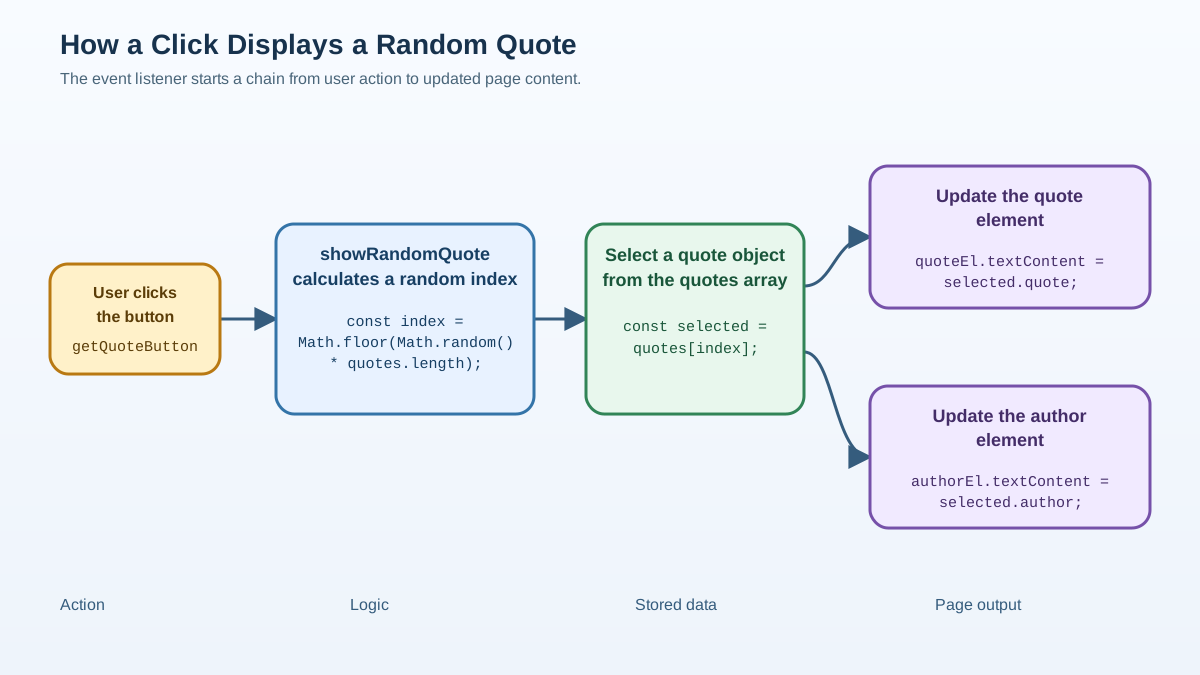
The DOM—Document Object Model—is how JavaScript sees your HTML. When the browser loads a page, it builds a tree-like structure of every element. JavaScript can reach into that tree, find elements, and change them.
The first step is grabbing the elements you want to change. document.getElementById() finds an element by its id attribute:
const quoteElement = document.getElementById("quote");
const authorElement = document.getElementById("author");
Now quoteElement points to the <p id="quote"> element on your page. To change what it displays, use textContent:
quoteElement.textContent = "New quote text here.";
textContent sets the plain text inside an element. It's the right tool here because quotes are plain text. The alternative, innerHTML, interprets strings as HTML, which can cause problems if your quote text ever contains characters like < or >. For plain text, textContent is safer and simpler.
Now write a function that picks a random quote and writes it into the page:
function showRandomQuote() {
  const randomIndex = Math.floor(Math.random() * quotes.length);
  const selectedQuote = quotes[randomIndex];

  quoteElement.textContent = selectedQuote.quote;
  authorElement.textContent = `— ${selectedQuote.author}`;
}
The function does three things: picks a random index, pulls the quote object at that index, and writes both the quote and author into their elements. The backtick syntax in the author line is a template literal—a way to build strings with variables inside.
Finally, connect the button to the function. An event listener tells the button what to do when clicked:
const button = document.getElementById("new-quote");
button.addEventListener("click", showRandomQuote);
Your complete script.js should look like this:
const quotes = [
  {
    quote: "The only way to do great work is to love what you do.",
    author: "Steve Jobs"
  },
  {
    quote: "Life is what happens when you're busy making other plans.",
    author: "John Lennon"
  },
  {
    quote: "In the middle of difficulty lies opportunity.",
    author: "Albert Einstein"
  },
  {
    quote: "Simplicity is the ultimate sophistication.",
    author: "Leonardo da Vinci"
  }
];

const quoteElement = document.getElementById("quote");
const authorElement = document.getElementById("author");
const button = document.getElementById("new-quote");

function showRandomQuote() {
  const randomIndex = Math.floor(Math.random() * quotes.length);
  const selectedQuote = quotes[randomIndex];

  quoteElement.textContent = selectedQuote.quote;
  authorElement.textContent = `— ${selectedQuote.author}`;
}

button.addEventListener("click", showRandomQuote);
Save the file and refresh index.html in your browser. Click the button. Each click replaces the quote on screen with a randomly selected one.
That's the whole app. You just built a JavaScript random quote generator.
Knowledge check
Check your understanding
Answer this question before you continue.
Common Beginner Mistakes and How to Fix Them
If something isn't working, don't guess. Read the error, trace the state, fix the assumption. Here are the usual suspects:
Decimal index returns undefined. If you forgot Math.floor(), your random index might be 2.731, and quotes[2.731] doesn't exist. The console will show undefined. Fix: wrap the multiplication in Math.floor().
Typo in the id name. document.getElementById("quotes") fails silently if the HTML says id="quote". No error appears—the element is just null, and setting textContent on null throws an error. Fix: check that the id in your HTML matches the id in your JavaScript exactly.
Script runs before the page loads. If your <script> tag sits in the <head>, the script runs before the body exists. document.getElementById("quote") finds nothing. Fix: move the script tag to the end of the body, as shown earlier.
Clicking does nothing. The button id and the event listener reference might not match. Check both. Also confirm the script file loaded—look in the browser's Network tab or Console for errors.
Each mistake is evidence about what your code is doing. The console is your ally. Open it, read the error, and trace backward to the cause.
Knowledge check
Check your understanding
Answer this question before you continue.
Make It Yours: Practice Tasks
The project works. Now make it yours. Each of these tasks stretches a different skill:
Add more quotes. Add ten more quotes to the array. The generator keeps working without any logic changes because the random index scales with quotes.length. This is the payoff of writing flexible code.
Create a second button. Add a button that pulls from a separate array of fun facts. You'll practice duplicating a working pattern and keeping two data sources independent.
Prevent repeats. Track the last shown index and pick again if the new one matches. This teaches you to manage state across clicks.
Show a quote count. Display how many quotes have been shown. You'll practice updating multiple parts of the page at once.
Add a small animation. Fade the quote in on each click. This is a CSS challenge that makes the app feel polished.
When you're ready for the next step, build a to-do list. It uses the same DOM skills you just practiced, then adds the ability to create and remove items dynamically. That's where JavaScript starts feeling like a tool you can build with, not just a language you're studying.
For now, enjoy this moment. You stored data, selected from it randomly, and wrote the result into a live page. That's not a toy exercise—that's the foundation of nearly every interactive website you've ever used.
Knowledge check
Final check
Finish the article by checking the ideas you just learned.
References
Want a more structured JavaScript path?
Use the JavaScript for AI Applications Starter Pack to turn individual tutorials into a focused path from language fundamentals to interactive AI applications.
JavaScript for AI Applications Starter Pack
Build the JavaScript foundation behind modern interactive applications. The JavaScript for AI Applications Starter Pack takes you from core language concepts through functions, browser events, forms, DOM updates, application state, debugging, and practical projects—so you can learn how interfaces take input, work with structured data, respond to users, and turn results into experiences people can actually use.
- 253-page illustrated PDF
- 12 guided JavaScript chapters
- Visual concept diagrams
- Self-assessment quizzes
- Bonus deep-dive sections
- DOM, events, forms & application state
- Browser projects, debugging & practical workflows
Coming soon


