
Java vs. JavaScript: What Beginners Need to Know
You have seen both names. Maybe in a course catalog, maybe in a job listing, maybe in the same sentence. And the obvious question is: is JavaScript just a…

Key topics
Two languages. One shared word. Almost no shared history.
You have seen both names. Maybe in a course catalog, maybe in a job listing, maybe in the same sentence. And the obvious question is: is JavaScript just a newer version of Java?
No. They are two separate programming languages that happen to share part of a name. That shared name is a marketing accident from 1995, not a family tree. By the end of this article, you will know how to tell them apart, what each one is commonly used for, and which one this site teaches.
Why the Names Sound the Same
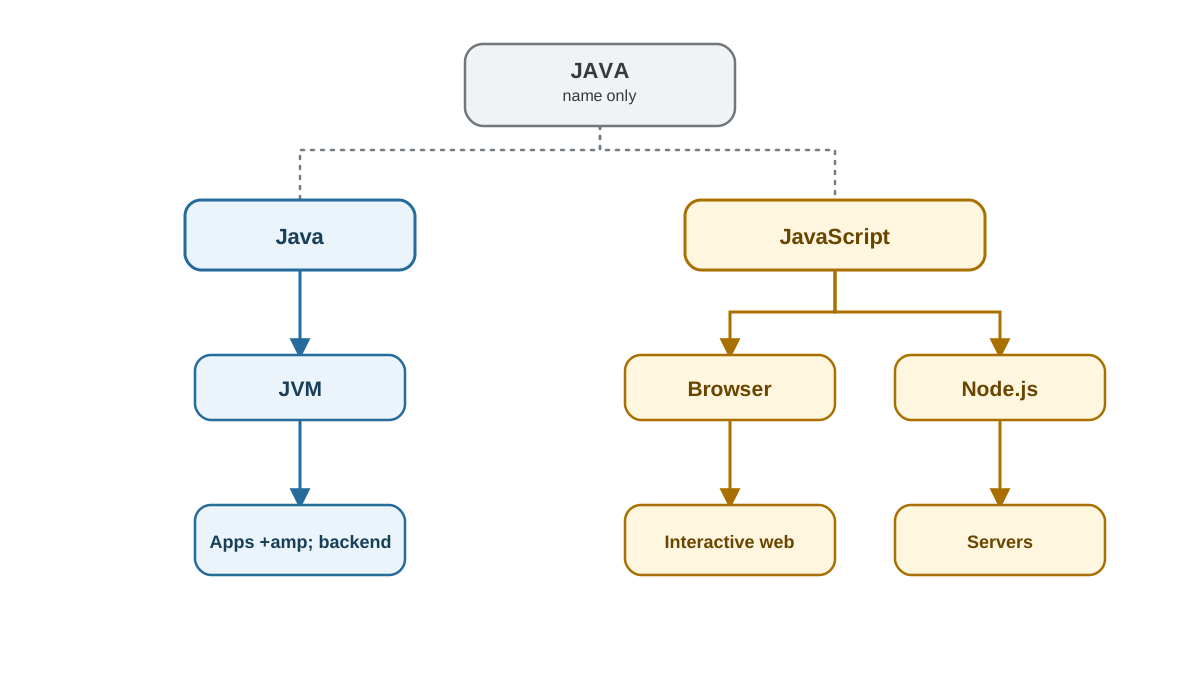
In 1995, Netscape was building a browser. A developer there created a small scripting language for web pages. It was first called Mocha, then LiveScript. Around the same time, Java was becoming a big deal in the software world. So the name was changed to JavaScript — a marketing decision meant to ride Java's popularity.
That is the whole connection. A naming decision, not a technical one.
A few details that trip up beginners:
- JavaScript is not a simplified Java. It is not a subset, a dialect, or a newer version.
- The official standard behind JavaScript is called ECMAScript. That is a third name for the same language, which is why the naming gets confusing fast.
- Both names are trademarks of Oracle in the U.S. and other countries. That is a legal detail, not a technical one.
If you want the fuller picture of what JavaScript actually is and how it runs in a browser, that is covered separately. For now, hold onto this: the names are related, the languages are not.
Knowledge check
Check your understanding
Answer this question before you continue.
The One-Line Difference
Here is the sentence to remember:
Java and JavaScript are separate languages with different common uses. Java is typically used for standalone applications, Android apps, and backend systems. JavaScript is typically used to make web pages interactive, and it can also run on servers through a runtime like Node.js.
That is the core of it. Everything else is detail.
Here is the trap. Both languages use curly braces, semicolons, and similar-looking loops and if-statements. A beginner sees two code samples side by side and assumes they must be related.
They look similar because both borrowed C-style syntax — the punctuation conventions that came from the C language. That is a shared ancestor, not a shared identity. Two languages can use the same punctuation and still follow completely different rules about data types, objects, and how code actually runs.
Similar surface. Different machinery underneath.
Knowledge check
Check your understanding
Answer this question before you continue.
Side-by-Side Comparison for Beginners
| Java | JavaScript | |
|---|---|---|
| Main use | Standalone apps, Android, backend systems | Interactive web pages, and more |
| Where it commonly runs | Java Virtual Machine (JVM) | Browser engine, or a runtime like Node.js |
| How it executes | Compiled to bytecode, then run | Interpreted as the script runs |
| Typing | Statically typed — types are fixed | Dynamically typed — types can change |
| To get started | Install a development kit (JDK) | Open a text file or the browser console |
If you remember only one row, remember main use. Java is built for standalone applications that run on a virtual machine. JavaScript is built for making web pages interactive inside the browser you already have open. That difference in purpose explains most of the rest.
Common mistake: Reading the "where it runs" row as a hard rule. JavaScript also runs on servers through Node.js, and Java can power the backend of a web product. The table describes common roles, not exclusive boundaries.
Knowledge check
Check your understanding
Answer this question before you continue.
What Each Language Is Actually Used For
Java shows up in Android apps, large business and banking systems, and backend services where stability and scale matter. It is a workhorse for big, long-lived software.
JavaScript shows up in the interactive parts of nearly every website you use: buttons that respond, forms that check your input, content that updates without reloading the page.
And here is the part that surprises people: JavaScript also runs outside the browser. Runtimes like Node.js let it power servers too. The old idea that "JavaScript is only for websites" is outdated.
The two languages often appear in the same product. A JavaScript front end talking to a Java backend is a normal setup, not a contradiction. They are colleagues, not competitors.
Knowledge check
Check your understanding
Answer this question before you continue.
Which One Should You Learn First?
Use your goal as the deciding factor, not the language's reputation.
- If you want to build things you can see and click today — web pages, small apps, interactive tools — start with JavaScript.
- If your goal is Android apps or enterprise backend work, Java is the more direct path, but it asks more of a first-time learner.
JavaScript is generally the gentler first language. No install, immediate visible feedback in the browser, and a short path from idea to running code. Java is not harder because it is better. It is harder because it enforces more rules up front — and those rules pay off later in large codebases.
State your goal clearly, and the choice usually makes itself.
When Not to Reach for Either One
A few honest boundaries:
- If you only need static text and images on a page, HTML and CSS are enough. JavaScript is for behavior, not layout.
- If you need heavy number crunching, data analysis, or machine learning, other languages are usually the better fit.
- Do not pick Java because it sounds more serious. Do not pick JavaScript because it is popular. Match the language to the output you want.
And set your expectations: both languages are large. Expect weeks, not days, before either one feels comfortable. That is normal, not a sign you are doing it wrong.
What This Site Teaches
This site teaches JavaScript — from browser basics through to building real web projects. Java is not covered here, and that is a deliberate scope choice, not an oversight.
Everything ahead assumes zero prior programming experience. You will write code in the browser, run it, see output, and change it.
Here is your first action. Open your browser, press F12 to open the developer console, and type this:
console.log("JavaScript is running on my machine");
JavaScript is running on my machine
That is JavaScript executing on the computer you already own, with nothing installed. No setup, no compiler, no virtual machine.
The rule to carry forward: match the language to the output you want, not to the name. If you want to build interactive things on the web, you are in the right place. Start with the next lesson in this path, and keep that console open.
Knowledge check
Final check
Finish the article by checking the ideas you just learned.
References
Want a more structured JavaScript path?
Use the JavaScript for AI Applications Starter Pack to turn individual tutorials into a focused path from language fundamentals to interactive AI applications.
JavaScript for AI Applications Starter Pack
Build the JavaScript foundation behind modern interactive applications. The JavaScript for AI Applications Starter Pack takes you from core language concepts through functions, browser events, forms, DOM updates, application state, debugging, and practical projects—so you can learn how interfaces take input, work with structured data, respond to users, and turn results into experiences people can actually use.
- 253-page illustrated PDF
- 12 guided JavaScript chapters
- Visual concept diagrams
- Self-assessment quizzes
- Bonus deep-dive sections
- DOM, events, forms & application state
- Browser projects, debugging & practical workflows
Coming soon


