
Work with JSON in JavaScript: Parse and Stringify Data
You log a value from an API or from localStorage, and it looks exactly like an object. You can see the keys. You can see the values. So you try to read a…

Key topics
You log a value from an API or from localStorage, and it looks exactly like an object. You can see the keys. You can see the values. So you try to read a property off it, and you get undefined.
That moment is where most beginners get stuck, and the fix is not a new method. It is a better mental model. JSON is not an object. JSON is text that describes data. JavaScript cannot touch that data until you convert it, and that conversion is the whole job of JSON.parse and JSON.stringify.
Two directions, one pair of methods: parse in, stringify out. Let's make that concrete.
JSON Is Text, Not an Object
JSON stands for JavaScript Object Notation. The syntax was inspired by JavaScript object literals, which is exactly why it fools you. It looks like code. It is not code. It is a string.
Here is the smallest experiment that proves it. Run this in your browser console or a Node script:
const jsonText = '{"name": "Ada", "age": 36}';
const realObject = { name: "Ada", age: 36 };

console.log(typeof jsonText);
console.log(typeof realObject);
console.log(jsonText.name);
console.log(realObject.name);
string
object
undefined
Ada
Look at the third line. jsonText.name gives undefined because you are indexing into a string, not reading a property from an object. Strings do not have a name property, so JavaScript hands you undefined instead of an error. That silent undefined is the symptom that sends beginners hunting for a bug in the wrong place.
Why does JSON exist at all if JavaScript already has objects? Because objects live in memory, and memory does not travel. You cannot email an object, store it in a text file, or send it over HTTP. JSON is a data interchange format — a shared text shape that a JavaScript client, a Python server, and a config file can all agree on. You already know how to build objects and arrays. JSON is how those structures leave your program and come back.
Note: JSON is language-independent. It was inspired by JavaScript, but it is not owned by JavaScript. That is why almost every language ships a JSON library.
Parse JSON Text into Usable Data
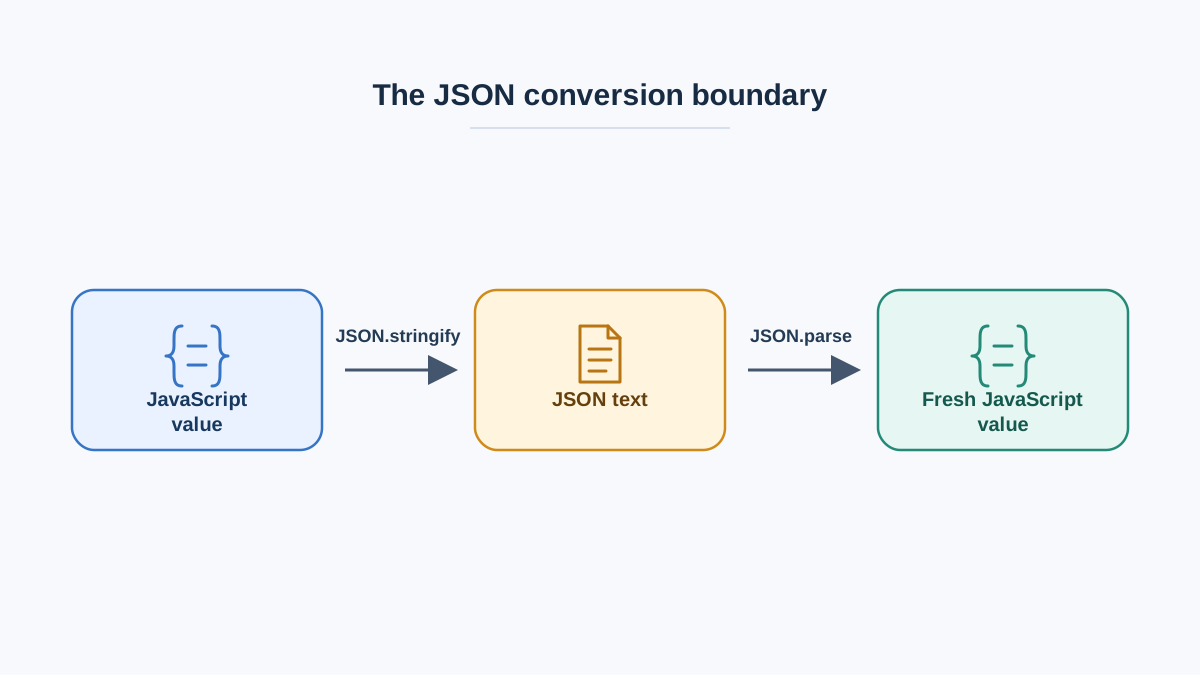
JSON.parse(text) takes a JSON string and returns the JavaScript value it describes. That value can be an object, an array, a string, a number, a boolean, or null.
const jsonText = '{"user": {"name": "Ada", "roles": ["admin", "editor"]}}';

console.log(typeof jsonText);

const data = JSON.parse(jsonText);

console.log(typeof data);
console.log(data.user.name);
console.log(data.user.roles[1]);
string
object
Ada
editor
Notice the type change: string in, object out. After parsing, data behaves like any object literal you wrote yourself. There is no wrapper, no special API, no .get() call. You use dot syntax and bracket syntax exactly as you already do.
Arrays are valid JSON too, and parsing works the same way:
const scores = JSON.parse('[10, 20, 30]');
console.log(Array.isArray(scores));
console.log(scores[0] + scores[2]);
true
40
The rule to carry forward: parse once, then work with the result like normal JavaScript. If you find yourself calling JSON.parse on the same value repeatedly, you probably parsed too early or stored the wrong thing.
Knowledge check
Check your understanding
Answer this question before you continue.
Stringify JavaScript Values Back into JSON
JSON.stringify(value) does the reverse. It takes a JavaScript value and returns a JSON string.
const user = { name: "Ada", age: 36, active: true };

const jsonText = JSON.stringify(user);

console.log(typeof jsonText);
console.log(jsonText);
string
{"name":"Ada","age":36,"active":true}
Two things to notice. First, typeof returns "string" — beginners often expect an object back and get confused when they try to read a property off the result. Second, the keys are now wrapped in double quotes. That is not decoration; it is the JSON format.
The round trip is what makes the pair memorable. Build an object, stringify it, parse it back, and confirm the values survived:
const original = { name: "Ada", age: 36 };
const text = JSON.stringify(original);
const restored = JSON.parse(text);

console.log(restored.name);
console.log(restored.age);
console.log(original === restored);
Ada
36
false
That last line matters. restored is a fresh copy, not the original object. The values match, but the reference does not. Any change you make to restored will not appear in original.
Knowledge check
Check your understanding
Answer this question before you continue.
What JSON Can and Cannot Represent
JSON has a small vocabulary: objects, arrays, strings, numbers, booleans, and null. That is the entire list. Anything outside it gets reshaped or dropped during JSON.stringify, and the reshaping is silent.
| JavaScript value | What appears in the JSON output | Why it matters |
|---|---|---|
undefined (as a property) | The property is removed | You lose the key entirely |
undefined (inside an array) | null | Array positions are preserved, values are not |
| Function or method | Skipped | Methods do not survive a round trip |
NaN, Infinity | null | Numeric edge cases become indistinguishable from "no value" |
Symbol | Skipped | Symbol-keyed data disappears |
Date | An ISO string like "2024-01-01T00:00:00.000Z" | Comes back as a string, not a Date |
Here is the failure in code:
const record = {
  id: 1,
  nickname: undefined,
  score: NaN,
  createdAt: new Date("2024-01-01T00:00:00Z"),
  greet() { return "hi"; }
};

const text = JSON.stringify(record);
console.log(text);

const back = JSON.parse(text);
console.log(typeof back.createdAt);
console.log(back.nickname);
{"id":1,"score":null,"createdAt":"2024-01-01T00:00:00.000Z"}
string
undefined
The nickname key is gone. score became null. greet vanished. And createdAt came back as a string, so calling back.createdAt.getFullYear() will throw.
Common mistake: Assuming a
Datesurvives the round trip. It does not. If you need a realDateafter parsing, rebuild it yourself:new Date(back.createdAt).
The decision rule is simple. If a value must survive a round trip, store it in a JSON-safe form — a string, number, boolean, array, plain object, or null — and rebuild the richer type after parsing.
Knowledge check
Check your understanding
Answer this question before you continue.
When Parsing Fails: Malformed JSON
JSON.parse does not return null on bad input. It throws a SyntaxError. If you are not ready for that, your script stops.
The most common causes are small syntax slips that JavaScript tolerates but JSON does not:
- Single quotes instead of double quotes
- A trailing comma after the last property
- Unquoted keys
- Comments (
//or/* */) - Passing an object that is already parsed
Here is what the error looks like:
try {
  JSON.parse("{'name': 'Ada'}");
} catch (error) {
  console.log(error.name);
  console.log(error.message);
}
SyntaxError
Unexpected token '
Read the message. It usually names the character or position where parsing broke, which points straight at the offending spot. In this case, the single quote is the culprit — JSON requires double quotes.
When the input comes from outside your program — an API, a file, localStorage, a user paste — wrap the parse in try/catch and decide what the fallback should be:
function safeParse(text, fallback = null) {
  try {
    return JSON.parse(text);
  } catch (error) {
    console.log("Could not parse:", error.message);
    return fallback;
  }
}

console.log(safeParse('{"ok": true}'));
console.log(safeParse("not json"));
{ ok: true }
Could not parse: <engine-specific SyntaxError message>
null
The exact wording of error.message varies between JavaScript engines and versions, so do not treat the text above as a fixed string. What stays stable is the behavior: parsing throws, the catch runs, and your fallback is returned.
Tip: Log the raw string before parsing. If you only log the parsed result, you never see what the parser actually saw.
Knowledge check
Check your understanding
Answer this question before you continue.
Common Beginner Mistakes to Avoid
These are the mistakes I see most often, and each one comes from mixing up text and objects.
Stringifying twice. The second call escapes the first result, so you get a string full of backslashes:
const person = { name: "Ada" };
const once = JSON.stringify(person);
const twice = JSON.stringify(once);

console.log(once);
console.log(twice);
{"name":"Ada"}
"{\"name\":\"Ada\"}"
If you see backslashes in your output, you almost certainly stringified something that was already a string.
Parsing something that is already an object. JSON.parse expects a string. Pass it an object and it throws, because it will try to coerce the object to a string first and then fail on the result.
Assuming a parsed value is a live reference. It is a copy. Changes do not travel back to the original.
Expecting methods and class instances to survive. JSON.stringify keeps plain data only. Prototypes, getters, and custom methods are not part of the format.
A quick habit that prevents all four: log typeof before and after every conversion until the pattern becomes automatic.
Where You Will Actually Use This
You will meet this pair constantly, and recognizing the pattern early saves a lot of confusion.
- Reading an API response. When you read the response as text — for example with
response.text()— you parse it before touching the data. Many browser helpers, such asresponse.json(), do that parse step for you and hand you a value directly. - Saving to
localStorage. Storage only holds strings, so you stringify on the way in and parse on the way out. - Sending a POST request. The body must be a JSON string, so you stringify the object first.
- Config files and fixtures. JSON is the format you will read most often when a project ships sample data.
Each of these is a full topic on its own. For now, the point is orientation: check what you are actually holding. If it is JSON text, parse it. If it is a JavaScript value, work with it directly. The conversion is driven by the value in hand, not by the fact that data moved.
Practice: Round-Trip a Small Object
Here is a deliberate drill that exercises both methods and forces you to observe the type changes.
Step 1. Create an object with a string, a number, a boolean, a nested object, and one undefined property.
const profile = {
  username: "ada",
  level: 7,
  verified: true,
  settings: { theme: "dark" },
  lastSeen: undefined
};
Step 2. Stringify it and log the result. Before you run it, predict which property disappears.
const text = JSON.stringify(profile);
console.log(text);
{"username":"ada","level":7,"verified":true,"settings":{"theme":"dark"}}
lastSeen is gone. If you predicted that, the mental model is working.
Step 3. Parse the string back and compare it to the original.
const restored = JSON.parse(text);
console.log(restored.settings.theme);
console.log("lastSeen" in restored);
dark
false
Step 4. Deliberately break the JSON string — remove a quote or add a trailing comma — and read the error message.
try {
  JSON.parse('{"username":"ada",}');
} catch (error) {
  console.log(error.name);
}
SyntaxError
The parser is telling you exactly where your mental model and the format disagreed. The message text will differ across engines, but the SyntaxError name will not.
Use typeof at every stage to confirm what you are holding. Text or object — the answer changes what you can do next.
What to Do Next
The decision rule is short enough to memorize: text coming in gets parsed, data going out gets stringified, and anything that crosses that boundary must be JSON-safe.
The best next step is to use this pair inside a real boundary. Try a fetch call where you read the response as text and parse it yourself, then compare that with a version that uses response.json() and skips the manual parse. Or save a small object to localStorage and read it back on the next page load. Both exercises force you to handle the conversion in a working context instead of a console snippet, and both will teach you why the parse step exists the moment you forget it.
Knowledge check
Final check
Finish the article by checking the ideas you just learned.
References
Want a more structured JavaScript path?
Use the JavaScript for AI Applications Starter Pack to turn individual tutorials into a focused path from language fundamentals to interactive AI applications.
JavaScript for AI Applications Starter Pack
Build the JavaScript foundation behind modern interactive applications. The JavaScript for AI Applications Starter Pack takes you from core language concepts through functions, browser events, forms, DOM updates, application state, debugging, and practical projects—so you can learn how interfaces take input, work with structured data, respond to users, and turn results into experiences people can actually use.
- 253-page illustrated PDF
- 12 guided JavaScript chapters
- Visual concept diagrams
- Self-assessment quizzes
- Bonus deep-dive sections
- DOM, events, forms & application state
- Browser projects, debugging & practical workflows
Coming soon


