
Handle JavaScript Errors with try, catch, and throw
One bad line can take down everything after it. Here is how to catch that failure at the exact point it happens, and how to throw your own when a function…

Key topics
One bad line can take down everything after it. Here is how to catch that failure at the exact point it happens, and how to throw your own when a function cannot honestly return a real answer.
You have written a few functions by now. You can pass arguments in and get values back. Then one day you run a script and the console turns red. The line that broke stops, and every line after it never runs. That is the moment error handling stops being a theory topic and becomes something you actually need.
This article is about ordinary synchronous code — the kind that runs top to bottom, one line after another. We will look at what a thrown error really does to your program, how try and catch give you a place to land, when finally runs, and how to decide between throwing an error and returning a value.
Why One Bad Line Stops Everything
Start with a tiny script. Three lines, one mistake:
console.log("Line 1: starting");
console.log(missingVariable);
console.log("Line 3: this never runs");
Line 1: starting
Uncaught ReferenceError: missingVariable is not defined
Line 1 prints. Line 2 throws a ReferenceError because missingVariable was never declared. Line 3 never gets a chance.
Here is the mental model that matters: an exception is a control-flow jump, not just a message in the console. The moment an error is thrown, JavaScript stops executing the current path and starts looking for a handler. If it finds none, the program stops and reports the error.
That word — uncaught — is the whole story. The error was thrown, and nothing caught it.
Runtime errors vs. syntax errors
Not every red message can be caught. There are two very different situations:
- Runtime errors happen while valid code is running. A missing variable, calling a method on
undefined, parsing bad JSON. These are catchable. - Syntax errors happen before your code runs at all. If you forget a closing brace, the engine refuses to run the file. No
try/catchcan help, because the code never started.
Note: If your
try/catchseems to do nothing at all, check for a syntax error first. The engine never reached yourtryblock.
Knowledge check
Check your understanding
Answer this question before you continue.
Your First try/catch Block
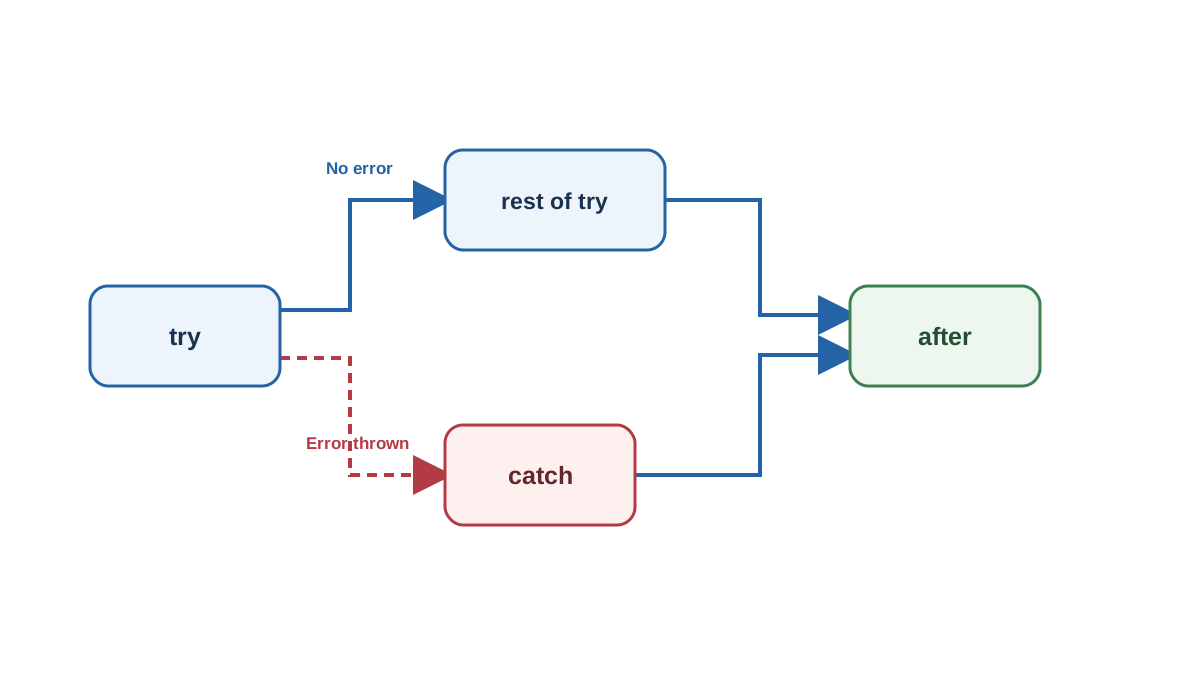
The try/catch statement gives you two paths through the same block of code. Here is the smallest useful version:
try {
  console.log("Trying something risky");
  console.log(missingVariable);
  console.log("This line is skipped");
} catch (err) {
  console.log("Caught an error");
}
Trying something risky
Caught an error
Notice what happened. The try block started running, hit the broken line, and immediately jumped to catch. The line after the error never ran. The catch block received the error as err.
Now run the same structure with no error inside:
try {
  console.log("Trying something safe");
  console.log("All good");
} catch (err) {
  console.log("This never runs");
}
Trying something safe
All good
When nothing throws, catch is skipped entirely. That is the key behavior: catch only runs when something inside try actually throws.
Knowledge check
Check your understanding
Answer this question before you continue.
Reading the Error Object
The value your catch block receives is usually an Error object. It carries useful details, and you should use them instead of logging a vague string.
Two properties matter most right now:
nametells you the type of error, such asReferenceError,TypeError, orSyntaxError.messagetells you what went wrong in plain words.
try {
  console.log(missingVariable);
} catch (err) {
  console.log(`${err.name}: ${err.message}`);
}
ReferenceError: missingVariable is not defined
Most environments also give you err.stack, which points to where the error was created. It is useful later when you debug deeper problems, but you do not need it yet.
Common mistake: An empty
catchblock. Writingcatch (err) {}hides the bug instead of handling it. If you truly want to ignore an error, log it first so future-you can see what happened.
Knowledge check
Check your understanding
Answer this question before you continue.
Throwing Your Own Errors
So far you have been catching errors JavaScript throws for you. But sometimes your code is the one that knows something is wrong.
That is what throw is for. It creates an error and sends it outward, stopping the current path just like a built-in error would.
function square(number) {
  if (typeof number !== "number") {
    throw new Error("square expects a number");
  }
  return number * number;
}

try {
  console.log(square(4));
  console.log(square("four"));
} catch (err) {
  console.log(`${err.name}: ${err.message}`);
}
16
Error: square expects a number
The first call returns 16. The second call hits the throw, jumps straight to catch, and the line after it never runs.
Prefer throw new Error("message") over throwing a bare string. An Error object carries name, message, and stack, so whoever catches it has real information to work with.
throw vs return: Which One Do You Want?
This is the decision that trips up most beginners. When a function cannot produce a valid result, should it return something like null, or should it throw?
Returning a sentinel value — null, undefined, -1, an empty string — forces every caller to remember to check. Forget one check, and the invalid value flows silently into the rest of your program. That is how a small bug becomes a confusing bug three functions later.
Throwing makes failure impossible to ignore. The caller either handles it or the program stops loudly.
| Signal | Who must check | If ignored | Best fit |
|---|---|---|---|
return null | Every caller | Silent wrong data | Failure is normal and expected |
throw new Error(...) | The nearest catch | Program stops loudly | Function cannot fulfill its contract |
My rule of thumb: return when failure is a normal outcome the caller can act on; throw when the function cannot honestly do its job and continuing would produce wrong data.
For example, a search function returning null for "no results" is fine — no results is a normal answer. But a parseConfig function that receives broken input should throw, because returning a half-parsed config would poison everything downstream.
Note: This article covers synchronous code only. Errors inside promises,
setTimeout, or async callbacks behave differently and need their own approach — that is a separate topic.
Knowledge check
Check your understanding
Answer this question before you continue.
When finally Runs
The third block is finally, and it has one job: run no matter what happened.
function checkValue(value) {
  try {
    if (value < 0) {
      throw new Error("Value cannot be negative");
    }
    return "Value is fine";
  } catch (err) {
    return `Handled: ${err.message}`;
  } finally {
    console.log("Cleanup runs here");
  }
}

console.log(checkValue(5));
console.log(checkValue(-1));
Cleanup runs here
Value is fine
Cleanup runs here
Handled: Value cannot be negative
Look closely at the order. finally runs before the caller receives the returned value. That is true whether try succeeded, whether catch handled the error, or whether the error was rethrown.
This makes finally the right place for cleanup that must always happen: hiding a loading spinner, closing a file, resetting a flag.
Warning: A
returnorthrowinsidefinallyoverrides whatever happened earlier. Avoid putting either one there — it silently swallows the real result.
Rethrowing Errors You Cannot Handle
A catch block that swallows every error turns real bugs into silence. The fix is a pattern called rethrowing: handle what you understand, pass the rest upward.
try {
  try {
    throw new Error("Something unexpected");
  } catch (err) {
    console.log(`Inner saw: ${err.message}`);
    throw err;
  } finally {
    console.log("Inner finally");
  }
} catch (err) {
  console.log(`Outer handled: ${err.message}`);
}
Inner saw: Something unexpected
Inner finally
Outer handled: Something unexpected
The inner catch logged the error, then rethrew it with throw err. The outer catch picked it up. Notice that an error thrown inside a catch block is caught by the next outer try, not the same one.
This pattern keeps your error handling honest. You deal with the cases you actually know how to fix, and you let everything else bubble up to code that has more context.
Common Beginner Mistakes
A few failure modes cost beginners the most time. Here they are with quick fixes:
- One giant
tryaround the whole script. When something breaks, you have no idea which line caused it. Wrap small, specific blocks instead. - Using
try/catchfor normal control flow. If you find yourself throwing errors to steer ordinary logic, useif/elseinstead. Savetry/catchfor genuinely exceptional situations. - Catching an error and returning a fake success value. This pushes the bug downstream where it is harder to trace. If you cannot fix it, rethrow it.
Practice: Make a Function Fail Loudly
Here is a small task that uses all three pieces together. Try it yourself before you look at the solution below.
Write a function that takes a number and returns its square, but throws an Error if the argument is not a number. Call it once with a valid number and once with a string, wrapping each call in try/catch. Add a finally block that logs "done checking" and confirm it prints in both cases.
When you are ready, compare your version with this reference solution:
function square(number) {
  if (typeof number !== "number") {
    throw new Error("Expected a number");
  }
  return number * number;
}

function run(value) {
  try {
    console.log(`Result: ${square(value)}`);
  } catch (err) {
    console.log(`Failed: ${err.message}`);
  } finally {
    console.log("done checking");
  }
}

run(6);
run("six");
Result: 36
done checking
Failed: Expected a number
done checking
Stretch goal: Move the throw into an inner try/catch, rethrow the error, and handle it in an outer try/catch. Watch the console order to confirm which block runs first.
What to Carry Forward
Three rules cover almost everything in synchronous code:
- Wrap code in
try/catchwhere failure is likely and recoverable. - Use
throwwhen a function cannot honestly return a valid result. - Put cleanup in
finallywhen it must happen no matter what.
The best next step is the practice function above. Run it, break it, change the error message, and watch how the output shifts. That loop — run, observe, adjust — is how error handling stops being syntax and becomes instinct.
Once synchronous try/catch feels natural, asynchronous error handling is the next topic worth learning. It behaves differently, and it will make a lot more sense now that you understand what a thrown error actually does.
Knowledge check
Final check
Finish the article by checking the ideas you just learned.
References
Want a more structured JavaScript path?
Use the JavaScript for AI Applications Starter Pack to turn individual tutorials into a focused path from language fundamentals to interactive AI applications.
JavaScript for AI Applications Starter Pack
Build the JavaScript foundation behind modern interactive applications. The JavaScript for AI Applications Starter Pack takes you from core language concepts through functions, browser events, forms, DOM updates, application state, debugging, and practical projects—so you can learn how interfaces take input, work with structured data, respond to users, and turn results into experiences people can actually use.
- 253-page illustrated PDF
- 12 guided JavaScript chapters
- Visual concept diagrams
- Self-assessment quizzes
- Bonus deep-dive sections
- DOM, events, forms & application state
- Browser projects, debugging & practical workflows
Coming soon


