
Model Application Data with JavaScript Objects
You have probably already written code like this: a cartTotal here, a userName there, an isLoggedIn flag somewhere else. It works, right up until you…

Key topics
Five variables, one feature, and a bug that only shows up on Tuesday.
You have probably already written code like this: a cartTotal here, a userName there, an isLoggedIn flag somewhere else. It works, right up until you update one variable and forget the other. Now your total says $42 and your item count says 3. Nothing threw an error. The page just quietly lies to you.
That is the real problem with loose variables: related data with no shared structure has no single place to read from and no single place to update. An object gives that related state one name, one shape, and one place to live. It does not, by itself, keep every value in sync — but it gives you the structure you need to do that deliberately.
By the end of this article, you will model a small feature as an object, read values out of it, nest data inside it, and update it without breaking the rest. You already know object literals and arrays exist. Now we use them to describe a feature, not just to store a value.
Why Loose Variables Break Down
Here is a tiny shopping cart written the way most beginners start:
let itemName = "Keyboard";
let itemPrice = 79;
let quantity = 2;
let cartTotal = itemPrice * quantity;
let isDiscounted = false;
Run it and everything is fine. cartTotal is 158. Now imagine the user changes the quantity to 3. You update quantity:
quantity = 3;
But cartTotal still says 158. You changed one fact and left a second fact stale. The data drifted apart because nothing tied it together.
An object is a named bundle of related state. Instead of five loose variables, you get one value that holds all five facts, and that bundle is the thing you log, pass to a function, or store in an array. When you need to know what the cart looks like, you look in one place.
That single source of truth is what people mean by JavaScript application state. It is just the current values your app is working with, grouped so they stay consistent.
Knowledge check
Check your understanding
Answer this question before you continue.
Model One Feature as an Object
Let's turn that cart into a model. A model is a simplified representation of something real — a cart item, a user, a task — written as an object.
const cartItem = {
  name: "Keyboard",
  price: 79,
  quantity: 2,
  isDiscounted: false
};

console.log(cartItem);
Save this as cart.js and run it with Node:
node cart.js
{ name: 'Keyboard', price: 79, quantity: 2, isDiscounted: false }
Notice what you have now. The JavaScript object properties — name, price, quantity, isDiscounted — are named, so the model reads like a description of a real thing. The values have different types on purpose: a string, a number, a boolean. Real features mix types all the time.
Property names are a design choice, not decoration. price is better than p. isDiscounted is better than flag. Predictable, descriptive keys make the model readable six months from now, when you have forgotten what flag meant.
And because the object is one value, you can log it, pass it to a function, or drop it into an array as a unit. That last part matters later.
Read Values Without Guessing
Reading a value from an object uses dot notation: the object name, a dot, then the property name.
console.log(cartItem.name);
console.log(cartItem.quantity);
Keyboard
2
Dot notation is for known, fixed property names. When the key is stored in a variable, or the name contains spaces, you use bracket notation instead:
const key = "price";
console.log(cartItem[key]);
console.log(cartItem["isDiscounted"]);
79
false
The difference is simple. Dot notation is for keys you type literally. Bracket notation is for keys that come from somewhere else — a variable, a form field, a loop.
Common mistake
Reading a property that does not exist does not throw an error. It returns undefined.
console.log(cartItem.nmae);
undefined
That silent result is dangerous. A typo looks like missing data, and you can spend an hour hunting a bug that is really a spelling error. When a value comes back undefined and you expected something, log the object itself to see its real keys:
console.log(Object.keys(cartItem));
[ 'name', 'price', 'quantity', 'isDiscounted' ]
Object.keys() lists the property names. Object.values() lists the values. Both are useful when you are unsure what is actually in the model.
Knowledge check
Check your understanding
Answer this question before you continue.
Nest Objects to Match Real Data
Real data has layers. A cart item might have shipping details. A user has an address. Instead of flattening everything into shippingStreet, shippingCity, shippingZip, you nest a sub-object:
const cartItem = {
  name: "Keyboard",
  price: 79,
  quantity: 2,
  isDiscounted: false,
  shipping: {
    city: "Austin",
    zip: "78701",
    isExpress: true
  }
};
Reading through a nested object is a path, one step at a time. The outer key shipping returns the inner object. Then you reach into it:
console.log(cartItem.shipping.city);
console.log(cartItem.shipping.isExpress);
Austin
true
The payoff is readability. The top level of the model stays short and meaningful, and related details stay grouped where they belong. You can also nest deeper, but one level is enough for now. Deep trees and the tricky question of copying nested objects belong to later topics.
Knowledge check
Check your understanding
Answer this question before you continue.
Update State Predictably
Updating a single property uses the same dot notation on the left side of an assignment:
console.log(cartItem.quantity);
cartItem.quantity = 3;
console.log(cartItem.quantity);
2
3
You can add a new property or remove one. Objects are mutable, meaning the same object changes in place:
cartItem.color = "black";
delete cartItem.isDiscounted;
console.log(cartItem);
{
  name: 'Keyboard',
  price: 79,
  quantity: 3,
  shipping: { city: 'Austin', zip: '78701', isExpress: true },
  color: 'black'
}
Note
You declared cartItem with const, yet the properties changed. That confuses almost everyone at first. const stops you from rebinding the variable — you cannot write cartItem = somethingElse. It does not stop you from changing properties inside the object. The variable still points at the same object; you just edited what is inside it.
The decision rule for updates is short: update the property that owns the fact, and update it in one place. If the quantity changes, change quantity. Do not scatter assignments across five functions and hope they stay in sync. That is exactly how the loose-variable bug from the start of this article creeps back in.
Knowledge check
Check your understanding
Answer this question before you continue.
Fix the Stale Total
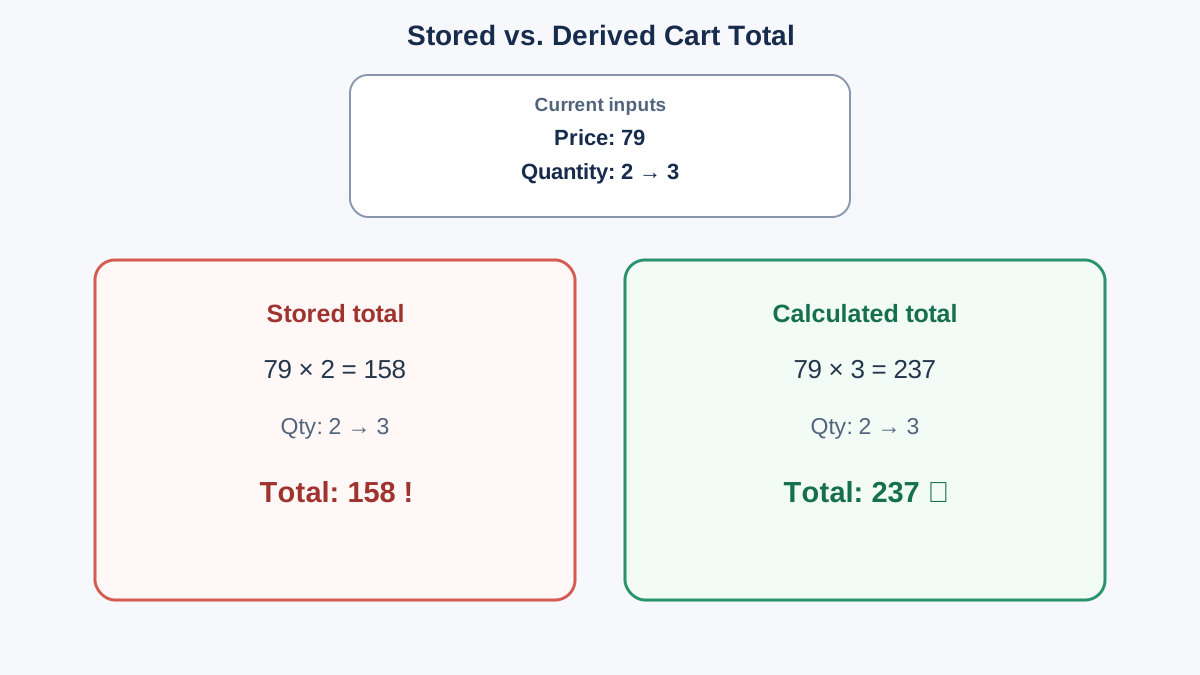
Here is the part the first example left hanging. Grouping values into an object does not automatically recalculate a total. You still have to decide which values are the source of truth and which ones are derived.
The fix is to stop storing cartTotal as a separate fact. Store the source values — price and quantity — and calculate the total when you need it:
const cartItem = {
  name: "Keyboard",
  price: 79,
  quantity: 2
};

function getCartTotal(item) {
  return item.price * item.quantity;
}

console.log("Total:", getCartTotal(cartItem));

cartItem.quantity = 3;

console.log("Total after quantity change:", getCartTotal(cartItem));
Total: 158
Total after quantity change: 237
Now the total can never go stale, because it is not stored anywhere. It is computed from the current state every time you ask. The object holds the facts; the function derives the answer.
This is the mental model worth keeping: an object organizes state, but your code still has to keep dependent values consistent. Sometimes that means calculating on demand, as above. Sometimes it means writing an update function that changes several properties together. Either way, the object gives you one place to look — it does not do the bookkeeping for you.
Put It Together: A Runnable Feature Model
Here is a slightly larger model — a user profile with a nested address — that reads, updates, and logs in one run.
const user = {
  name: "Maya",
  age: 28,
  isActive: true,
  address: {
    city: "Portland",
    state: "OR"
  }
};

console.log("Before:", user);

console.log("City:", user.address.city);

user.age = 29;
user.address.city = "Seattle";

console.log("After:", user);
Before: {
  name: 'Maya',
  age: 28,
  isActive: true,
  address: { city: 'Portland', state: 'OR' }
}
City: Portland
After: {
  name: 'Maya',
  age: 29,
  isActive: true,
  address: { city: 'Seattle', state: 'OR' }
}
Look at what the output proves. The model held its shape — name and isActive never moved. Two updates changed exactly two things: the top-level age and the nested city. Nothing else drifted. That is the point of modeling data as an object: one place to read, one place to update, and a clear structure for keeping related facts in agreement.
Common Mistakes and How to Recover
| Mistake | What you see | How to recover |
|---|---|---|
| Typo in a property name | undefined, no error | Log the object or Object.keys() to see the real keys |
| Reading through a missing nested level | TypeError when the parent is undefined | Check each step: log user.address before user.address.city |
| Storing a derived value as its own property | A total that goes stale after an update | Calculate it from the source values, or update it in the same function that changes them |
| Overwriting the whole object | All properties replaced | Assign to one property, not the whole variable |
| Bracket notation with an unquoted key | Looks up a variable, not a property | Quote the key: user["name"], not user[name] |
The nested-level error deserves a closer look. user.address.city works only if user.address exists. If address is missing, JavaScript tries to read .city on undefined and throws. Read the path one step at a time when you are unsure.
When an Object Is the Right Model
Use an object when the data has named, known fields that describe one thing — a user, a cart item, a task, a settings panel.
Use an array when order matters or the count is unknown and you need to loop. Use an array of objects when you have many of the same kind of thing. That last shape is where most app features end up: a list of users, a list of cart items, a list of tasks. Each item is an object; the collection is an array.
If you find yourself numbering your keys — item1, item2, item3 — stop. That is an array wearing an object costume.
Practice: Model Your Own Feature
Pick one small feature you use daily: a music track, a game character, a to-do item. Model it as an object with at least four properties, one of which is nested.
Then:
- Read two values, including one from the nested object, and log them.
- Update one property and log the object before and after.
- Add one derived value — something calculated from two other properties — and write a small function that returns it. Change one of the source properties and call the function again to confirm the derived value updates.
- Compare your output to what you expected. If they differ, log the object itself and check the real keys.
As a stretch goal, put three of these objects in an array and log the name of each one. You are not looping with map or filter yet — a plain for loop or even three manual logs is fine. The goal is to see that each object keeps its own shape inside the collection.
Where This Leads
Before you write logic for a feature, write the object first. Name the properties. Decide what nests. Decide which values are stored facts and which ones should be calculated. Then write the code that reads and updates it. The model comes before the behavior, and the behavior gets simpler because the data already has a home.
The natural next step is putting several models in an array and looping over them — reading each object's properties one at a time. That is the shape of nearly every real feature you will build, and you now have the foundation for it.
Knowledge check
Final check
Finish the article by checking the ideas you just learned.
References
Want a more structured JavaScript path?
Use the JavaScript for AI Applications Starter Pack to turn individual tutorials into a focused path from language fundamentals to interactive AI applications.
JavaScript for AI Applications Starter Pack
Build the JavaScript foundation behind modern interactive applications. The JavaScript for AI Applications Starter Pack takes you from core language concepts through functions, browser events, forms, DOM updates, application state, debugging, and practical projects—so you can learn how interfaces take input, work with structured data, respond to users, and turn results into experiences people can actually use.
- 253-page illustrated PDF
- 12 guided JavaScript chapters
- Visual concept diagrams
- Self-assessment quizzes
- Bonus deep-dive sections
- DOM, events, forms & application state
- Browser projects, debugging & practical workflows
Coming soon


