
Strict vs. Loose Equality in JavaScript: When to Use === and ==
Two equals signs and three equals signs look like a typo. They are not. They are two different questions, and one of them lies to you politely.

Key topics
Two equals signs and three equals signs look like a typo. They are not. They are two different questions, and one of them lies to you politely.
Here is the moment that usually starts the confusion. You write a check for an empty input box, expecting it to catch a missing value:
const userInput = "";

if (userInput == 0) {
  console.log("Treating this as zero");
}
Treating this as zero
An empty string is not zero. And yet the branch fired. Nothing crashed, nothing warned you — the code simply took a path you did not intend. That quiet wrong turn is what this article is about.
Most beginners carry a weak model: == and === are "basically the same, one is just stricter." That model is why the snippet above feels like a betrayal. The real mechanism is simpler and more useful: === compares type and value directly, while == runs a conversion step first and then compares. Once you can see that conversion step, you can predict the result instead of being surprised by it.
You already know from working with variables and data types that JavaScript has numbers, strings, booleans, null, and undefined. You also know that = assigns a value. Keep that last fact close — it comes back later as the most expensive beginner bug in this whole topic.
The Comparison That Surprised You
Start with the smallest possible experiment. Open your browser console and run this:
console.log(5 == "5");
console.log(5 === "5");
true
false
Same two values. Opposite answers. The only thing that changed is the operator.
Here is what each one is actually doing:
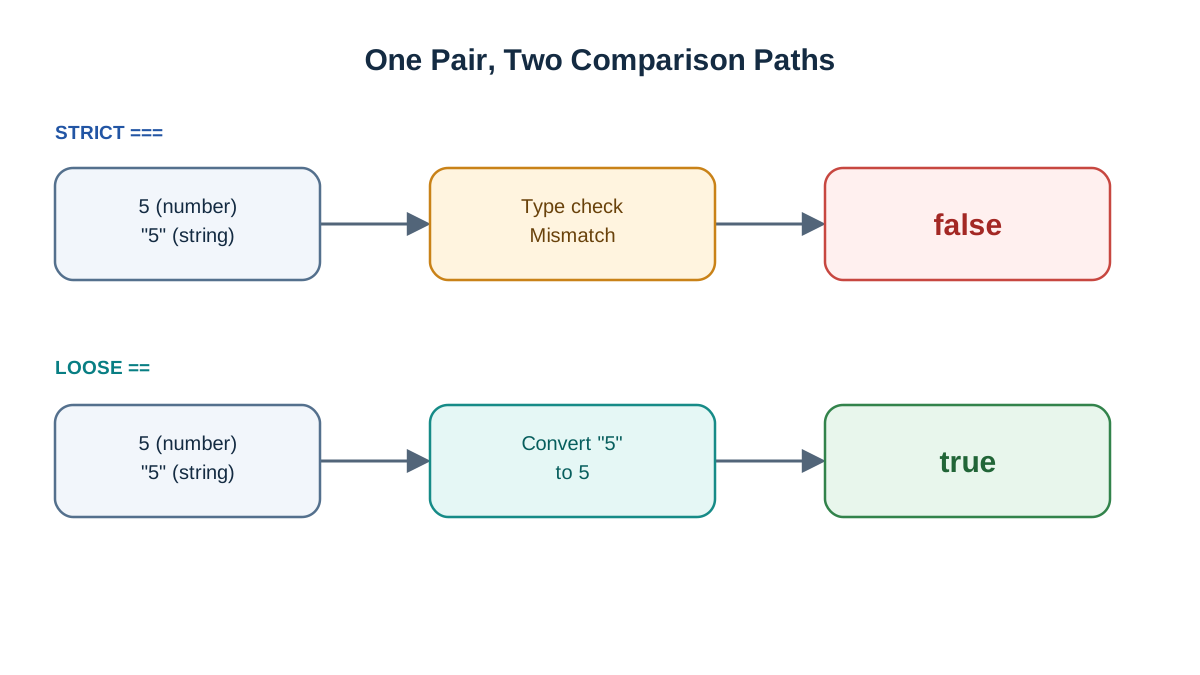
==is loose equality (also called abstract equality). It converts one side to match the other, then compares.===is strict equality. It checks the type first. If the types differ, it returnsfalseimmediately and stops.
So in the example above, 5 == "5" converts the string "5" into the number 5, and then compares 5 to 5. The === version never gets that far — a number and a string are different types, so the answer is false before any value comparison happens.
There is a third lookalike that causes real damage: = assigns, it never compares. It sets a variable's value. When you see it inside an if, treat it as a red flag, not a comparison.
Knowledge check
Check your understanding
Answer this question before you continue.
What === Actually Checks
Strict equality is the predictable operator, so let's build your default on solid ground first.
The rule runs in order:
- Are the two values the same type?
- If no — return
false. Done. - If yes — are the values equal? Return
trueorfalse.
That is the whole thing. Here it is across the types you already use:
console.log(1 === 1);              // true  — same type, same value
console.log(1 === 2);              // false — same type, different value
console.log("hi" === "hi");        // true  — same string contents
console.log("1" === 1);            // false — string vs number
console.log(true === 1);           // false — boolean vs number
console.log(null === undefined);   // false — different types
console.log(null === null);        // true
Notice the pattern: whenever the types disagree, you get false and you can move on. No conversion, no guessing.
Its natural partner is !==, the strict "not equal" operator. It is the exact opposite of ===, and it is what you reach for when you want to check that two values are not the same:
console.log(1 !== 2);       // true
console.log("1" !== 1);     // true — different types
Two numeric edge cases are worth knowing so they do not ambush you later. NaN === NaN is false — NaN means "not a number," and it is not equal to anything, including itself. And 0 === -0 is true, because JavaScript treats positive and negative zero as the same value under strict equality. You do not need to memorize more than that today.
Knowledge check
Check your understanding
Answer this question before you continue.
What == Does Behind the Scenes
Loose equality is not random. It follows a conversion algorithm, and you can trace it in plain language:
- If both sides are the same type, it falls straight through to strict comparison.
- If the types differ, it converts one side — usually toward a number — and then compares.
That "usually toward a number" is where the surprises live. Watch what happens when strings and numbers meet:
console.log("5" == 5);        // true  — "5" becomes 5
console.log(0 == "");         // true  — "" becomes 0
console.log(0 == "0");        // true  — "0" becomes 0
console.log(false == 0);      // true  — false becomes 0
console.log(null == undefined); // true — special case, they match each other
Now the trap. Look at these two lines together:
console.log("" == "0");   // false — both are strings, compared directly
console.log(0 == "");     // true  — "" is converted to 0
Both comparisons involve "" and 0 in some order, yet they disagree. That is the proof that == is not transitive: a == b and a == c do not guarantee b == c. You cannot reason about loose equality by intuition. You have to trace the conversion.
One more rule that applies to both operators: objects compare by reference, not by contents. Two arrays that look identical are still two different objects, so they are never equal:
console.log([1, 2, 3] == [1, 2, 3]);   // false
console.log([1, 2, 3] === [1, 2, 3]);  // false
If you need to compare contents, you compare them piece by piece or use a helper — the operator will not do it for you.
Knowledge check
Check your understanding
Answer this question before you continue.
Side by Side: A Quick Comparison Table
Here is the whole difference compressed into one view. Come back to this when you need a fast answer.
| Operator | Name | Converts types? | What it compares | Example | Result |
|---|---|---|---|---|---|
== | Loose equality | Yes | Values after conversion | 5 == "5" | true |
=== | Strict equality | No | Type and value | 5 === "5" | false |
!= | Loose not-equal | Yes | Values after conversion | 5 != "5" | false |
!== | Strict not-equal | No | Type and value | 5 !== "5" | true |
The negated forms are just the opposites of their positive partners. Once you trust ===, !== comes free.
When to Use === and When == Is Acceptable
Default rule: use === and !== everywhere in your own code. That single habit removes an entire category of bugs before they happen.
There is one widely accepted exception:
if (value == null) {
  // runs when value is null OR undefined
}
This works because null and undefined are loosely equal to each other and to nothing else. So value == null is a compact way to ask, "is this missing?" — catching both cases in one check. It is a deliberate choice, not a loophole, and it is the one place where == earns its keep.
When should you not use ==? Anywhere a string and a number could both arrive. That means:
- User input from forms — text fields always hand you strings.
- Numbers read from the page or an API — they may be strings in disguise.
- Anything where you are not certain of the type — which, early on, is most things.
If you want to enforce the default across a real project, linters can do it for you. The ESLint eqeqeq rule flags every == and lets you whitelist the == null pattern. The rule survives contact with a real codebase because the tool remembers what you would otherwise forget at 2 a.m.
The Mistake That Costs Beginners an Hour
This is the one I would bet on you hitting eventually:
let x = 0;

if (x = 5) {
  console.log("This always runs");
}
This always runs
There is no comparison here at all. x = 5 assigns 5 to x, and the assignment expression evaluates to 5 — which is truthy, so the branch always runs. No error is thrown. The code just quietly takes the wrong path, and you stare at it wondering why your condition is "always true."
The fix is one character:
if (x === 5) {
  console.log("Only runs when x is 5");
}
The reason this bug is so expensive is that it is silent. A typo that throws an error costs you seconds. A typo that changes which branch runs costs you an hour of reading logic that was never the problem.
Recovery habit: when a condition behaves strangely, read the operator before you read the logic. Nine times out of ten, the operator is the culprit.
Knowledge check
Check your understanding
Answer this question before you continue.
Where This Shows Up in Real Code
These rules stop being trivia the moment you touch real data. Here is where they earn their place.
Form input. A text field always gives you a string, even when the user types a number. So this fails:
const input = "0";

console.log(input === 0);          // false — string vs number
console.log(Number(input) === 0);  // true  — convert explicitly
Convert on purpose with Number(input) instead of leaning on == to do it invisibly. Explicit conversion tells the next reader exactly what you intended.
API and JSON data. A field that is missing from a response comes back as undefined. When you want to check whether a value is present at all, value == null catches both null and undefined in one line — the sanctioned exception in action.
Conditionals and loops. Every if and while you write becomes more predictable when the comparison inside uses ===. You stop wondering whether a string snuck in.
Array searching. Methods like indexOf use strict comparison under the hood. That is why [NaN].indexOf(NaN) returns -1 — it never finds a match, because NaN is not strictly equal to itself. Knowing the operator behind the method explains the result.
What to Memorize and What to Look Up
You do not need the full coercion algorithm in your head. Give yourself a small memory budget:
Memorize these four things:
===is your default comparison.!==is its partner.=assigns; it never compares.value == nullis the one exception worth keeping.
Look up everything else. Exotic combinations involving objects, symbols, or browser quirks are not worth memorizing. When a comparison surprises you, work through the conversion steps or check the documentation. Reaching for the spec on a weird case is normal engineering, not a gap in your knowledge.
Your Next Step
Here is the decision rule to carry forward: reach for === and !== by default, and allow == null only when you are checking for both null and undefined.
Now prove it to yourself. Open your browser console and run five comparisons of your own choosing — mix a number with a string, a boolean with a number, and null with undefined. Before you press Enter, write down what you expect. Then check. The gap between your prediction and the output is exactly where the learning happens.
Once that feels solid, your next move is to write an if statement that safely compares a form value: read the input, convert it explicitly with Number(), and compare with ===. That is the pattern you will use in real projects far more often than any clever coercion trick.
Knowledge check
Final check
Finish the article by checking the ideas you just learned.
References
Want a more structured JavaScript path?
Use the JavaScript for AI Applications Starter Pack to turn individual tutorials into a focused path from language fundamentals to interactive AI applications.
JavaScript for AI Applications Starter Pack
Build the JavaScript foundation behind modern interactive applications. The JavaScript for AI Applications Starter Pack takes you from core language concepts through functions, browser events, forms, DOM updates, application state, debugging, and practical projects—so you can learn how interfaces take input, work with structured data, respond to users, and turn results into experiences people can actually use.
- 253-page illustrated PDF
- 12 guided JavaScript chapters
- Visual concept diagrams
- Self-assessment quizzes
- Bonus deep-dive sections
- DOM, events, forms & application state
- Browser projects, debugging & practical workflows
Coming soon


