
Basic Operators in JavaScript
You've learned how to store values in variables. Now it's time to make those values do something. JavaScript operators are the verbs of your code—they add,…

You've learned how to store values in variables. Now it's time to make those values do something. JavaScript operators are the verbs of your code—they add, compare, update, and transform the data you've stored.
Here's a tiny taste of what you'll be able to do by the end of this article:
let score = 10;
score += 5;
console.log(score); // 15
console.log(score > 12); // true
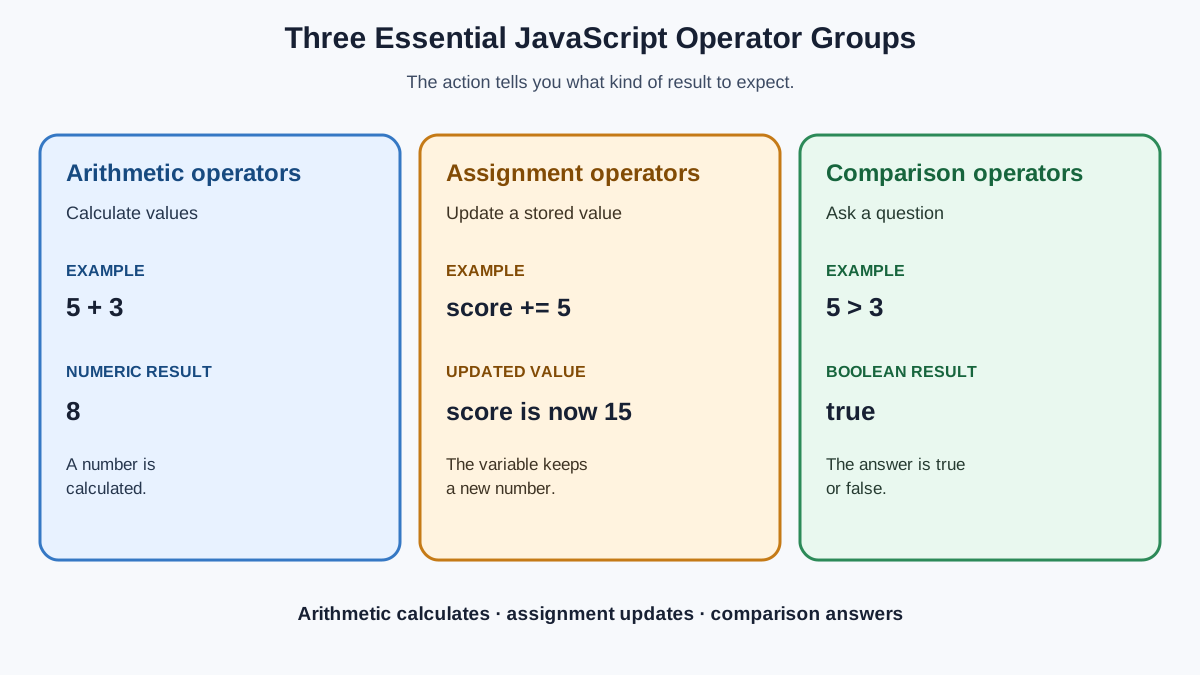
That little snippet uses three different kinds of operators. Let's break them all down.
What Is an Operator?
An operator is a symbol that tells JavaScript to perform an action on one or more values. The values an operator works on are called operands.
In this line:
let total = 5 + 3;
The + is the operator. The numbers 5 and 3 are the operands. The operator performs the action—addition—and produces a result: 8.
Think of it this way: variables are the nouns of your code, and operators are the verbs. Variables store the data; operators make it move, change, and combine.
Every operator produces a result. That result can be stored in a variable, printed to the console, or used as part of another operation. You already know how to store values—now you're learning how to transform them.
JavaScript has many operators, but this article focuses on the three groups you'll use constantly: arithmetic operators, assignment operators, and comparison operators.
Knowledge check
Check your understanding
Answer this question before you continue.
Arithmetic Operators: Doing the Math
Arithmetic operators perform mathematical calculations. The four standard ones work exactly how you'd expect from math class:
console.log(10 + 3);  // addition
console.log(10 - 3);  // subtraction
console.log(10 * 3);  // multiplication
console.log(10 / 3);  // division
13
7
30
3.3333333333333335
Notice that division can produce a decimal. JavaScript doesn't round down automatically—10 / 3 gives you the full decimal result.
Two more arithmetic operators are worth knowing early:
The remainder operator (%) returns what's left over after division:
console.log(12 % 5); // 2, because 5 goes into 12 twice with 2 left over
console.log(7 % 2);  // 1, because 2 goes into 7 three times with 1 left over
The exponentiation operator (**) raises a number to a power:
console.log(3 ** 2); // 9, which is 3 squared
console.log(2 ** 4); // 16, which is 2 to the 4th power
Arithmetic operators really shine when they work on variables, not just plain numbers. Let's use variables from the previous lesson:
let price = 25;
let quantity = 3;
let total = price * quantity;

console.log(total);
75
Here, the * operator multiplies the values stored in price and quantity, and the result gets stored in total.
One quick note: if you ever divide by zero in JavaScript, you won't crash your program. You'll get Infinity:
console.log(10 / 0);
Infinity
That's JavaScript's way of saying "this number is too big to represent."
Note: You might also see
++(increment) and--(decrement) in code you read online. They add or subtract exactly 1 from a variable. They're handy, but they can behave in confusing ways, so don't worry about mastering them yet. Just know they exist.
Knowledge check
Check your understanding
Answer this question before you continue.
Assignment Operators: Updating Variables
You already met the basic assignment operator = when you learned about variables. It stores a value on the right side into the variable on the left side:
let score = 10;
But what happens when you want to change a variable's value? You might write something like this:
let score = 10;
score = score + 5;
console.log(score);
15
Read that second line carefully: score = score + 5. JavaScript first looks at the current value of score (which is 10), adds 5, and then stores the result back into score. The variable is now 15.
This pattern is so common that JavaScript provides a shorthand. Instead of score = score + 5, you can write:
let score = 10;
score += 5;
console.log(score);
15
The += operator means "add to the current value and store the result back." It's identical to writing score = score + 5.
The same shorthand works for the other arithmetic operators:
| Shorthand | What it really means |
|---|---|
x += 5 | x = x + 5 |
x -= 5 | x = x - 5 |
x *= 5 | x = x * 5 |
x /= 5 | x = x / 5 |
Here's a longer example showing a variable changing step by step:
let score = 10;
score += 5;   // score is now 15
score -= 3;   // score is now 12
score *= 2;   // score is now 24
score /= 4;   // score is now 6
console.log(score);
6
This is exactly how running totals work in real code. A shopping cart total, a game score, a counter that tracks how many times a button was clicked—they all use this pattern of "take the current value, change it, store it back."
Knowledge check
Check your understanding
Answer this question before you continue.
Comparison Operators: Asking True or False Questions
Comparison operators compare two values and always return a boolean: either true or false. They're how you ask JavaScript questions about your data.
Here are the comparison operators you'll use most:
console.log(5 > 3);   // greater than
console.log(5 < 3);   // less than
console.log(5 >= 5);  // greater than or equal to
console.log(5 <= 4);  // less than or equal to
console.log(5 === 5); // strictly equal to
console.log(5 !== 3); // strictly not equal to
true
false
true
false
true
true
Each of these lines asks a question, and JavaScript answers with true or false.
The most important comparison operator is ===, which checks whether two values are equal. The !== operator checks whether two values are not equal.
Here's where beginners often trip up. There are two different equals signs in JavaScript:
=assigns a value to a variable.===compares two values.
let x = 5;          // assignment: stores 5 in x
console.log(x === 5); // comparison: asks "is x equal to 5?"
true
Mixing these up is one of the most common beginner mistakes in JavaScript. If you write if (x = 5) when you mean if (x === 5), you're not asking a question—you're overwriting the value of x.
Note: JavaScript also has
==and!=, which are looser versions of equality. They try to convert values to matching types before comparing, which can produce surprising results. As a beginner, make===and!==your default. They're stricter and more predictable.
Comparison operators matter because they're the foundation of decision-making in code. When you learn about if statements, you'll use comparisons to control what your program does:
let age = 18;
console.log(age >= 18); // true—this person can vote
Knowledge check
Check your understanding
Answer this question before you continue.
Common Beginner Mistakes
Every JavaScript developer has made these mistakes. Here's how to spot and fix them.
Mistake 1: Using = when you mean ===
let x = 5;
console.log(x = 3); // Oops! This assigns 3 to x, it doesn't compare
3
Instead of checking whether x equals 3, this code changes x to 3. The fix:
let x = 5;
console.log(x === 3); // false—x is still 5
false
Mistake 2: Forgetting that + also joins strings
The + operator does double duty. With numbers, it adds. With strings, it joins them together (this is called concatenation):
console.log("5" + 3);
53
Because one operand is a string, JavaScript treats + as joining text, not adding numbers. The result is the string "53", not the number 8. If you want to add numbers, make sure both values are actually numbers.
Mistake 3: Expecting division to always give a whole number
console.log(7 / 2);
3.5
JavaScript gives you the exact decimal result. If you need a whole number, you'll need to round it yourself—but for now, just expect decimals from division.
These mistakes aren't a sign that you're doing something wrong. They're part of learning how JavaScript actually behaves. Every developer hits these same walls.
Where You'll Use Operators in Real Code
Operators aren't just abstract concepts for practice. They're in nearly every program you'll ever write. Here's a small taste of a realistic scenario—checking whether a user is old enough to sign up for a service:
let userAge = 17;
let minimumAge = 18;

let canSignUp = userAge >= minimumAge;
console.log(canSignUp);
false
And here's a shopping cart total, using both arithmetic and assignment operators:
let cartTotal = 0;
cartTotal += 25;   // add a shirt
cartTotal += 12;   // add a book
cartTotal += 8;    // add a mug
console.log(cartTotal);
45
The arithmetic operators handle the math. The comparison operators handle the decisions. Together, they turn stored data into something useful.
Your Next Step
Open your browser's console (press F12 and click the Console tab) and experiment. Create a few variables, then combine operators:
let price = 20;
let tax = price * 0.08;
let finalPrice = price + tax;
console.log(finalPrice);
Try comparing your results with === and >. Try updating a variable with += and watch its value change.
Operators are the verbs that make your stored data useful. You've now got the three essential groups: arithmetic for math, assignment for updating, and comparison for asking questions. The natural next step is learning how to combine those true/false answers into bigger decisions with logical operators and if statements—that's where your code starts to think for itself.
Knowledge check
Final check
Finish the article by checking the ideas you just learned.
References
Want a more structured JavaScript path?
Use the JavaScript for AI Applications Starter Pack to turn individual tutorials into a focused path from language fundamentals to interactive AI applications.
JavaScript for AI Applications Starter Pack
Build the JavaScript foundation behind modern interactive applications. The JavaScript for AI Applications Starter Pack takes you from core language concepts through functions, browser events, forms, DOM updates, application state, debugging, and practical projects—so you can learn how interfaces take input, work with structured data, respond to users, and turn results into experiences people can actually use.
- 253-page illustrated PDF
- 12 guided JavaScript chapters
- Visual concept diagrams
- Self-assessment quizzes
- Bonus deep-dive sections
- DOM, events, forms & application state
- Browser projects, debugging & practical workflows
Coming soon


