
Making Decisions with if/else
Every program you write has to react to the world around it. A login form needs to say "Welcome back" to one person and "Invalid password" to another. A…

Key topics
Every program you write has to react to the world around it. A login form needs to say "Welcome back" to one person and "Invalid password" to another. A game needs to know whether your score beat the high score. A checkout page needs to tell whether you're a first-time customer or a returning one.
Code rarely runs the same way twice. The data changes, the user changes, the situation changes — and your program needs a way to change with it.
That's exactly what if/else statements are for. They give your code a fork in the road: check a condition, then run one block of code or another based on the answer.
The Simplest Decision: The if Statement
Here's the basic syntax of an if statement in JavaScript:
if (condition) {
  // code that runs when condition is true
}
JavaScript reads this top to bottom. First, it checks whatever is inside the parentheses. If that condition evaluates to true, the code inside the curly braces { } runs. If the condition is false, JavaScript skips the entire block — nothing inside it happens.
Let's try a real example. Imagine you're building a small game and you want to award a bonus when a player's score crosses a threshold:
let score = 95;

if (score > 90) {
  console.log("Bonus level unlocked!");
}
Bonus level unlocked!
Because score is 95, the condition score > 90 evaluates to true, so the message prints. Now imagine the same code with a lower score:
let score = 70;

if (score > 90) {
  console.log("Bonus level unlocked!");
}
Nothing prints. The condition is false, so JavaScript skips the block entirely. No error, no message — just silence. That's the if statement doing its job: it only acts when its condition is true.
Note: The curly braces
{ }mark the block of code that belongs to theif. Everything between them is what runs when the condition is true.
Knowledge check
Check your understanding
Answer this question before you continue.
Handling the Other Side: Adding else
An if statement alone handles only one side of the fork. But most real decisions have two outcomes. If the password matches, log the user in. If it doesn't, show an error. That's where the else clause comes in.
The syntax looks like this:
if (condition) {
  // code that runs when condition is true
} else {
  // code that runs when condition is false
}
The else block catches everything the if condition didn't. When the condition is true, the first block runs. When it's false, the second block runs. Exactly one of the two blocks will always execute — never both.
Here's a practical example. Let's check whether someone is old enough to vote:
let age = 16;

if (age >= 18) {
  console.log("You can vote.");
} else {
  console.log("You are not old enough to vote yet.");
}
You are not old enough to vote yet.
Because age is 16, the condition age >= 18 is false, so the else block runs. Change age to 22 and the first block would run instead. This is the core of the JavaScript if else pattern: one condition, two possible paths, and the code always picks exactly one.
Knowledge check
Check your understanding
Answer this question before you continue.
More Than Two Outcomes: else if Chains
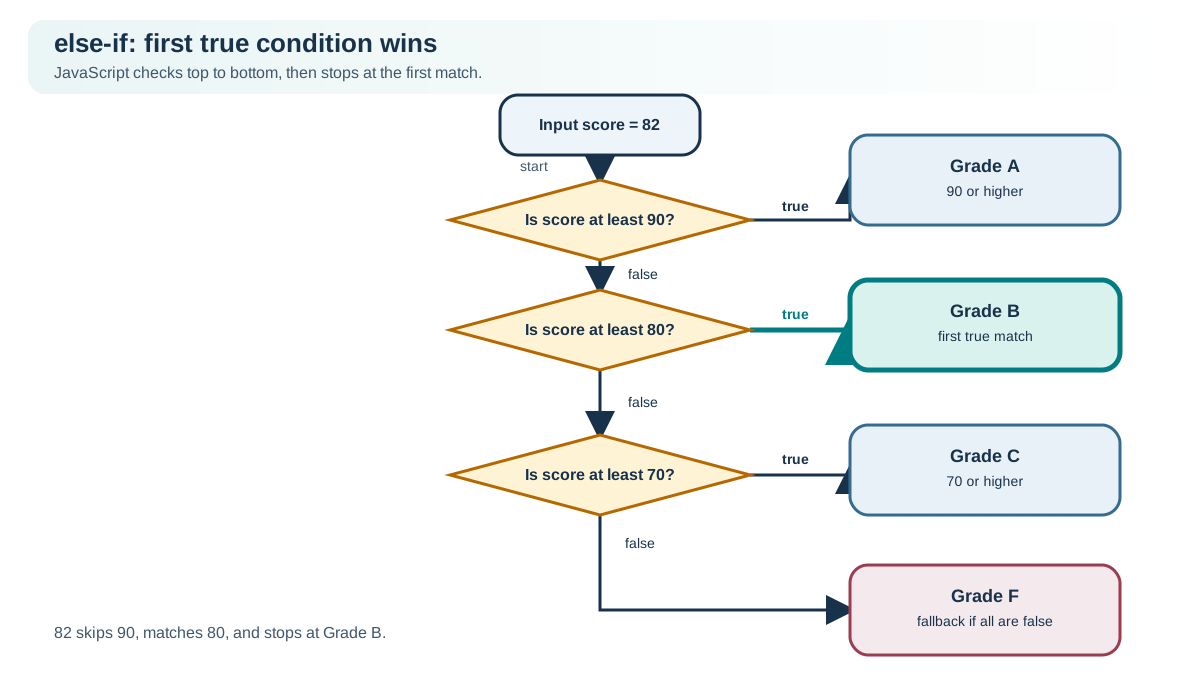
Real life rarely offers only two options. A grade might be A, B, C, D, or F. A greeting might depend on whether it's morning, afternoon, or evening. When you need to check multiple conditions in order, you chain them with else if.
if (condition1) {
  // runs when condition1 is true
} else if (condition2) {
  // runs when condition1 is false and condition2 is true
} else {
  // runs when none of the above conditions are true
}
JavaScript checks these conditions top to bottom. The moment it finds a condition that evaluates to true, it runs that block and skips everything after it. If no condition matches, the final else block runs as a fallback.
One important detail: there is no elseif keyword in JavaScript. It's always written as two words: else if.
Let's build a grade checker with an else if chain:
let score = 82;

if (score >= 90) {
  console.log("Grade: A");
} else if (score >= 80) {
  console.log("Grade: B");
} else if (score >= 70) {
  console.log("Grade: C");
} else {
  console.log("Grade: F");
}
Grade: B
Trace through what happened. JavaScript checked score >= 90 first — that's false, since 82 is less than 90. So it moved to the next condition, score >= 80, which is true. The chain stopped there and printed "Grade: B". It never checked the remaining conditions.
Order matters here because these conditions overlap. A score of 95 is greater than 90, but it's also greater than 80 and 70. If you checked score >= 70 first, a score of 95 would match that lower band and you'd never reach the A grade. That's why you check the highest threshold first: JavaScript always stops at the first true condition, so you need to test the narrowest range before a broader one can catch it.
This is also why chaining with else if differs from writing several separate if statements. Separate if statements each run independently, so multiple blocks could execute. An else if chain guarantees that only the first matching block runs.
Knowledge check
Check your understanding
Answer this question before you continue.
Common Beginner Mistakes to Avoid
Every JavaScript developer has tripped on these at some point. Here are the mistakes I see most often with conditional statements, and how to spot them in your own code.
Using = instead of ===
This is the classic. A single equals sign = is an assignment — it puts a value into a variable. A double or triple equals (== or ===) is a comparison — it checks whether two values match.
let age = 18;

// Wrong: this assigns 21 to age, then checks if 21 is truthy
if (age = 21) {
  console.log("Always runs!");
}
Always runs!
The condition didn't compare anything. It assigned 21 to age, and since 21 is a truthy value, the block always runs. Worse, your variable now holds the wrong value. Always use === when you mean to compare.
Knowledge check
Check your understanding
Answer this question before you continue.
Forgetting the braces
JavaScript lets you write an if statement without curly braces, but only the very next line belongs to it:
let score = 50;

if (score >= 60)
  console.log("You passed.");
  console.log("Nice try!"); // This line runs no matter what!
Nice try!
The second console.log looks like it belongs to the if, but it doesn't. Without braces, only the first line is conditional. The fix is simple: always use curly braces, even for one-line blocks. It makes your intent clear and prevents this entire class of bug.
Stacking if statements when you should chain
Remember the difference: separate if statements each run their own check. An else if chain stops at the first match. If you're testing one value against multiple ranges, you almost always want the chain.
Practice: Build a Small Decision
Let's put this together. Write a small program that greets the user based on the hour of the day. Use a variable called hour with a number from 0 to 23.
Here's your starter code:
let hour = 14;
Your task: print a greeting using this logic:
- If
houris less than12, print"Good morning!" - Otherwise, if
houris less than18, print"Good afternoon!" - Otherwise, print
"Good evening!"
Hint: This needs an else if chain. Start with the earliest time range and work forward.
When you run your code with hour = 14, you should see:
Good afternoon!
Try a few different values — 9, 14, 20 — and verify each output matches what you expect. If something prints wrong, trace through your conditions in order and check which one matched first.
What's Next
You've just given your code the ability to choose a path. That single skill — checking a condition and deciding what runs next — is the foundation of login forms, games, shopping carts, and nearly every interactive page on the web. The console.log examples here print messages, but the same condition could later decide which message to show on a page or which part of an app to load.
The natural next step is combining conditions. What if you need to check that a user is both logged in and an admin? That's where logical operators like && (AND) and || (OR) come in. They let you build richer questions out of the simple ones you just learned.
For now, play with the practice task. Change the hour, change the thresholds, break it on purpose and fix it again. Every time you watch your code make the right choice, you're building the mental model that everything else in JavaScript will lean on.
Knowledge check
Final check
Finish the article by checking the ideas you just learned.
References
Want a more structured JavaScript path?
Use the JavaScript for AI Applications Starter Pack to turn individual tutorials into a focused path from language fundamentals to interactive AI applications.
JavaScript for AI Applications Starter Pack
Build the JavaScript foundation behind modern interactive applications. The JavaScript for AI Applications Starter Pack takes you from core language concepts through functions, browser events, forms, DOM updates, application state, debugging, and practical projects—so you can learn how interfaces take input, work with structured data, respond to users, and turn results into experiences people can actually use.
- 253-page illustrated PDF
- 12 guided JavaScript chapters
- Visual concept diagrams
- Self-assessment quizzes
- Bonus deep-dive sections
- DOM, events, forms & application state
- Browser projects, debugging & practical workflows
Coming soon


