
Variables and Data Types in JavaScript
Every program you will ever write starts with the same move: storing information so you can use it later. A user's name, a score, a shopping cart total, a…

Key topics
Every program you will ever write starts with the same move: storing information so you can use it later. A user's name, a score, a shopping cart total, a setting that says whether dark mode is on—all of it needs a place to live while your code runs. In JavaScript, that place is called a variable.
Here is the short version: a variable gives a name to a value. Once you have named a value, you can reuse it, update it, and keep track of it without retyping it everywhere. This article walks you through how to declare JavaScript variables with let, const, and var, and how to work with the data types you will use most.
Why You Need Variables
Imagine you are writing a small script that shows a welcome message on a webpage. Without variables, you would type the visitor's name every single time you need it:
console.log("Welcome back, Sam!");
console.log("Your account is ready, Sam.");
console.log("Have a great day, Sam!");
That works, but it is painful. What happens when the visitor is not named Sam? You would have to find and change every line. Worse, if you miss one, the page now says "Welcome back, Sam!" to someone named Alex.
A variable fixes this by giving the value a name:
let userName = "Sam";

console.log("Welcome back, " + userName + "!");
console.log("Your account is ready, " + userName + ".");
console.log("Have a great day, " + userName + "!");
Now the name lives in one place. Change it once, and every line updates. That is the core idea: variables let you store data in JavaScript so you can reuse it, update it, and keep your code from falling apart when a value changes.
Think of a variable as a labeled container. The label is the name you choose, and the container holds the value. When you want the value, you refer to the label.
This article assumes you already know how to get JavaScript running in an HTML page with a <script> tag. If you need a refresher on that, review that lesson first, then come back here.
Declaring a Variable with let
To create a variable in JavaScript, you use a declaration. The modern way is the let keyword:
let message;
That single line does three things:
letis the keyword that tells JavaScript you are declaring a variable.messageis the name you chose for the variable.- The absence of a value means
messageis currentlyundefined—it exists, but it holds nothing yet.
To put a value into the variable, use the equals sign:
let message;
message = "Hello, world!";

console.log(message);
Hello, world!
That equals sign is called the assignment operator. It is not a math "equals" sign. In math, = means "these two things are the same." In JavaScript, = means "take the value on the right and store it in the variable on the left." That distinction matters, because you will see lines like this:
let score = 0;
score = score + 10;
The second line looks absurd in algebra. How can score equal itself plus 10? In JavaScript, it is perfectly normal: read the current value of score (which is 0), add 10, and store the result back into score. Now score is 10.
Most of the time, you will declare a variable and give it a value in one line:
let playerName = "Alex";
let score = 0;
And because let is built for values that change, you can update it as often as you need:
let score = 0;
score = 10;
score = 25;

console.log(score);
25
The old value is gone. The variable now holds 25.
Knowledge check
Check your understanding
Answer this question before you continue.
const for Values That Should Not Change
Now meet const. It works like let, with one crucial difference: once you assign a value to a const, you cannot reassign it.
const siteName = "LearnJSFast";
siteName = "SomethingElse"; // This will throw an error
TypeError: Assignment to constant variable.
That error is not JavaScript being mean. It is JavaScript protecting you. If you declare something with const, you are telling the language—and yourself—that this value should stay fixed. If you later try to change it by accident, JavaScript stops you immediately instead of letting a subtle bug slip into your code.
Here is the decision rule I teach every beginner:
Start with
const. Switch toletonly when you know the value must change.
Why? Because const makes your intentions clear. When someone reads your code and sees const, they know that value is stable. When they see let, they know to expect changes. That small signal prevents a whole class of mistakes.
| Keyword | Can you reassign it? | Use it when | Beginner mistake |
|---|---|---|---|
const | No | The value should never change after you set it | Trying to reassign it and getting a TypeError |
let | Yes | You know the value will change as the program runs | Using it for everything, even values that never change |
Both const and let are block-scoped, which means they are only available inside the block of code where you declared them. We will save the deep scope discussion for a later lesson. For now, just know that const is your default and let is for values that need to move.
Knowledge check
Check your understanding
Answer this question before you continue.
What About var?
If you have been poking around older JavaScript code, you have probably seen var:
var oldWay = "I am from the past";
var was the original way to declare variables in JavaScript. It still works in modern browsers, and you will see it constantly in older tutorials and legacy codebases. But modern JavaScript prefers let and const because var has confusing scoping behavior that leads to bugs. It does not respect blocks the way let and const do, which means variables can leak into places you did not expect.
The practical rule is simple:
You should be able to read
varcode. You should write new code withletandconst.
If you encounter var in the wild, you now know what it is doing: declaring a variable. Just keep writing your own code with the modern keywords.
The Data Types You Will Use Most
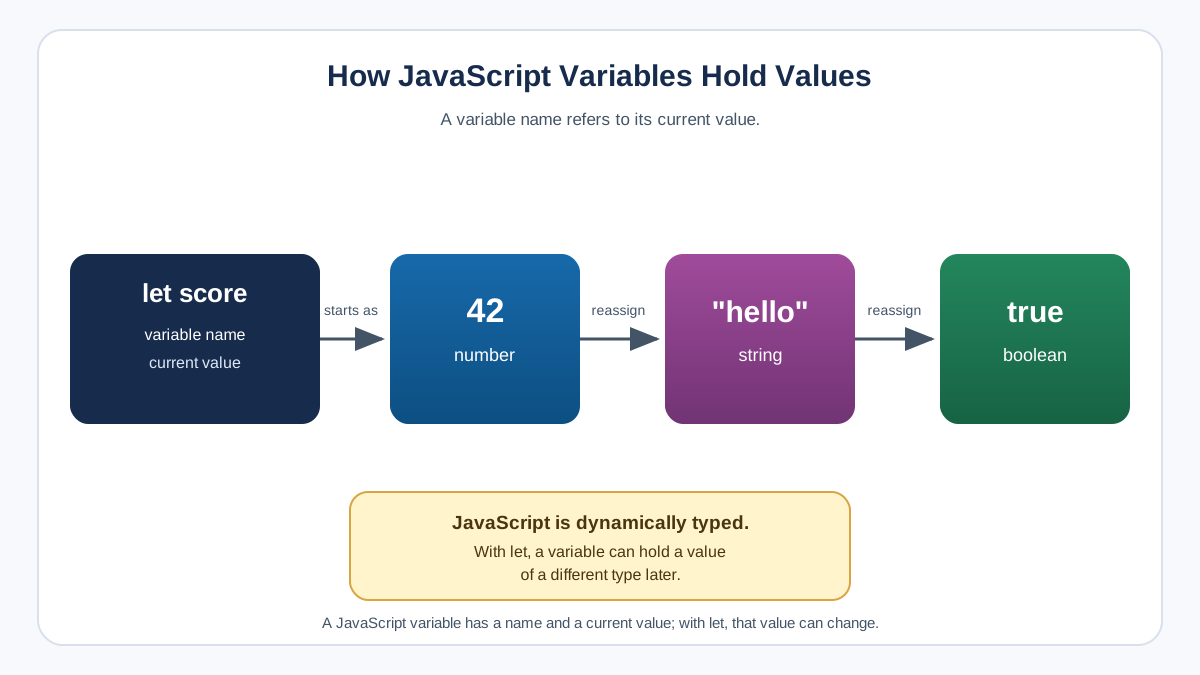
A data type describes what kind of value a variable holds. JavaScript variables can hold several different kinds of data, and the type matters because it determines what you can do with the value.
Here are the everyday types you will meet in your first weeks of JavaScript:
Number
Numbers are values you can do math with. They can be whole numbers or decimals:
const age = 27;
const price = 19.99;
const temperature = -5;

console.log(age + 1);
28
Notice that numbers are written without quotes. That detail matters, and we will come back to it in the mistakes section.
String
A string is text. You write it inside quotes—single or double both work:
const firstName = "Ada";
const greeting = 'Hello there!';

console.log(firstName);
Ada
Strings are for anything that is text: names, messages, addresses, labels.
Knowledge check
Check your understanding
Answer this question before you continue.
Boolean
A boolean is a logical value: true or false. It is the answer to a yes-or-no question:
const isLoggedIn = true;
const isDarkMode = false;

console.log(isLoggedIn);
true
Booleans are the backbone of decision-making in code. When you write "if the user is logged in, show the dashboard," that check is a boolean.
undefined and null
You will meet these two early, so here is the difference:
undefinedmeans a variable has been declared but has no value yet. Rememberlet message;from earlier? That variable isundefined.nullmeans the variable exists and you have intentionally set it to "nothing." It is an explicit choice to say "this is empty on purpose."
let notAssignedYet; // undefined
const empty = null; // intentionally empty

console.log(notAssignedYet);
console.log(empty);
undefined
null
A Note on Dynamic Typing
JavaScript is dynamically typed. That means a variable can hold different types of values over time, and you never declare a type up front. The same variable can start as a number, become a string, and then become a boolean:
let something = 42;      // a number
something = "hello";     // now a string
something = true;        // now a boolean
This is convenient, but it is also why the next section matters. When you name variables well, you make the type obvious from context.
Naming Your Variables Well
JavaScript has a few hard rules about variable names, plus one strong convention you should follow.
The hard rules:
- Names are case-sensitive.
ageandAgeare two completely different variables. - Names cannot start with a number.
1stPlaceis invalid;firstPlaceworks. - Names cannot contain spaces.
user nameis invalid. - Names cannot be reserved words like
let,const,if, orfunction.
The convention:
For multi-word names, JavaScript uses camelCase: the first word is lowercase, and each following word starts with a capital letter.
let userName = "Sam";
let shoppingCartTotal = 0;
let isDarkModeEnabled = false;
Compare those to these:
let x = "Sam";
let a = 0;
let b = false;
The first set tells you what the data means without reading any other code. The second set forces you to hunt through the program to figure out what x, a, and b represent.
A good variable name tells you what the value means. If you can read a line and know immediately what it holds, you have named it well. If you have to think, rename it.
Common Beginner Mistakes
Every beginner hits these. Here is what to watch for:
Putting quotes around a number
const score = "10";
const bonus = 5;
console.log(score + bonus);
105
Because "10" is a string, JavaScript does not add the numbers. It joins the text "10" with the text "5" and produces "105". If you want math, write the number without quotes.
Forgetting that names are case-sensitive
let userName = "Sam";
console.log(username); // ReferenceError: username is not defined
userName and username are different variables. JavaScript will not guess what you meant.
Trying to reassign a const
const maxPlayers = 4;
maxPlayers = 8; // TypeError: Assignment to constant variable.
If you need the value to change, declare it with let instead.
Declaring without a value and forgetting it is undefined
let total;
console.log(total + 10); // NaN
undefined plus 10 is NaN—"Not a Number." The variable exists, but it holds nothing usable yet. Assign a value before you use it.
Knowledge check
Check your understanding
Answer this question before you continue.
Where You Will Use This in Real Projects
Every real project you build will start with variables. Here is how the concepts from this lesson show up in actual applications:
- A user profile page stores the user's name and email as strings:
const userName = "Sam"; - A shopping cart tracks the running total as a number:
let cartTotal = 0;and updates it as items are added. - A settings panel remembers whether dark mode is on as a boolean:
let isDarkMode = false;
That is the pattern behind nearly every program: store data in variables first, then do something with it. Whether you are building a to-do list, a quiz app, or a chat interface, the first step is always the same—get the data into named variables so your code can work with it.
Your Practice Task
Do not just read about variables. Write some.
Open your browser's console or create a small HTML page with a <script> tag, and try this:
- Declare a
constfor your name. - Declare a
letfor your age. - Declare a
letfor whether you have written JavaScript before (trueorfalse). - Log all three to the console.
- Update your age variable to a new value and log it again.
- Try to update your name variable and watch the error appear.
If you see the error on step 6, you have just learned the difference between const and let with your own eyes. That error is not a failure—it is JavaScript showing you exactly how the rule works.
Once you are comfortable storing and updating values, the natural next step is learning what you can do with them: combining strings, doing math with numbers, and comparing values with operators. That is where the real power of variables shows up.
Knowledge check
Final check
Finish the article by checking the ideas you just learned.
References
Want a more structured JavaScript path?
Use the JavaScript for AI Applications Starter Pack to turn individual tutorials into a focused path from language fundamentals to interactive AI applications.
JavaScript for AI Applications Starter Pack
Build the JavaScript foundation behind modern interactive applications. The JavaScript for AI Applications Starter Pack takes you from core language concepts through functions, browser events, forms, DOM updates, application state, debugging, and practical projects—so you can learn how interfaces take input, work with structured data, respond to users, and turn results into experiences people can actually use.
- 253-page illustrated PDF
- 12 guided JavaScript chapters
- Visual concept diagrams
- Self-assessment quizzes
- Bonus deep-dive sections
- DOM, events, forms & application state
- Browser projects, debugging & practical workflows
Coming soon


