
JavaScript Dates and Timestamps: Create, Inspect, and Understand Time
You type new Date() into the console and get back a long string with a time zone name you never asked for. You type Date.now() and get a big number. Same…

Key topics
The number is the data. The string is just a translation.
You type new Date() into the console and get back a long string with a time zone name you never asked for. You type Date.now() and get a big number. Same moment in time, two completely different-looking values. That gap between the number and the string is where most beginner date confusion lives, so let's close it first.
What a JavaScript Date Actually Stores
A Date is not a calendar page. It is one instant in history, stored as a single number: milliseconds since midnight on 1 January 1970 UTC. That reference point is called the epoch.
That number is timezone-agnostic. It names one moment that happened everywhere on Earth at once. The time zone is not stored inside the Date object — it comes from whatever machine is reading it, which for browser code means the user's device.
If you already know how to declare variables and work with strings and numbers, a Date is just another value type. It happens to be a built-in object with methods attached, but the value underneath is a number.
const now = new Date();
console.log(now.toISOString());
console.log(now.getTime());
2024-01-15T10:30:00.000Z
1705314600000
Look at those two lines. The first is a readable rendering. The second is the raw millisecond count. They describe the same instant. That is the moment the mental model clicks: everything readable you see from a Date is a translation of a number.
Note: The output above is illustrative. If you run this code, your own timestamp and ISO string will reflect the actual current moment on your machine.
Knowledge check
Check your understanding
Answer this question before you continue.
Three Ways to Create a Date
You will use three creation patterns in almost all beginner code. Each one assumes something different about time zone, so it is worth knowing which is which.
new Date() gives you right now, in the reader's local time zone.
new Date(timestamp) builds a Date from a number of milliseconds. This is what you use when a server or API hands you a raw number.
new Date(year, month, day, ...) builds from components. Here is the trap: months are zero-indexed. January is 0. December is 11.
const fromParts = new Date(2024, 0, 15);
console.log(fromParts.toDateString());
Mon Jan 15 2024
If you expected February, you just met the zero-index rule. It is not a bug. It is the convention, and it will bite you once before you remember it.
One more mismatch worth knowing: many systems, including Unix and some APIs, send timestamps in seconds, not milliseconds. JavaScript wants milliseconds, so multiply by 1000 before passing the value in.
const unixSeconds = 1705314600;
const fromUnix = new Date(unixSeconds * 1000);
console.log(fromUnix.toISOString());
2024-01-15T10:30:00.000Z
Knowledge check
Check your understanding
Answer this question before you continue.
Timestamps: The Number Behind the Date
A timestamp is just that millisecond number. You can get it two ways.
Date.now() returns the current timestamp as a plain number without creating a Date object. It is the fast path when you only need the number.
date.getTime() converts an existing Date back into its timestamp.
const fixed = new Date('2024-01-15T10:30:00Z');
const roundTrip = fixed.getTime();
console.log(roundTrip);
1705314600000
The number comes back unchanged. That round trip is the proof that the Date object is a wrapper around the number, not a separate thing.
Why does this matter in practice? Because timestamps are numbers, so you can compare them with plain < and >. Formatted strings are not reliably comparable. And when you store a value or send it to a server, a timestamp carries no ambiguity about format or zone. A string like "01/15/2024" does.
Tip: If you only need the current moment as a number, reach for
Date.now()and skip creating an object entirely.
Reading Parts of a Date
Once you have a Date, you can pull out its components: getFullYear(), getMonth(), getDate(), getDay(), getHours(), getMinutes().
Two traps live here. getMonth() is zero-indexed, same as the constructor. And getDay() returns the day of the week (0 = Sunday), not the day of the month. That second one catches almost everyone.
The bigger lesson is the local-versus-UTC split. Every component getter has a UTC twin.
const sample = new Date('2024-01-15T10:30:00Z');
console.log('UTC hours:', sample.getUTCHours());
console.log('UTC month index:', sample.getUTCMonth());
UTC hours: 10
UTC month index: 0
Same instant, different numbers depending on which getter you call. The UTC getters read the instant in UTC. The local getters read it in the reader's time zone, so their output depends on the machine running the code.
Here is the decision rule I use, and it has three separate parts:
- Comparing two moments: compare timestamps with
<,>, or===. You do not need component getters at all. - Storing or transmitting a moment: store the timestamp or an ISO string. That is a representation choice, not a getter choice.
- Extracting calendar components: pick local getters when the calendar day should match the user's wall clock, and UTC getters when it should match UTC. The choice depends on what the component means, not on a blanket rule.
Knowledge check
Check your understanding
Answer this question before you continue.
Formatting a Date for Display
A printed date is not the data. It is a rendering. JavaScript gives you several renderings of the same instant.
toString() is what you see in the console by default — human-readable, includes the time zone.
toISOString() produces a stable, machine-friendly format ending in Z, which means UTC. This is the format to use when sending dates between systems.
toLocaleDateString() and toLocaleTimeString() render for a specific locale and time zone. Good for showing a date to a user. Bad for storing one.
const instant = new Date('2024-01-15T10:30:00Z');
console.log(instant.toISOString());
console.log(instant.toLocaleDateString('en-US', { timeZone: 'UTC' }));
console.log(instant.toLocaleDateString('en-US', { timeZone: 'America/New_York' }));
2024-01-15T10:30:00.000Z
1/15/2024
1/15/2024
One value, three strings. The rule: store and transmit the timestamp or the ISO string; format only at the moment of display.
Note: Without an explicit
timeZoneoption,toLocaleDateString()uses the reader's local zone, so the output varies by machine. Passing a time zone makes the result reproducible.
Parsing Date Strings Without Getting Burned
This is where beginners get hurt most often, so read this section slowly.
new Date('2024-01-15T10:30:00Z') is safe. The ISO format with an explicit Z or offset is unambiguous.
new Date('01/15/2024') is not safe. Slash-separated and natural-language strings are interpreted inconsistently across engines, and 03/04/2024 can mean March 4 or April 3 depending on the reader.
There is also a date-only surprise:
console.log(new Date('2024-01-15').toISOString());
console.log(new Date('2024-01-15T00:00:00Z').toISOString());
2024-01-15T00:00:00.000Z
2024-01-15T00:00:00.000Z
The first string is date-only and is treated as UTC midnight. The second has a time and an explicit Z, so it is also UTC midnight. Drop the Z from the second string and JavaScript falls back to local time, which shifts the instant by the reader's offset.
Date.parse() returns a timestamp instead of a Date object and follows the same rules. Use it when you want the number, not the object.
Invalid input does not throw. It produces a Date whose timestamp is NaN.
const bad = new Date('not a date');
console.log(bad.getTime());
console.log(isNaN(bad.getTime()));
NaN
true
Common mistake: Never use
new Date(string)as a general-purpose parser for user input. Require a known format, or parse the fields yourself.
Knowledge check
Check your understanding
Answer this question before you continue.
The Time Zone Trap Beginners Hit First
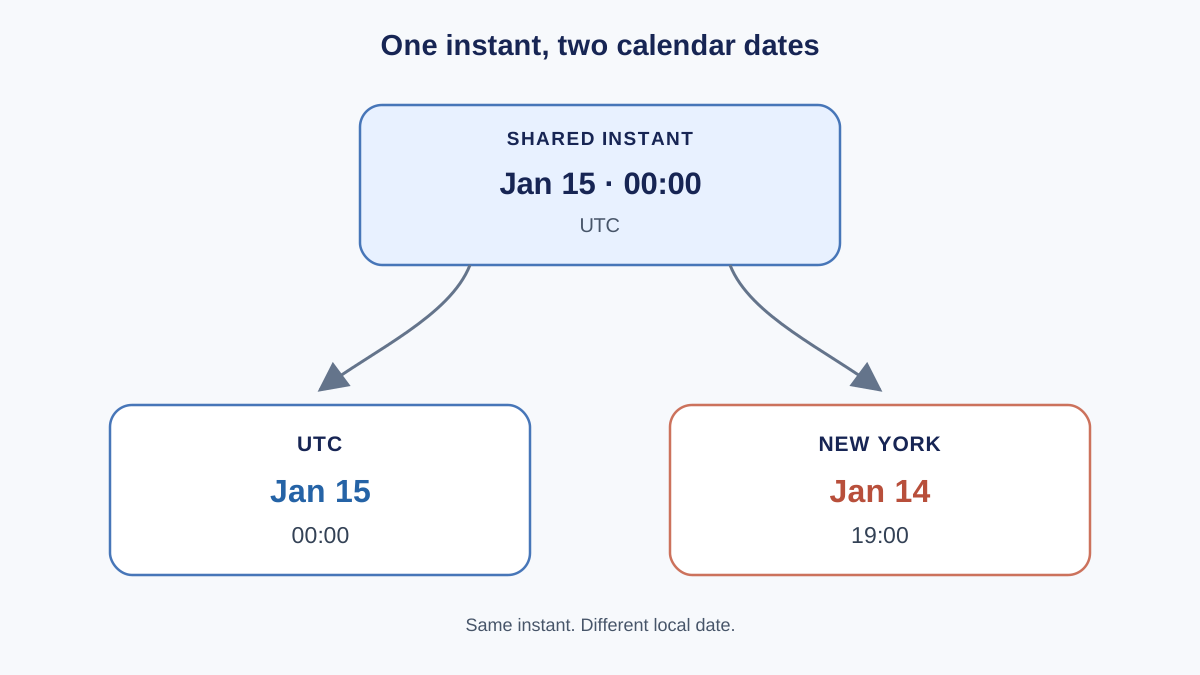
Here is the bug that shows up in real apps. A date created from a date-only string displays as the previous day for users in negative UTC offsets.
const eventDate = new Date('2024-01-15');
console.log(eventDate.toLocaleDateString('en-US', { timeZone: 'America/New_York' }));
1/14/2024
The value is UTC midnight on January 15. A user in a time zone behind UTC renders that instant as the evening of January 14. The calendar day slipped backward. In a time zone at or ahead of UTC, the same code prints 1/15/2024 — the bug only appears behind UTC.
The mechanism is simple once you see it: the Date stores an instant, the display applies the local offset, and the offset can push the calendar day across a boundary.
The fix is to be explicit. Include a time offset in the string, or construct from components when your intent is "this local calendar day."
const fixed = new Date(2024, 0, 15);
console.log(fixed.toLocaleDateString('en-US'));
1/15/2024
One more thing to keep in mind: daylight saving time changes the offset at different times of year, so a fixed offset assumption can break twice a year. This is the beginner-level version of the problem, not a full treatment of internationalization.
When to Use Date and When to Reach for Something Else
The built-in Date object is fine for most beginner work. Use it for the current time, timestamps, simple display formatting, and basic comparisons.
Be cautious with complex time zone conversion, recurring schedules, calendar arithmetic across months, and parsing free-form user input. Those are the areas where Date's rough edges show.
The Temporal API is the planned long-term replacement and is not yet broadly available in browsers, so learn Date first. Libraries exist for heavier date work, but that is a separate topic.
Practice: Build a Small Timestamp Tool
Try this in your console or a small script file. The point is repetition of the core conversions, not a full project.
Step 1. Capture the current timestamp, build a Date from it, and print both the ISO string and a locale-formatted string.
Hint: Date.now() gives you the number. new Date(number) gives you the object. toISOString() and toLocaleDateString() give you the two renderings.
Step 2. Build a Date from explicit components for a fixed date and print its timestamp.
Hint: Remember January is 0. Use getTime() to get the number back out.
Step 3. Deliberately pass an invalid string and confirm the result is an invalid Date rather than an error. Then add the isNaN check.
Hint: isNaN(date.getTime()) is your validity test.
If your output shows a number, an ISO string, and a locale string for the same instant, you have the mental model. The number is the data. The string is a rendering.
From here, the natural next step is using these values inside conditions and loops — comparing timestamps to decide what to show, or iterating over a list of timestamped records. That is where dates stop being a curiosity and start being part of real code.
Knowledge check
Final check
Finish the article by checking the ideas you just learned.
References
Want a more structured JavaScript path?
Use the JavaScript for AI Applications Starter Pack to turn individual tutorials into a focused path from language fundamentals to interactive AI applications.
JavaScript for AI Applications Starter Pack
Build the JavaScript foundation behind modern interactive applications. The JavaScript for AI Applications Starter Pack takes you from core language concepts through functions, browser events, forms, DOM updates, application state, debugging, and practical projects—so you can learn how interfaces take input, work with structured data, respond to users, and turn results into experiences people can actually use.
- 253-page illustrated PDF
- 12 guided JavaScript chapters
- Visual concept diagrams
- Self-assessment quizzes
- Bonus deep-dive sections
- DOM, events, forms & application state
- Browser projects, debugging & practical workflows
Coming soon


