
null vs. undefined in JavaScript: Meaning and Common Sources
You log three things in the console. A variable you declared but never filled in. A property you hoped was on an object. A function call that was supposed…

Key topics
You log three things in the console. A variable you declared but never filled in. A property you hoped was on an object. A function call that was supposed to hand you a result. The console answers undefined, undefined, and null. Same empty feeling, three different stories.
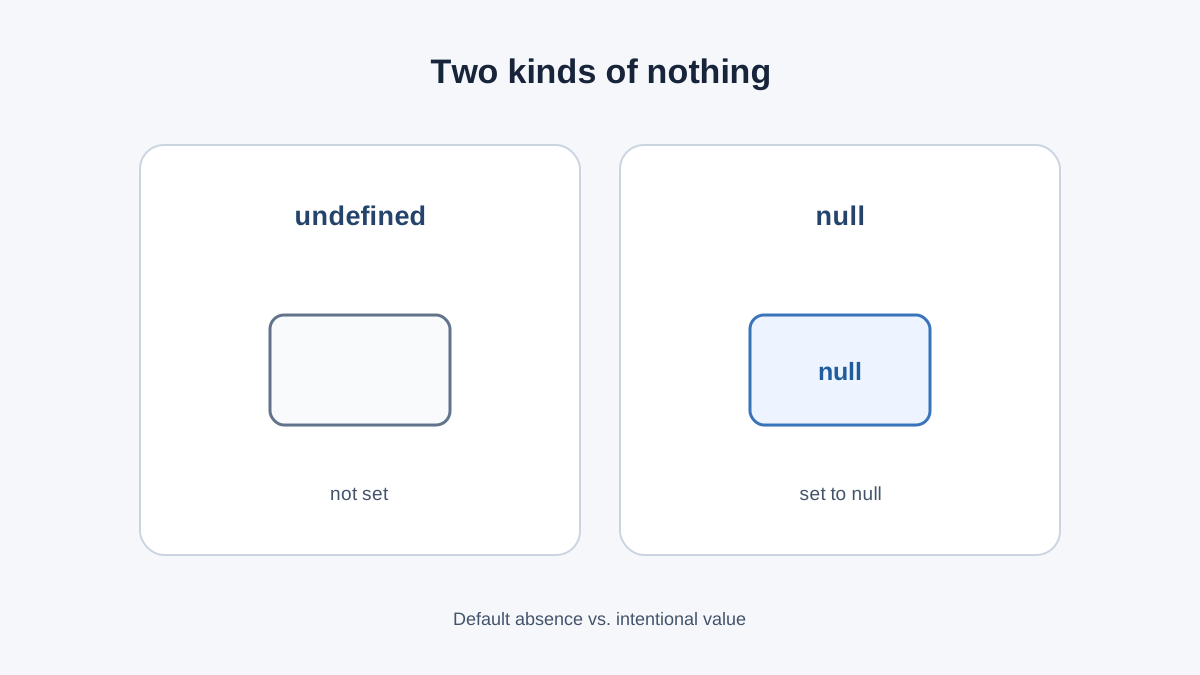
The weak model most beginners carry is: both mean empty, so they're interchangeable. That model survives right up until it costs you a bug. The stronger model is smaller and sharper: undefined is the value you observe when nothing was ever put in a slot. null is a value someone put there on purpose to mean "intentionally empty."
That wording matters. undefined is not forbidden from being assigned by hand — you can write let x = undefined and JavaScript will not complain. But in practice, undefined shows up mostly on its own, while null is almost always a deliberate choice. Treat that as the working distinction, not an absolute law.
Let's prove it with code you can run right now.
Two Kinds of Nothing
Open your browser console or a Node.js session and type this:
let a;
let b = null;

console.log(a);
console.log(b);
undefined
null
Look at the two lines. They are not the same output, and that difference is the whole article in miniature.
a was declared but never assigned. JavaScript filled the gap with undefined — its way of saying "nothing was ever placed here." b was assigned null by you, deliberately. You said: this slot is empty, and I want it that way.
Both are primitive values. Both are falsy, meaning they behave like false inside an if check. But falsy and absent are not the same claim. A value can be falsy and still very much present — 0 and '' are proof of that. Hold onto this; it becomes a real bug later.
Knowledge check
Check your understanding
Answer this question before you continue.
Where undefined Comes From
You will meet undefined in four everyday places. Recognizing them turns a scary word into useful information.
1. Declared but never assigned.
let score;
console.log(score);
undefined
This is the same "declare a variable, then give it a value" idea you already know from variables and data types — just seen from the empty side.
2. A missing object property.
const user = { name: "Ada" };
console.log(user.nickname);
undefined
The nickname key simply isn't there. JavaScript doesn't throw an error for a missing property; it hands you undefined. This is one of the most common sources of confusion when you're inspecting data.
3. A function that returns nothing.
function greet(name) {
  console.log("Hello, " + name);
}

const result = greet("Ada");
console.log(result);
Hello, Ada
undefined
The function ran. It printed. But it has no return statement, so the call itself produces undefined. If you ever see undefined where you expected a value from a function, check the return path first.
4. An array index that doesn't exist.
const colors = ["red", "green"];
console.log(colors[5]);
undefined
No error. Just undefined. The index is out of range, and JavaScript tells you so quietly.
Knowledge check
Check your understanding
Answer this question before you continue.
Where null Comes From
null is almost always a deliberate signal. You or a library chose it.
You assign it yourself when a value genuinely isn't applicable yet:
let selectedUser = null;
You're saying: there is no selected user right now, and that's a meaningful state — not an accident.
APIs and databases send it for a field that exists but has no value. The key is present; the value is empty. This is different from a missing key, which arrives as undefined.
JSON serialization keeps null but drops undefined. Run this:
console.log(JSON.stringify({ a: null, b: undefined }));
{"a":null}
Notice b vanished entirely. That's why API payloads look the way they do — null survives the trip, undefined doesn't.
One quirk worth knowing: typeof null returns 'object'. This is a long-standing bug in JavaScript, not a hint that null is an object. Don't build logic on it.
Knowledge check
Check your understanding
Answer this question before you continue.
Checking for null and undefined
Here's the working decision rule. Use === when you need to tell them apart:
let a;
let b = null;

console.log(a === undefined); // true
console.log(b === null);      // true
console.log(a === null);      // false
console.log(b === undefined); // false
true
true
false
false
Use == when you genuinely want "no value at all" and don't care which kind:
console.log(null == undefined);
true
That loose equality is useful sometimes and dangerous other times. The table below is the one that actually reduces confusion here.
| Check | null | undefined | 0 | '' |
|---|---|---|---|---|
value === null | true | false | false | false |
value === undefined | false | true | false | false |
value == null | true | true | false | false |
typeof value | 'object' | 'undefined' | 'number' | 'string' |
value ?? 'fallback' | 'fallback' | 'fallback' | 0 | '' |
That last row is the nullish coalescing operator ??. It supplies a fallback only when the left side is null or undefined. Unlike ||, it keeps 0 and '' — which matters more than you'd think.
const count = 0;
console.log(count || 10);  // 10  — wrong if 0 is valid
console.log(count ?? 10);  // 0   — correct
10
0
Knowledge check
Check your understanding
Answer this question before you continue.
Absence Is Not Falsiness
This is the misconception the whole article is circling. 0, '', false, null, and undefined are all falsy. But only the last two mean "no value."
An if (value) check silently lumps them together:
function showCount(count) {
  if (count) {
    console.log("Count: " + count);
  } else {
    console.log("No count provided");
  }
}

showCount(0);
No count provided
That's a bug waiting to happen. 0 is a legitimate count. The check confused "falsy" with "absent."
Decision rule: if you mean "is there a value here," test against null/undefined explicitly or use ??. If you mean "is this truthy," use the boolean check — and be sure that's what you actually want.
When to use null: for intentional emptiness you control. When not to: don't assign undefined by hand just to be tidy. It's legal, but it blurs the signal — you lose the ability to tell "JavaScript never set this" apart from "I set this to nothing." Let undefined surface naturally and reserve null for deliberate emptiness.
Common Beginner Mistakes
Using == and catching undefined by accident. Sometimes fine, sometimes the bug. If you only want null, use ===.
Trusting typeof for null checks. typeof null === 'object' will send you down a wrong path. Use === null instead.
Treating undefined as an error message. It usually isn't. It's information: a missing property, a forgotten return, or a typo in a key name. When you see it, log the value and its typeof, then trace where it was supposed to be assigned.
Where You'll Meet These in Real Code
Form inputs. A user who hasn't chosen a value yet is a natural null — the field exists, the choice doesn't.
Fetching data from an API. Missing keys arrive as undefined; explicit empties arrive as null. Knowing which is which tells you whether the field was ever meant to exist.
Function results. A search helper that finds nothing should return null deliberately, rather than falling off the end and returning undefined. The first says "I looked, nothing matched." The second says "I forgot to tell you anything."
What to Do Next
Carry this rule: undefined is the value you observe when nothing was set. null is a value someone set on purpose to mean empty.
Now open your console and predict before you press Enter. Declare a variable and log it. Read a property that isn't there. Call a function with no return. Guess each output first, then check. The prediction is where the learning happens.
Your next step is handling these values safely — default values with ?? and optional chaining with ?. — so a missing property doesn't crash your code before you can inspect it.
Knowledge check
Final check
Finish the article by checking the ideas you just learned.
References
Want a more structured JavaScript path?
Use the JavaScript for AI Applications Starter Pack to turn individual tutorials into a focused path from language fundamentals to interactive AI applications.
JavaScript for AI Applications Starter Pack
Build the JavaScript foundation behind modern interactive applications. The JavaScript for AI Applications Starter Pack takes you from core language concepts through functions, browser events, forms, DOM updates, application state, debugging, and practical projects—so you can learn how interfaces take input, work with structured data, respond to users, and turn results into experiences people can actually use.
- 253-page illustrated PDF
- 12 guided JavaScript chapters
- Visual concept diagrams
- Self-assessment quizzes
- Bonus deep-dive sections
- DOM, events, forms & application state
- Browser projects, debugging & practical workflows
Coming soon


