
What is the DOM?
Your HTML file is just text. It sits on disk, perfectly still, until a browser reads it. Yet the page you're looking at right now can change—text updates,…

Your HTML file is just text. It sits on disk, perfectly still, until a browser reads it. Yet the page you're looking at right now can change—text updates, menus open, dark mode flips on. Something has to bridge that gap between static text and a living page. That something is the DOM.
The problem the DOM solves
Imagine you've written a simple page with a heading and a button. The HTML file says the heading reads "Hello." When someone clicks the button, you want that heading to change to "You clicked me."
Here's the puzzle: the HTML file can't change itself. It's just text on a server. Once the browser reads it, the file doesn't do anything anymore. So how does the page update?
The answer is that the browser doesn't just display your HTML and forget about it. It builds something else—a live, structured version of your page that programs can read and modify. That live version is the DOM.
The browser is the actor here. It reads your HTML, builds the DOM from it, and then exposes that model to JavaScript. When you click a button and the page responds, you're seeing JavaScript work with the model the browser created.
Knowledge check
Check your understanding
Answer this question before you continue.
What the DOM actually is
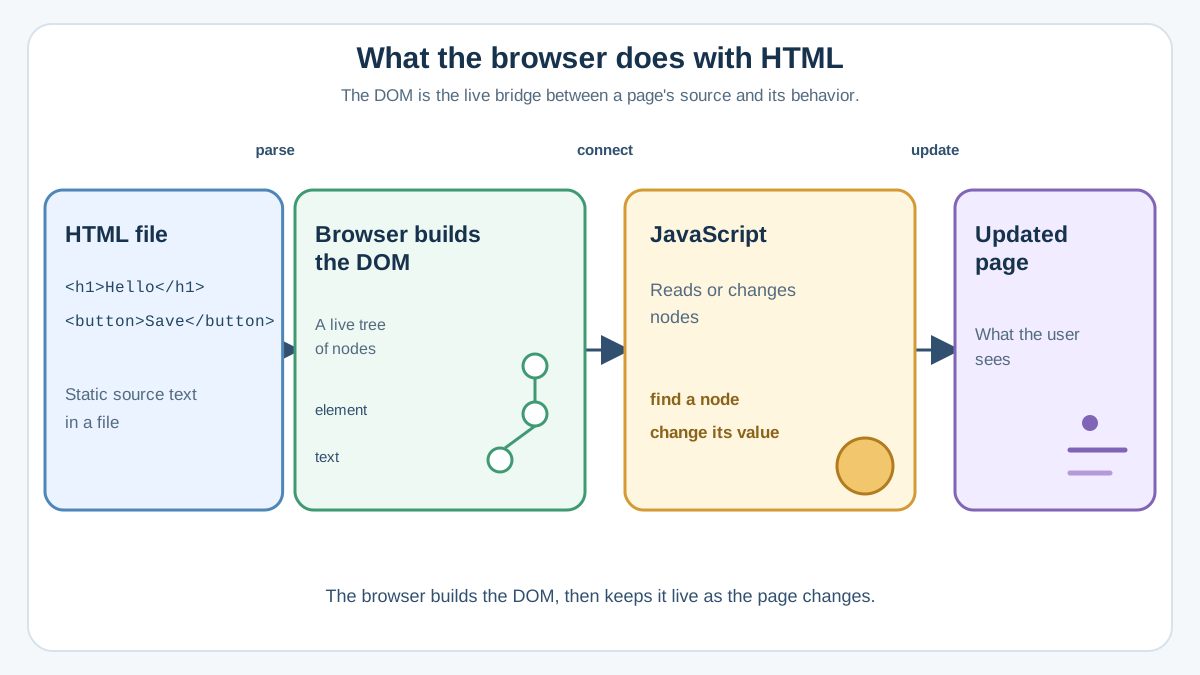
The DOM—Document Object Model—is the browser's structured representation of your page. It's the bridge between the HTML you write and the interactive page users see.
Let's unpack that name, because it sounds more intimidating than it is:
- Document — the web page itself
- Object — every piece of the page becomes an object JavaScript can work with
- Model — a structured representation of how those pieces fit together
Here's the key insight: the DOM is not your HTML file, and it's not the pixels on your screen. It sits between them. When you write HTML, the browser reads that text and constructs the DOM from it. When JavaScript changes something on the page, it's changing the DOM, not your original file.
The best part? You don't have to build it. The browser does this automatically every time it loads a page. Your job is just learning to use what it gives you.
The DOM tree: how the page becomes objects
Think of the DOM as a family tree for your page. HTML elements nest inside each other, and the DOM represents that nesting as a hierarchy.
Take this tiny HTML snippet:
<div>
  <h1>My Page</h1>
  <p>Welcome, friend.</p>
</div>
The browser reads this and builds a structure that looks like this:
div
├── h1
│   └── "My Page"
└── p
    └── "Welcome, friend."
Each HTML tag becomes an element node. The text inside those tags becomes a text node. The div is the parent of the h1 and p, and they are its children.
This tree shape matters because it gives JavaScript a map. Want to change the paragraph text? You can find the p element and update what's inside it. Want to add a new item to a list? You can find the list, create a new element, and attach it as a child.
Without this structure, JavaScript would have no way to locate specific parts of your page. The tree is what makes targeting possible.
Knowledge check
Check your understanding
Answer this question before you continue.
Why JavaScript needs the DOM
Here's something that surprises many beginners: JavaScript by itself has no idea what a web page is. It's a general-purpose programming language. It can do math, handle text, and process data—but it has no built-in way to see your HTML or change what's displayed.
The DOM is the interface that gives JavaScript access to the page. Through the DOM, JavaScript can:
- Find elements — locate a specific button, heading, or form field
- Read content — see what text or values are currently in those elements
- Change content — update text, images, and attributes
- Modify styles — change colors, visibility, and layout
- Add and remove elements — build new parts of the page or delete existing ones
- Respond to events — react when a user clicks, types, or submits a form
You've probably already learned about events like clicks and form submissions. Those events are part of the DOM too. When a user clicks a button, the browser detects that click through the DOM and gives JavaScript a chance to respond.
Knowledge check
Check your understanding
Answer this question before you continue.
A tiny example you can run
Let's make this real. Copy this entire page into a file called dom-demo.html and open it in your browser:
<!DOCTYPE html>
<html>
  <body>
    <h1 id="greeting">Hello</h1>
    <button id="changeButton">Click me</button>

    <script>
      const heading = document.getElementById("greeting");
      const button = document.getElementById("changeButton");

      button.addEventListener("click", function () {
        heading.textContent = "You clicked me!";
      });
    </script>
  </body>
</html>
Here's what each piece does:
document.getElementById("greeting")asks the DOM to find the element with that ID. This is your first reach into the tree.button.addEventListener("click", ...)tells the DOM, "When this button gets clicked, run this function."heading.textContent = "You clicked me!"changes the text inside the heading.
Notice what you didn't have to do: you didn't hunt for a text node and edit it directly. You found the h1 element, changed its textContent property, and the browser handled the text inside it. That's the beginner-friendly way to update what a page shows.
Click the button. The heading changes from "Hello" to "You clicked me!"—without reloading the page. That's the DOM in action.
Knowledge check
Check your understanding
Answer this question before you continue.
Where the DOM shows up in real pages
Once you know what the DOM is, you'll see it everywhere. Every interactive behavior on the web runs through it.
Take a form with a "Submit" button. When a user submits an invalid email, JavaScript selects the error message element, listens for the submit event, and changes the message text from empty to "Please enter a valid email." That's the same three-step pattern you just used: select, listen, change.
The same pattern powers menu toggles, image sliders, live search suggestions, and dark mode switches. The page structure updates, the text changes, the styles shift—all because JavaScript reached into that live model and modified it.
Common beginner confusion: DOM vs. HTML
The most common misconception is that the DOM and your HTML are the same thing. They're related, but they're not identical.
Your HTML file is the starting text. It's what the browser first reads when it loads a page. The DOM is the live model the browser builds from that text.
When JavaScript changes the page, it changes the DOM—not the HTML file on disk. Refresh the page, and the browser reads the original HTML again, building a fresh DOM. That's why your changes disappear on reload.
A good rule of thumb: think in terms of the DOM when you're writing JavaScript, but remember the HTML file is what the browser reads first. The HTML is the recipe; the DOM is the meal on the table. JavaScript can season the meal, but the recipe stays unchanged.
If you confused these at first, that's completely normal. Almost every beginner does. The distinction becomes obvious the first time you change a page with JavaScript and then refresh to see your changes vanish.
Your next step
Open your browser's developer tools (right-click any page and select "Inspect"). You'll see the DOM of the page you're viewing—not the HTML source, but the live, current structure. Click around, expand nodes, and notice how the tree matches what you see on screen.
Then try the example above. Change the heading text, add a second button, or make the button change the paragraph instead. The fastest way to understand the DOM is to poke at it and watch what happens.
The DOM is the foundation of everything interactive on the web. Once you're comfortable with what it is, the next step is learning how to select elements and change them with JavaScript—the practical skills that turn static pages into something users can actually use.
Knowledge check
Final check
Finish the article by checking the ideas you just learned.
References
Want a more structured JavaScript path?
Use the JavaScript for AI Applications Starter Pack to turn individual tutorials into a focused path from language fundamentals to interactive AI applications.
JavaScript for AI Applications Starter Pack
Build the JavaScript foundation behind modern interactive applications. The JavaScript for AI Applications Starter Pack takes you from core language concepts through functions, browser events, forms, DOM updates, application state, debugging, and practical projects—so you can learn how interfaces take input, work with structured data, respond to users, and turn results into experiences people can actually use.
- 253-page illustrated PDF
- 12 guided JavaScript chapters
- Visual concept diagrams
- Self-assessment quizzes
- Bonus deep-dive sections
- DOM, events, forms & application state
- Browser projects, debugging & practical workflows
Coming soon


